Best Conference Room Sound Bar for Clear Meetings and Cleaner Audio
Answering the need for crisp audio and simple setup in meeting spaces, these conference room sound bars are designed for small to medium rooms. They blend video and audio in one unit, making online meetings smoother. Best for buyers who want all-in-one solutions, easy USB or HDMI connectivity, and good microphone pickup for multiple participants. The top picks below include standalone soundbars with built-in cameras and beamforming mics, plus compact units that fit under a monitor or TV. Use the buying guide to compare features like mic arrays, camera quality, and room coverage.
| Product | Brand | Key Benefit |
|---|---|---|
| Bose Videobar VB1 | Bose | All-in-one video soundbar with six beam-steering mics and auto EQ |
| Yamaha CS-700 AV | Yamaha | Plug-and-play, focused mic array, wide 120° camera |
| AMX Acendo Vibe | AMX | JBL sound, far-field mic array, 110° camera |
| AVer VB342 | AVer | 4K video, 12 ft voice pickup, professional 4K collaboration |
| ROCWARE RB20 | ROCWARE | Dual-lens 4K with 12x optical zoom and AI tracking |
Note: The following sections describe each product with what makes it strong for conference rooms, who should buy it, and potential limitations. All sections use objective language and clear contrasts to help you choose quickly.
Bose Videobar VB1: All-in-One for Small Rooms

The Bose Videobar VB1 is designed for small to medium spaces with a single or dual-occupant setup. It pairs a premium built-in camera and auto-framing with six beam-steering microphones that actively focus on voices while suppressing ambient noise. This makes it a strong choice for teams needing natural conversation flow and clear video conferencing without extra hardware.
Best for: Small conference rooms and home offices where one or two participants are typical. It’s ideal when you want an all-in-one package that reduces cable clutter and automatically optimizes audio for participants in the room.
Limitation: As an all-in-one, the system hinges on the integrated mic array and camera for coverage; large rooms may require additional microphones or a larger room solution.
Yamaha CS-700 AV: Plug-and-Play for Huddle Rooms

The CS-700 AV offers plug-and-play compatibility across common operating systems and setups. It features a focused microphone array and a four-element speaker system to deliver clear collaboration audio. The 120-degree ultra-wide camera is suitable for most huddle-room layouts, making it a practical choice for quick-room setups without extensive configuration.
Best for: Huddle rooms and small meeting areas where near-instant setup and cross-platform compatibility matter most. It’s a solid pick when you want reliable audio and a broad room view without complex installation.
Limitation: Description emphasizes basic room coverage; rooms outside a typical range may require closer mic placement or a separate camera module for full visibility.
AMX Acendo Vibe: JBL-Driven Audio in Conference Rooms

The Acendo Vibe pairs high-quality JBL audio with a far-field microphone array and a wide-angle 110-degree camera. It supports HDMI, USB, and Bluetooth, enabling BYOD workflows. Built-in echo cancellation and ambient noise reduction help maintain crisp audio during meetings.
Best for: Rooms that require flexible device integration and reliable echo/noise management, especially when BYOD is common. It’s a good all-rounder for small to mid-size conference spaces.
Limitation: The emphasis is on compatibility and basic room coverage; power users may want advance controls or more expansive mic coverage for larger spaces.
AVer VB342: Professional USB Plug-N-Play

The VB342 delivers 4K color accuracy and a wide 94-degree field of view with up to 4X zoom. It is designed for professional huddle spaces and small conference rooms needing crisp visuals and reliable audio capture at closer distances. The plug-and-play approach simplifies setup in many environments.
Best for: Small to mid-size conference rooms where you need sharp video and flexible zoom without complex configuration. Choose this if you want a compact device with strong camera performance.
Limitation: Zoom can help close-ups, but in very large rooms, push-to-close arrangements or additional mic coverage may be necessary for equal pickup everywhere.
ROCWARE RB20: 4K Dual-Lens AI Conferencing
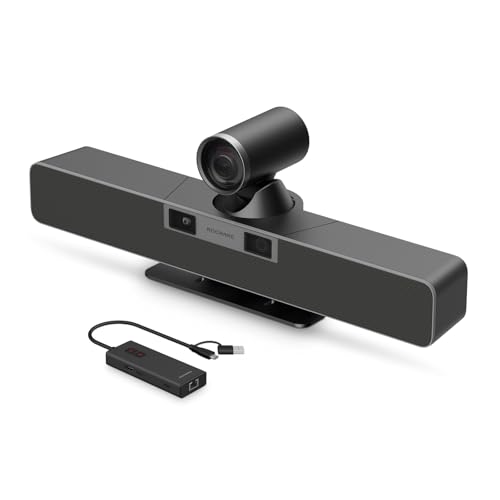
The RB20 features a dual-camera system with a 12x optical zoom and AI speaker tracking. The dual-lens approach allows room-wide coverage plus close-ups of the presenter, while eight microphones provide extended pickup and AI noise reduction for clearer calls in larger spaces.
Best for: Medium to large meeting rooms where detailed presenter views and robust mic pickup are needed. Choose this if you want advanced tracking and flexible framing for dynamic meetings.
Limitation: Higher complexity and data processing may require careful network planning to ensure stable performance in busy networks.
Buying Guide: Key Purchase Considerations
What should I prioritize for a conference room sound bar? Consider microphone array size and pickup range, camera quality and field of view, USB/HDMI/Bluetooth connectivity, and whether you want an all-in-one device or modular components. For hybrid teams, prioritize reliability in diverse environments, including echo cancellation and ambient noise reduction. If you regularly host larger teams, look for models with longer pickup ranges and advanced AI tracking. For BYOD workflows, ensure device compatibility and simple pairing.
How to choose by room size
Small rooms: Look for compact units with strong beamforming mics and a built-in camera.
Medium rooms: Favor devices with 4K video, wider camera views, and larger mic arrays for even coverage.
Large rooms: Consider dual-camera systems or models with extended AI tracking and higher pickup ranges, possibly combined with supplementary mics.
Connectivity and compatibility
Evaluate whether your rooms use USB-C, HDMI, or Bluetooth. BYOD environments benefit from USB-C or Bluetooth, while fixed rooms may prefer HDMI for reliable conferencing software support.
Audio quality vs. room acoustics
Built-in echo cancellation helps in echo-prone spaces, but rooms with hard surfaces may still benefit from acoustic treatment or additional microphones placed around the room.
Budget and lifecycle
All-in-one devices reduce cabling but may have fewer upgrade paths. Standalone cameras and microphones offer flexibility but can increase setup complexity and cost over time.
FAQ
- What is the best all-in-one video soundbar for a small conference room? Bose Videobar VB1 is designed for small spaces with integrated mic array and camera, simplifying setup.
- Which model offers the widest room coverage? ROCWARE RB20 provides an AI-driven dual-camera setup with broad mic pickup for medium to large spaces.
- Is BYOD support important for conference rooms? Yes; AMX Acendo Vibe and Yamaha CS-700 emphasize compatibility with multiple devices and platforms.
- Do I need a separate camera or speaker system? It depends on room size and collaboration needs. Some all-in-one bars include cameras; others pair with separate cameras for flexibility.
- What should I consider if my room has strong ambient noise? Look for models with robust ambient noise reduction and echo cancellation features.
- Can these devices be mounted or placed on a desk? Most are versatile, with options for wall mounting or desk placement depending on the model.