
Best Ways to Convert Music Tapes to CD
Answering your search for reliable cassette-to-CD conversion, the best options mix portability, ease of use, and built-in storage. These devices let listeners preserve old tapes as digital MP3s or lossless formats, with some offering USB, SD card, or direct CD transfer. Ideal buyers include: those with limited computer setup seeking plug‑and‑play solutions; travelers who want portable tape-to-digital on the go; and budget shoppers comparing multi-function players versus PC-based capture. The table below highlights five strong picks and what each excels at.
| Product | Best For | Key Benefit |
|---|---|---|
| KLIM K7 Cassette Tape Player (16GB SD) | On-the-go conversion | Integrated MP3 conversion with SD storage |
| DigitNow USB Cassette Player BR607 | PC-free capture | USB drive for direct MP3 files |
| Reshow Cassette Tape Player | Simple USB transfer | Easy digital conversion via USB |
| ClearClick Cassette to USB 2.0 | Track splitting | Automatic track splitting to MP3 on USB |
| DigitPro USB Capture Card | Multi-device capture | USB capture to PC or Mac |
KLIM K7 Cassette Tape Player With MP3 Converter

Features: Converts cassettes directly to MP3 on a provided 16GB SD card. Functions as an SD card music player with no extra apps required. Built-in microphone and speaker enable quick voice notes or playback. Includes a 3.5mm earphone jack and earphones for portable listening. Note: recording is not possible directly onto cassette tapes; recordings go to the SD card.
Who it’s best for: a commuter or traveler who wants a self-contained unit for converting tapes to MP3 and listening on the go. Why selected: strong portability and bundled storage capacity simplify digital archiving without needing a computer.
Caution: limited to SD card storage as the destination for MP3s; not ideal if you must re-record directly onto tapes.
DIGITNOW USB Cassette Tape To MP3 Converter BR607
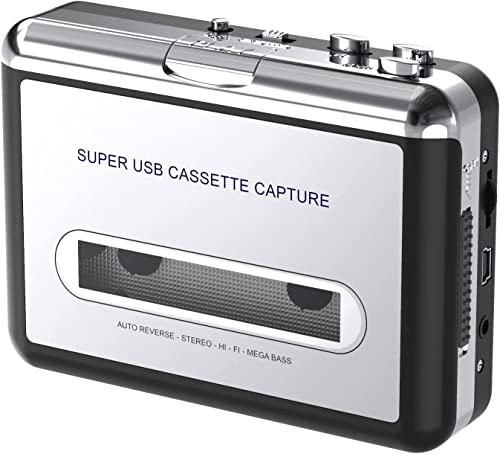
Features: Converts old tapes to MP3 via USB, with no installation needed. Includes a 3.5mm jack for headphones and offers portable playback. Designed to work with laptops and PCs for later burning to CDs or archiving on a digital library.
Who it’s best for: users who want a PC-free workflow with straightforward USB transfers to MP3. Why selected: emphasizes simplicity and portability for quick digitization.
Caution: may rely on USB drive compatibility; verify drive format and capacity before long sessions.
ClearClick Cassette To USB 2.0 (Second Gen)

Features: Transfers cassette audio to MP3 on a USB flash drive (16 GB included). No computer, software, or drivers required. Includes automatic track splitting to create individual MP3s.
Who it’s best for: users seeking an ultra-simple, stand-alone solution with automatic track management. Why selected: eliminates software steps and provides organized tracks directly on USB.
Caution: automatic track splitting depends on clear tape content; complex recordings may need manual adjustments.
DigitPro USB 2.0 Audio Capture Card

Features: Plug-and-play capture for vinyl, cassette, and radio. Records to USB on PC or Mac for MP3 or WAV formats. Supports 3.5mm and RCA inputs. Compatible with multiple Windows versions and Mac OS versions (note: Mac OS 10.15 not supported).
Who it’s best for: users who want a flexible capture solution that works across devices and can feed a computer for advanced editing. Why selected: broad compatibility makes it a strong choice for longer digitization projects.
Caution: requires a computer for full MP3/WAV processing; not ideal for purely PC-free setups.
Buying Guide
What to consider when choosing a cassette-to-CD or digital conversion device:
- Destination format: MP3 vs WAV; USB drive vs SD card; whether you want automatic track splitting or manual editing.
- Portability: if you’ll digitize on the go, look for built-in battery, earphones, and compact design.
- Connectivity: USB, SD/TF, and 3.5mm outputs affect how easily you transfer files to computers or other devices.
- Storage potential: consider SD card size or USB drive capacity to avoid frequent reformatting.
- Software needs: some devices require no software, while others pair with Audacity or similar programs for editing.
Practical tips for buyers
- Verify supported formats and maximum file size before choosing a device with limited storage.
- For high fidelity, prefer devices that offer lossless or higher bitrate MP3 options and direct transfer to USB or SD cards.
- If you plan to archive many tapes, prioritize devices with easy track separation and batch transfer capabilities.
FAQ
- Can these devices burn CDs directly? Answer: Most listed devices convert to digital files (MP3/WAV) on USB/SD; CD burning usually requires a computer or compatible CD writer.
- Will they work with old Walkman tapes? Answer: Yes, many units are designed to read standard cassette tapes and output digital files.
- Is software required for digitizing? Answer: Some units are plug-and-play with no software; others may offer optional software for editing.
- What is the best option for beginners? Answer: A PC-free converter with USB/SD storage and automatic track splitting is ideal for quick results.
- Do these devices support continuous recording? Answer: Recording usually targets digital storage paths like SD cards or USB drives; direct tape-to-tape is not supported on most units.