
Best Digital-to-Analog Audio Converters for Clean, Flexible Sound
Direct conversion from digital to analog audio is essential for connecting modern TVs, gaming consoles, and streaming boxes to traditional amplifiers and speakers. This guide highlights five reliable options, explains who each is best for, and compares their key capabilities. Ideal buyers include home theater hobbyists, gamers seeking clear LPCM output, and audio enthusiasts needing high-resolution conversions. The quick reference table below helps you compare core specs at a glance.
| Product | Brand | Best For |
|---|---|---|
| PROZOR 192Khz DAC Optical to RCA | PROZOR | Users needing 5.1-capable output from optical or coaxial sources |
| PROZOR 192KHz Digital to Analog Audio Converter | PROZOR | People wanting PCM/LPCM output with versatile inputs |
| Rybozen 192KHz DAC Digital to Analog | Rybozen | Simple setup for two-channel PCM audio without 5.1 decoding |
| AUTOUTLET 192kHz DAC Optical to RCA | AUTOUTLET | Pro-grade audio processing with 192 kHz capability |
| DigitConvert DAC 192KHz | DigitConvert | PS4/PS3 and home theater setups needing PCM/2-channel output |
Each product section below describes who it’s best for, key strengths, and a potential limitation. Use the buying guide to tailor a choice to your setup and listening goals.
PROZOR 192Khz Digital to Analog Audio Converter
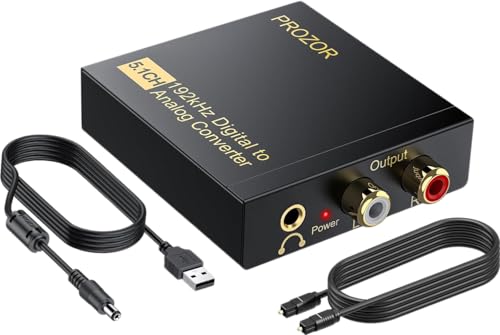
This converter accepts optical or coaxial input and outputs analog L/R RCA and 3.5mm audio. It supports 5.1-channel formats like DTS and Dolby Digital, but converts to 2.0 or 2.1 channel analog output. Best for: home theater setups where 5.1 sources can be downmixed for stereo playback. Limitation: 5.1 downmix may not reproduce full surround effects unless your amp supports it.
PROZOR 192KHz Digital to Analog Audio Converter (2nd Model)

Converts coaxial or Toslink to analog L/R and 3.5mm simultaneously. Best for: users who want synchronized two-channel audio from PCM/LPCM streams with flexible output. Caution: Optical output is not supported for some devices; ensure PCM output is chosen to avoid distortion when using older gear.
Rybozen 192KHz Digital to Analog Converter

Two-channel PCM and LPCM output from optical or coaxial sources with a bundled optical cable and power adapter. Best for: users who want a straightforward DAC with no 5.1 support, optimized for clear stereo audio. Limitation: Not suitable for 5.1-channel decoding or multi-channel outputs.
AUTOUTLET 192kHz DAC Digital to Analog Converter

Professional-grade DAC with 192 kHz sampling and a built-in amplifier to boost RCA output. Best for: home theater enthusiasts who need robust amplification in addition to a reliable optical-to-analog conversion. Limitation: Optical input supports high-res PCM but avoid expecting 5.1 decoding unless your equipment explicitly supports it.
DigitConvert DAC 192KHz

Converts coaxial or Toslink PCM to analog L/R and 3.5mm simultaneously. Best for: PS4/HD setups requiring PCM output with reliable, low-latency transmission. Limitation: Not a solution for 5.1-channel downmix; use independent 5.1 equipment if needed.
Buying Guide: Key Considerations For Digital-To-Analog Converters
- What output format do you need? Determine whether you require 2.0/2.1 stereo or 5.1-capable downmix, as some devices only pass PCM 2.0 signals to analog outputs.
- Supported input types. If your gear uses Toslink or coaxial SPDIF, verify the converter accepts both and reports sampling rates up to 192 kHz and 24-bit.
- Output options. L/R RCA and 3.5mm jacks are common; ensure your amplifier or speaker system has compatible inputs.
- Power and installation. Some units include a powered cable or wall adapter; ensure your setup has a convenient power source.
- Compatibility with TV and gaming consoles. For gaming and media centers, look for LPCM/PCM compatibility and minimal latency to avoid lip-sync issues.
- Audio quality considerations. Higher sampling rates (192 kHz) and 24-bit depth typically reduce audible distortion but confirm that your source material and player support these specs.
Frequently Asked Questions
- Do these converters support 5.1 audio output? Some models support 5.1 passthrough for certain formats; many convert to 2-channel PCM for stereo playback.
- Will I hear delay when using these DACs? Most converters are designed for real-time conversion, but some setups can introduce minimal latency depending on source format and downstream equipment.
- Can I use these with a TV? Yes, when the TV outputs PCM/LPCM over optical or coaxial and your receiver or speakers accept analog L/R or 3.5mm inputs.
- Do I need to enable PCM on my TV or source device? Yes. Set the audio output to PCM/LPCM to ensure clean two-channel analog output.
- Is a separate amplifier needed? If your speakers require amplification, use an amplifier between the DAC and speakers. Some DACs include a basic amplifier, while others do not.
- Are these units universal for Blu-ray players, game consoles, and set-top boxes? Most models are broadly compatible with devices that provide optical or coaxial PCM audio signals, but verify input type and supported formats before purchase.