
Best Cassette to MP3 Converters for Digitizing Your Music Library
Answering the question “how can I convert cassette tapes to MP3 efficiently?” these picks offer easy, computer-free or USB-enabled digitization. They’re ideal for different buyers: casual hobbyists who want quick USB transfers, memory-keepers who prefer built-in mics and portable designs, and budget-conscious converters that still deliver solid MP3 files. Below is a concise table of the five strongest options and what each excels at.
| Product | Best For | Why It Stands Out |
|---|---|---|
| KLIM K7 Cassette Tape Player | On-the-go digitization | Includes 16GB SD card, built-in mic and speaker, portable design |
| SEMIER Small Cassette Tape Player | Two-way conversion | SD card and USB option; LCD for easy navigation |
| ClearClick Cassette Tape to USB 2.0 (Second Gen) | USB drive saves MP3s directly | Automatic track splitting; 16GB USB included |
| MYPIN USB Cassette to MP3 Converter | Simple computer-free USB transfer | Records to USB drive; volume control; FAT32 up to 128GB |
| DIGITNOW USB Cassette Player BR607 | Flexible playback and capture | Auto reverse, no PC required, 32KHz 128Kbps spec |
Introduction: The following sections cover five highly relevant cassette-to-MP3 converters. Each entry includes who it’s best for, why it’s chosen, and a practical caution to consider before buying.
KLIM K7 Cassette Tape Player

The KLIM K7 is a portable cassette-to-MP3 converter with a built-in microphone and speaker. It includes a 16GB SD card and SD card reader for straightforward storage, and no apps are required to convert tapes to MP3 on the SD card. Best for travelers and casual users who want an all-in-one device for quick digitization and immediate playback.
Best for: On-the-go digitization and playback without a computer. Caution: It records to the SD card, not directly onto cassette tapes, so plan to manage files on the SD card after transfer.
SEMIER Small Cassette Tape Player

The SEMIER unit supports two-way conversion: directly to MP3 on the included SD card and via USB with Audacity software. It’s compact, has an LCD for navigation, and suits users who want flexible workflows. Best for: Individuals who want both SD and USB conversion options, and who may edit with PC software.
Caution: Does not support Type IV or metal tapes, which limits compatibility for certain archival tapes.
ClearClick Cassette Tape to USB 2.0 (Second Generation)

ClearClick offers instant USB-based conversion to MP3 with a bundled 16GB USB drive and automatic track splitting. This model emphasizes ease of use and immediate file creation on a USB stick, making it ideal for simple handoffs of digital files without a PC.
Best for: Quick, driver-free transfers to USB with automatic track separation. Caution: USB drive format compatibility may require FAT/FAT32 adherence for best performance.
DIGITNOW USB Cassette Player BR607
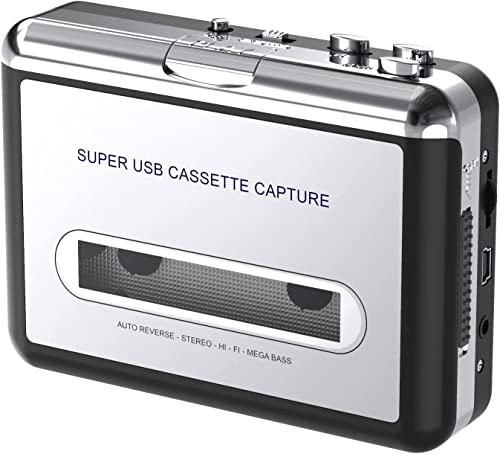
The DIGITNOW BR607 is designed for USB drive-based MP3 capture with auto reverse and no PC required. It supports 32KHz audio output and 128Kbps bit rate, suitable for basic digitization needs. Best for: Users who want a straightforward, portable converter with USB drive output.
Caution: Audio quality is entry-level; consider higher-bitrate options if preserving fidelity matters for archiving.
MYPIN USB Cassette To MP3 Converter

The MYPIN USB model converts cassette tapes to MP3 on a USB drive and includes volume control for recording and playback. It supports USB2.0 and USB3.0 and works with FAT/FAT32 formats up to 128GB. Best for: Budget-minded buyers who want a simple, USB-only workflow with adjustable volume.
Caution: Performance depends on USB drive speed; a slower drive may cause occasional stuttering during playback.
Buying Guide
What should I consider when choosing a cassette-to-MP3 converter?
Compatibility with your tapes matters. Some devices skip Type IV or metal tapes, while others handle a wider range. Decide if you prefer SD card storage, USB drive output, or direct PC editing with software.
How important is portability versus audio quality?
Portable units excel for on-the-go digitization, while larger models may deliver steadier playback and simpler file management. Audio quality often correlates with bit rate, sample rate, and transfer method; higher settings yield crisper MP3s but require careful handling of the source tapes.
Do I need software or a PC for conversion?
Some models operate independently (USB drive or SD card). Others offer optional PC software (like Audacity) for editing and track management. Choose based on your comfort with software workflows.
What storage method fits my workflow?
SD cards are great for standalone use and playback. USB drives simplify sharing and archiving. FAT32 compatibility is common, so confirm drive format and capacity before use.
What are practical limitations to expect?
Built-in mics and speakers aid quick playback but may not match dedicated external devices for critical listening. Some units record only to SD or USB, not both, and certain tapes may be incompatible with cheaper or older converters.
FAQ
Can I convert tapes to MP3 without a computer?
Yes, many converters transfer audio directly to USB drives or SD cards for standalone use.
Is automatic track splitting important?
Automatic track splitting helps organize long tapes into individual MP3 files, which is convenient for albums or mixtapes.
Will these devices preserve cassette hiss or noise?
Digitized files reflect the original tape’s quality; some devices offer basic noise handling, but archival fidelity often depends on the source tapes.
What formats do these devices support besides MP3?
Most target MP3; some support WAV or provide batch conversion to MP3 from analog sources.
How should I format my USB drive for compatibility?
FAT32 and compatible FAT formats are widely supported. Check device manuals for maximum drive size and format recommendations.