
Best DAC Digital to Analog Converter (5.1-Compatible) for Home Theater and TV Audio
If you’re upgrading older speakers or a home theater setup, a 5.1-compatible DAC can convert digital optical or SPDIF signals into rich analog sound. This guide highlights five reliable options ideal for different needs—from simple TV audio boosts to more immersive 5.1-capable setups. Best for: cinephiles with older stereo speakers, gamers needing smooth digital-to-analog transition, and TV owners seeking easy audio upgrades.
Buyer overview: the table below compares the five selected DACs on key points such as input types, sample rates, 5.1 support, built-in amplification, and control features. Use this as a quick reference when you’re deciding which device best fits your gear and listening preferences.
| Product | Input | Output | Notable Feature | Best For |
|---|---|---|---|---|
| LiNKFOR Digital Optical SPDIF Toslink to Analog RCA DAC Converter | Toslink (Optical) | RCA L/R | Built-in amplifier, 192kHz/24-bit | TVs with old speakers |
| PROZOR 192Khz Digital to Analog Audio Converter (5.1CH) | Optical/Coaxial | RCA L/R, 3.5mm | Supports 5.1 channel, Dolby/DTS | Home theater with 5.1 needs |
| PROZOR 192kHz Digital to Analog Audio Converter (Dolby/DTS 5.1Ch to Stereo) | Optical/SPDIF | RCA L/R, 3.5mm | Dolby AC-3, DTS 5.1 to stereo | 5.1 sources reduced to stereo |
| DigitConvert DAC 192KHz Digital to Analog Audio Converter | Toslink/Coaxial | RCA L/R, 3.5mm | 192kHz sampling, stable transmission | Multi-device compatibility |
| PROZOR DAC Converter 192Khz Digital to Analog Audio (5.1CH DTS) | Optical/Coaxial | RCA L/R, 3.5mm | 5.1 channel support | Multichannel needs with decoding |
LiNKFOR Optical to RCA DAC with Built-in Amplifier

LiNKFOR’s Optical to RCA DAC includes a built-in audio amplifier chip to boost RCA output levels while preserving sound clarity. It accepts 192kHz/24-bit SPDIF signals and provides left/right analog outputs. Best for: TV owners who want a straightforward upgrade to drive existing speakers without a separate amplifier. Caution: It’s designed for stereo L/R outputs; 5.1 decoding is not natively supported, so multi-channel setups will rely on external processing.
PROZOR 192Khz 5.1CH Optical To RCA Converter
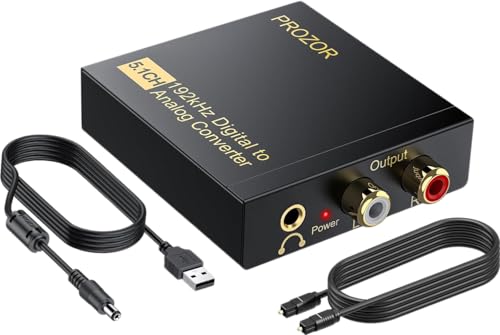
This PROZOR model supports 5.1-channel output by converting optical or coaxial digital signals to L/R RCA and 3.5mm analog outputs. It handles 192kHz/24-bit sampling and supports Dolby AC-3, DTS, and PCM. Best for: users with 5.1-capable speakers seeking faithful channel separation from digital sources. Limitation: The device uses one-way signal transmission and must be paired with compatible 5.1 sources to maximize surround capabilities.
PROZOR 192kHz Dolby/DTS 5.1 to Stereo DAC

This PROZOR model focuses on converting Dolby AC-3 and DTS 5.1 channels into stereo L/R while delivering 192kHz/24-bit audio. It adds a built-in volume control for easy balancing. Best for: users who want a simple, direct conversion to stereo with adjustable output. Limitation: It converts to stereo, not native 5.1, so surround effects will be mixed into two channels.
DigitConvert 192KHz Optical To RCA DAC

DigitConvert offers a 192kHz DAC that handles Toslink optical and coaxial inputs to analog L/R RCA and 3.5mm outputs. It emphasizes stable audio transmission with minimal delay. Best for: multi-device setups where optical or coaxial sources feed traditional speakers. Caution: Some users may need to adjust TV or source settings to PCM/LPCM for clean analog output.
PROZOR 192Khz DTS 5.1 DAC for 5.1 Systems

This device supports 192kHz/24-bit decoding and 5.1-channel formats, making it suitable for true surround setups. It includes a built-in volume control and ships with a cable bundle for quick setup. Best for: enthusiasts who want robust multichannel decoding. Limitation: Some configurations may require additional processing gear to fully utilize 5.1 playback.
PROZOR 192KHz Optical To RCA DAC Upgrade With Volume
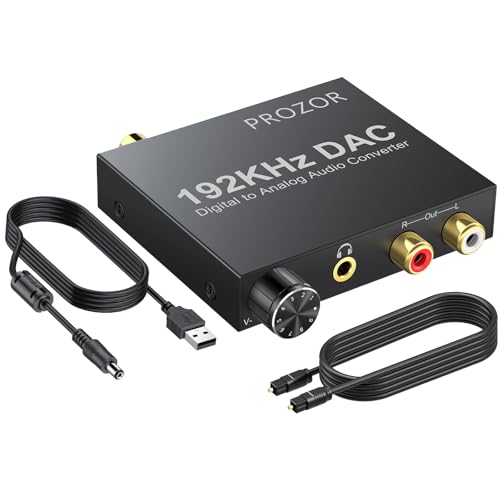
PROZOR’s upgrade model emphasizes a built-in volume control and supports 192kHz/24-bit sampling. It converts coaxial or Toslink digital PCM audio to L/R RCA and 3.5mm outputs. Best for: listeners who want easy volume management without external amps. Caution: The output configuration is fixed; volume control affects both 3.5mm and RCA outputs simultaneously.
PROZOR 192KHz Optical to Analog DAC for TV/PS4

This PROZOR model decodes up to 192kHz/24-bit PCM and supports optical or coaxial input with L/R RCA and 3.5mm outputs. It emphasizes PCM/LPCM output and notes that optical output is not supported for some configurations. Best for: users needing PCM/LPCM compatibility with TVs and game consoles. Caution: Optical output is not supported for some setups; ensure your source is PCM/LPCM enabled.
Buying Guide
Key considerations when choosing a DAC for 5.1-compatible or stereo setups:
- Input and output compatibility: Ensure the device accepts Optical Toslink or Coaxial inputs and provides RCA L/R or 3.5mm outputs that match your speakers or amplifier.
- Channel support: If you need true 5.1, pick models advertised as supporting 5.1 input and 5.1-compatible output paths. Some units convert 5.1 signals to stereo; know what your speaker system requires.
- Sampling rate and bit depth: Look for 192kHz/24-bit support for best fidelity with modern sources. This reduces potential noise and preserves dynamic range.
- Built-in amplification: Some units include a small amplifier to boost RCA outputs. This is helpful if your speakers require higher line-level signals.
- Volume control: Built-in knobs simplify balance adjustments. Check whether the control affects all outputs equally or independently for different jacks.
- Setup and source configuration: Some devices require PCM/LPCM mode on the source. Verify TV or Blu-ray players are set to PCM output to avoid distortion or no sound.
- Ease of use and cabling: Consider bundled cables or required adapters. Short, simple setups reduce clutter and potential signal loss.
Frequently Asked Questions
- What does a DAC do for TV audio? It converts digital audio signals into analog signals that amplifiers and speakers can play, enabling legacy speakers to work with modern TVs.
- Do all DACs support 5.1 surround? Not all do. Some convert 5.1 digitally to stereo; others provide true 5.1 decoding. Verify the device’s stated capabilities with your speaker setup.
- Is optical input necessary, or can coaxial be used? Both are common. Choose a model that supports your source type. Some devices handle both inputs but may require specific configurations.
- Will a DAC improve TV sound quality by itself? It can improve clarity and reduce hiss or noise when paired with appropriate amplifiers and speakers, but overall improvement depends on the rest of the audio chain.
- Do I need external amplification with these DACs? If your speakers require higher line-level output, a DAC with built-in amplification helps. For passive speakers, connect to an amplifier or AV receiver after the DAC.
- Can I use these DACs with gaming consoles? Yes, provided the console outputs PCM/LPCM through Optical or Coaxial and matches the DAC’s inputs and outputs.