
Best Desktop Computer Sound System for Clear, Rich Audio
Answer: A 2.1 desktop speaker setup with a dedicated subwoofer is typically the best choice for most users seeking improved PC audio, gaming immersion, and simple USB or auxiliary connections. This guide highlights five solid options suited for office desktops, gaming rigs, and multimedia setups. Each picks emphasizes clarity, bass response, and ease of use. The top picks cover THX-certified performance, versatile inputs, and compact designs for small desks.
| Product | Type | Best For |
|---|---|---|
| Logitech Z313 | 2.1 Multimedia | Budget-friendly desk setups with easy control |
| Klipsch ProMedia 2.1 THX | 2.1 THX Certified | Premium PC gaming and movies with high clarity |
| Cyber Acoustics CA-3810 | 2.1 Speaker System | Room-filling sound and versatile connections |
| Logitech Z625 | 2.1 THX Certified | Powerful audio with multiple inputs |
| Nylavee 2.1 USB/Bluetooth | 2.1 Bluetooth/USB | Modern wireless and wired flexibility |
Logitech Z313 2.1 Multimedia Speaker System

The Logitech Z313 delivers 25 Watts RMS with a compact subwoofer and a convenient control pod. Best for budget-conscious buyers seeking straightforward setup for everyday computing, streaming, and light gaming. The compact subwoofer provides noticeable bass without taking up excess desk space.
Best for: value-focused users who want simple, reliable sound with an easy to use control pod. Limitations: not THX certified, and midrange may be less refined at higher volumes.
Klipsch ProMedia 2.1 THX Certified

Klipsch ProMedia 2.1 THX Certified speakers pair Klipsch’s renowned clarity with THX certification for accurate, room-filling audio. The 3” midrange satellites plus a 6.5” side-firing subwoofer deliver full bandwidth bass and precise highs, ideal for gaming, movies, and music. The design emphasizes efficiency and directional sound control for focused listening.
Best for: users who want premium sound quality and THX assurance for immersive gaming and movies. Limitation: higher price and larger footprint than basic 2.1 sets.
Cyber Acoustics CA-3810 2.1 Speaker System

CA-3810 provides 80W peak and 40W RMS with a ported 5.25” subwoofer and dual 2” satellites. It suits users seeking larger bass presence and room-filling sound for music, movies, and games. A convenient control pod and 3.5mm AUX input help connect gaming consoles or mobile devices easily.
Best for: desktop users wanting strong bass and flexible connections. Caution: larger footprint may dominate smaller desks.
Logitech Z625 Powerful THX Certified 2.1 System
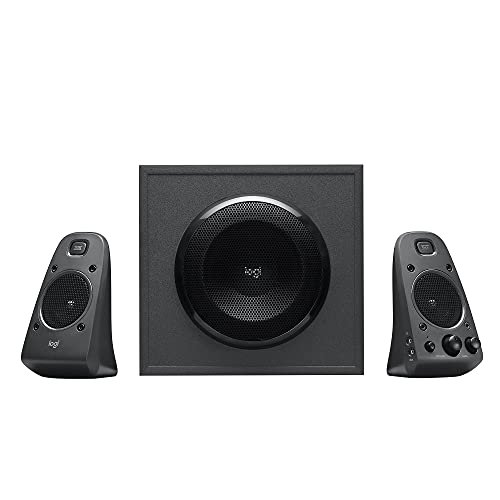
The Z625 offers 200 Watts RMS total (400 Watts peak) and THX certification. It supports multiple inputs, including optical, 3.5mm, and RCA, enabling easy connections to game consoles, TVs, and PCs. The system is designed for robust, cinematic sound with strong bass and clear dialogue for media consumption and gaming alike.
Best for: users seeking high output and flexible input options in a compact 2.1 package. Limitation: higher cost compared with entry-level sets.
Nylavee Computer Speakers with Subwoofer

Nylavee provides 2.1 channel 60W peak power with Bluetooth 5.4 and USB-A/AUX options. This makes it versatile for wired desktop use or wireless listening from laptops or phones. The system emphasizes clear mids and highs with a strong low end for gaming, movies, and music, plus broad compatibility through multiple inputs.
Best for: buyers who want modern connectivity (Bluetooth and USB) without sacrificing bass. Caution: confirm USB-C compatibility if needed for select devices.
Buying Guide
What should I consider when choosing a desktop sound system?
Ask about room size, desk space, and intended use. Larger rooms benefit from higher wattage and a bigger subwoofer, while compact desks can prefer smaller 2.1 systems with THX where possible.
Do I need THX certification?
THX certification signals tested performance and accuracy. If you want precise sound reproduction for gaming and movies, a THX-certified 2.1 system is a strong choice, though it often comes at a higher price.
What inputs matter most?
Look for optical, 3.5mm, RCA, USB, and Bluetooth options. Optical and USB-C inputs are convenient for modern PCs and consoles; Bluetooth adds wireless flexibility for laptops and phones.
How important is speaker configuration?
Two upfront satellites plus a bass subwoofer offer the best balance of space and sound. Side-firing or down-firing subs can influence bass localization; consider desk and room layout when evaluating placement.
What trade-offs should I expect?
Entry-level systems are affordable and compact but may lack deep bass or refined highs at high volumes. Premium 2.1 sets provide better clarity and dynamics but take up more desk space and cost more.
Usage scenarios to match with products
- Budget PC setup: Logitech Z313 for basic productivity and media.
- Premium gaming and movies: Klipsch ProMedia 2.1 THX or Logitech Z625 for high-fidelity sound.
- Wireless flexibility: Nylavee 2.1 with Bluetooth 5.4 and USB compatibility.
Quick comparison snapshot
- Best budget option: Logitech Z313
- Best overall sound and clarity: Klipsch ProMedia 2.1 THX
- Best for powerful bass: Logitech Z625
- Best for wireless and USB/aux variety: Nylavee 2.1
FAQ
- What is a 2.1 speaker system?
- Is THX certification important for gaming?
- Can these systems work with laptops?
- Which is better for small desks: compact or larger systems?
- Do I need an optical input?
A 2.1 system uses two satellite speakers for left/right channels and one subwoofer for bass, delivering richer sound than 2.0 setups.
THX certification indicates tested performance, which can improve perceived accuracy and immersive experience in gaming and movies.
Yes. Most use 3.5mm aux, USB, or Bluetooth and easily connect to laptops and desktops.
Compact 2.1 sets save space and are typically sufficient for casual listening, while larger systems deliver stronger bass and higher max volume.
Optical inputs are beneficial when connecting to devices that offer digital audio outputs, such as certain consoles or high-end TVs.