
Best Digital Optical Audio Splitter Solutions for Clear TV and Gaming Audio
The best digital audio cable splitter expands one optical (Toslink) audio signal to two receivers without introducing appreciable delay or loss. This guide highlights top options for gamers, home theater setups, and multi-device listening. The right choice depends on how many outputs you need, compatible formats, and whether you want independent volume control. The following picks suit different lifestyles—from casual TV watching to immersive multi-speaker systems.
Buyer overview: The top products cover 1×2 and 1×3 outputs, support PCM, Dolby Digital, and DTS formats, and emphasize plug-and-play use. The table below summarizes the key attributes to compare at a glance.
| Product | Output Count | Best For | Notes |
|---|---|---|---|
| Orisell Optical Splitter | 1×2 | Gamers and home theater users needing two optical outputs | Dolby/DTS compatibility; solid connectors |
| NEWCARE 1×3 Splitter | 1×3 | Users with three receiving devices (soundbar, amp, headphones) | Balanced signal; ESD protection |
| NEWCARE 1×2 Splitter | 1×2 | Simple two-device setups | Stable signal; broad compatibility |
| avedio links 1×2 Splitter | 1×2 | Two receivers with independent volume control | Separate volume control; easy setup |
| LiNKFOR 1×3 Splitter | 1×3 | Three receivers with high audio fidelity | Longer reach options; 5.1/2.0 PCM support |
Orisell Digital Optical Splitter 1×2
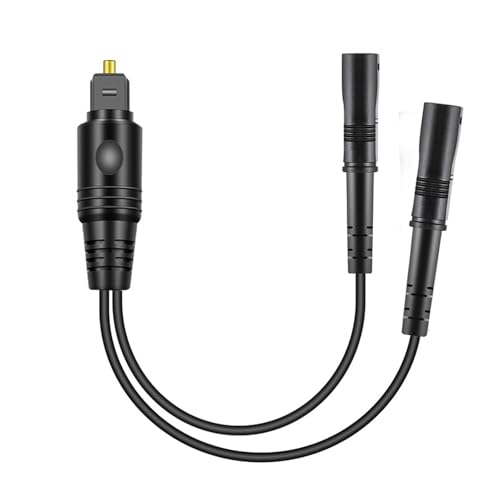
Best for gamers and home theater fans who need two optical outputs from a single source. This 1×2 splitter supports uncompressed PCM and 5.1–7.1 surround formats, including Dolby Digital Plus and DTS-HD. The device uses a solid PVC outer layer and gold-plated connectors to minimize signal loss. Distance of signal transmission can reach up to 150 feet with proper cabling. The input is compatible with PCs, consoles, Blu-ray players, and HDTVs, while outputs feed two devices such as a soundbar and a digital amplifier.
Who it is best for: gamers or movie enthusiasts with two separate optical devices needing simultaneous audio, such as a receiver and a gaming headset adapter. Choose this if you need two outputs from one source and value long cable reach. Caution: It is a passive splitter; if signal strength is weak, one output may be quieter than the other.
NEWCARE 1×3 Optical Splitter

This 1×3 splitter is suited for setups where three devices need optical input from a single source. It emphasizes a built-in balance system to reduce signal loss and includes ESD protection for security. It supports formats such as 5.1 Dolby and DTS, as well as 2.0 PCM/LPCM. It is broadly compatible with Apple TV, cable boxes, Roku, Xbox, PS4/PS5, Blu-ray players, amplifiers, and speakers.
Best use case: households with a soundbar, a digital amplifier, and a wireless DAC or headphone adapter that all need the same optical signal. Better for users wanting triple outputs without switching cables. Limitation: as a passive splitter, the signal can attenuate with longer runs or poor-quality fiber cables; ensure short and high-quality Toslink cables for best results.
NEWCARE 1×2 Optical Splitter

The 1×2 splitter from NEWCARE focuses on a clean split to two devices with robust build and reliability. It features automatic balance and ESD protection to help maintain a stable signal. It supports common digital formats: Dolby Digital, DTS, and PCM/LPCM. It is particularly well-suited for setups that require two optical outputs, such as a soundbar plus a separate digital-to-analog converter (DAC) or wireless headphone adapter.
Who this is for: users upgrading from a single device to dual destinations without adding extra cables. Choose this if you want dependable two-out performance with straightforward plug-and-play operation. Caution: performance depends on the downstream devices; if one device aggressively consumes power, you may see signal competition or reduced level on the other output.
avedio links Optical Audio Splitter 1×2

Designed for two outputs with an eye toward independent listening, this splitter supports separate volume control for each output. This is especially useful for households where one person wishes to crank the sound on a soundbar while another prefers headphones without interfering with the other listener. It supports standard digital formats including 5.1 Dolby DTS and 2.0 PCM/LPCM. The setup remains plug-and-play with devices like Xbox, PS4, Blu-ray players, and HDTVs.
Best for: families or roommates who want simultaneous, independently adjustable audio streams from one source. Limitation: the device is passive, so using two high-demand outputs may reduce perceived loudness on one channel if the input signal is marginal.
LiNKFOR Digital Optical 1×3 Splitter

LiNKFOR’s 1×3 splitter provides three outputs from a single optical input, supporting formats like Dolby-AC3, DTS, PCM, and LPCM up to 96 kHz. It offers longer transmission options and claims low optical loss of under 0.2 dB/m, with an output reach up to about 25 meters (80 feet). This makes it suitable for larger rooms or setups where components are spread apart.
Best for: multimedia setups with multiple receivers (soundbar, AV receiver, DAC) spread across a room. Better for users who need 5.1-capable compatibility across three devices. Limitation: the device does not transmit 7.1-channel formats; ensure your system does not require those higher-channel configurations over optical splitters.
Buying Guide
What is a digital optical audio splitter and when do you need one?
A digital optical audio splitter duplicates one Toslink signal to multiple outputs. Use one when you want to share a single audio source with multiple devices, such as a soundbar and a DAC, or a speaker system and wireless headphones, without reconnecting cables.
How many outputs do you really need?
Common configurations are 1×2 or 1×3. Choose 1×2 for a simple dual-output setup, or 1×3 if you have three devices (e.g., soundbar, receiver, and wireless adapter). Note that more outputs can increase complexity and potential signal loss.
What formats should the splitter support?
Look for support for PCM/LPCM and common surround formats like Dolby Digital and DTS. These ensure compatibility with most TVs, consoles, and home theaters. If you require 7.1-channel transmission, verify whether the optical path supports it with your devices.
Passive vs. active splitters
Most consumer optical splitters are passive, meaning they split the signal without amplification. This is fine for short runs and quality cables but can reduce signal strength over longer distances. If your setup involves long cable runs, consider a splitter known for low loss and good cable quality, or an actively powered option if available.
Build quality and protections
Choose models with robust connectors and protective features like ESD protection, corrosion-resistant connectors, and buffer tubing. These reduce wear and signal degradation over time and improve reliability in everyday use.
Practical considerations
- Check cable length: longer Toslink cables reduce signal strength.
- Ensure compatibility: confirm that both the input device and outputs have Toslink ports.
- Plan cable routing: place the splitter where cables can be managed to prevent accidental disconnections.
FAQ
- Can I use a digital optical splitter with stereo headphones?
- Will a splitter affect video quality?
- Do I need an active splitter for long cable runs?
- Is Dolby TrueHD or DTS-HD transmitted through Toslink splitters?
- Can I split to three devices and still use them at the same time?
Yes, as long as your output device supports the desired format. If you wish to listen privately while someone else uses the sound system, independent volume control helps, as seen in some models.
No, a Toslink splitter only handles audio. Video signals are independent and unaffected.
Active (powered) splitters are less common in consumer use. If you experience significant signal loss, consider shorter cables, higher-quality Toslink cables, or a model specifically designed for longer runs.
Some formats may not transmit in full quality over certain optical cables or splitters. Check format support for your specific devices and ensure compatibility with the output receivers.
Yes, if the splitter and devices support simultaneous outputs and the input signal is strong enough. Expect some signal attenuation with longer runs or multiple loads.