
Best Digital Optical to RCA DACs for Clear Audio Across Devices
Direct optical-to-RCA DACs offer a simple way to convert digital Toslink signals into analog stereo sound. This guide highlights five options that cover common setups—from HDTVs and Blu-ray players to game consoles and home cinema systems. Each product is chosen for reliable signal processing, high sampling rates, and practical ease of use. This overview helps buyers pick the right DAC based on whether they value best volume, ease of installation, or compatibility with existing amps and speakers.
| Product | Best For | Key Benefit |
|---|---|---|
| AUTOUTLET 192kHz DAC Digital to Analog Audio Converter | HDTVs and game consoles | High 192 kHz processing with RCA output |
| PROZOR 192Khz Digital to Analog Audio Converter | Home theaters with 5.1 needs | Supports 5.1CH pass-through via optical/coax |
| Rybozen Digital to Analog Audio Converter | PCM-friendly setups | Simultaneous RCA and 3.5mm outputs |
| PROZOR 192KHz Optical to RCA Converter with Built-in Amp | Small living rooms | Built-in amplifier for increased RCA volume |
| DigiConvert 192KHz DAC with Coax/Toslink | Budget-conscious setups | Stable digital-to-analog transmission |
AUTOUTLET 192kHz DAC Digital to Analog Audio Converter

AUTOUTLET’s 192 kHz optical-to-RCA converter is designed for professional audio signal processing. It converts Toslink digital audio signals to analog RCA with a built-in amplifier to boost output levels. Best for users who need clean, distortion-free stereo sound from HDTVs, DVDs, Blu-ray players, or game consoles. The product supports 24-bit/192 kHz input and a range of sample rates, ensuring broad compatibility with modern digital sources.
Who this is best for: home theater enthusiasts who want a straightforward optical-to-analog bridge with reliable output levels. Avoid this if you need multi-channel or 5.1 surround decoding on the DAC itself. Caution: ensure your source is set to a compatible PCM/LPCM format to avoid unexpected downmixing.
PROZOR 192Khz Digital to Analog Audio Converter
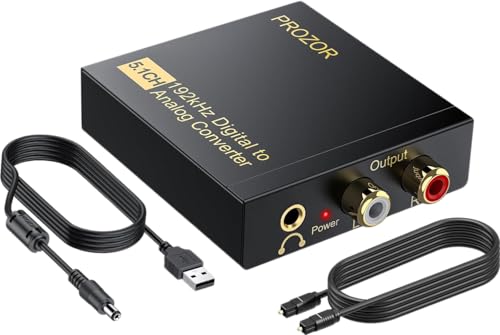
PROZOR’s 192 kHz DAC handles optical and coaxial inputs and outputs to L/R RCA plus 3.5mm. It supports 5.1CH passthrough in suitable configurations, making it a fit for home theaters linking to speakers and headphones. Its maximum sampling rate of 192 kHz (24-bit) aims to preserve detail in PCM streams. This choice suits setups where you want flexible input and a simple RCA/3.5mm mix at the output.
Best for: users who need 5.1-capable input options and a straightforward RCA output. Choose this if you require a compact unit that doubles as a headphone-ready adapter. Caution: ensure your TV or player outputs PCM/LPCM to maximize compatibility and sound quality.
Rybozen 192KHz Digital to Analog Audio Converter

Rybozen adds a compact, multi-output option with RCA L/R and a 3.5mm jack. It supports 32–192 kHz sampling rates and 24-bit SPDIF input, suitable for users who want simultaneous analog outputs for both speakers and headphones. The device emphasizes clean signal transmission with minimal electromagnetic interference.
Best for: setups requiring both RCA and 3.5mm outputs from a single DAC. Better for PCM/LPCM sources; not recommended for 5.1-channel decoding. Caution: not all players will export 5.1 audio through PCM; verify your source settings before use.
PROZOR 192KHz Digital to Analog Audio Converter 7ft Cable

This PROZOR model features a built-in audio amplifier and supports 32–192 kHz sampling with 24-bit SPDIF input, converting to L/R RCA. It emphasizes a higher output volume on RCA and is ideal for smaller rooms where you want to improve volume without a separate amplifier. It notes PCM/LPCM as the target input format for best performance.
Best for: compact rooms where a built-in amp adds noticeable loudness. Choose this if you want a streamlined setup with a longer cable length included. Caution: optical output is not supported on some configurations; ensure your source supports Toslink input.
DigitConvert DAC 192KHz Optical To RCA Adapter

DigitConvert offers a straightforward digital-to-analog conversion from coaxial or Toslink to L/R RCA and 3.5mm simultaneous outputs. It emphasizes stable, synchronized audio with low delay and broad compatibility across common home devices, such as PS4, Blu-ray players, and AV amps. It supports up to 192 kHz/24-bit PCM input, helping preserve detail in most PCM streams.
Best for: budget-conscious buyers who want reliable conversion across multiple sources. Better for two-channel PCM rather than multichannel audio. Caution: ensure the TV or player’s output is set to PCM/LPCM to avoid distortion.
YGiTK 192kHz DAC Digital to Analog Audio Converter

YGiTK presents a 192 kHz optical-to-RCA converter with a focus on refined audio performance. It highlights a built-in amplifier to raise RCA output levels and deliver clearer sound. The device is compact for space-saving setups and aims for stable signal processing with minimal coloration.
Best for: users who need a compact, easy-to-install converter with a modest volume boost. Choose this if you want a simple upgrade without a separate amp. Caution: volume adjustments should be made at the output device; the DAC itself concentrates on signal conversion rather than amplification control.
Buying Guide: Key Purchase Considerations
- Input and output options: Ensure the DAC supports Toslink optical input and RCA/L/R and 3.5mm outputs if you plan to drive both speakers and headphones.
- Sample rate and bit depth: Look for devices that support up to 192 kHz and 24-bit PCM to preserve audio detail.
- Built-in amplification: Consider whether you need a DAC with a built-in amp to increase RCA volume, especially when connecting to older amplifiers.
- Channel support: If you require 5.1-channel passthrough, verify that the device explicitly supports PCM/5.1 via optical or coaxial inputs.
- Installation notes: Some models require PCM/LPCM output settings on the source; others may have caveats about optical outputs or compatibility with certain devices.
- Space and cable length: For compact setups, choose a small unit and consider included cables to minimize clutter.
FAQ
- What is the advantage of a 192 kHz DAC over a lower-res model?
It can preserve more audio detail in PCM streams and reduce audible artifacts on high-quality sources. - Do these DACs support 5.1 channel audio?
Some models support 5.1 in practice through PCM passthrough; always verify the specific product’s supported formats. - Should I use the DAC’s built-in amp or my speaker amp?
Use the built-in amp if your speakers require higher RCA volume or if your receiver has limited output; otherwise, connect to your existing amp. - Why do some models require PCM/LPCM on the source?
To avoid distortion and ensure accurate two-channel output, many DACs rely on PCM/LPCM as the standard audio format for conversion. - Is optical output not supported on any model?
Some models advertise optical input only and may require a separate coaxial connection or a different setup; check the product notes for optical compatibility. - What setup steps improve audio quality?
Set the source to LPCM/PCM, use a stable optical cable, and adjust output volume on the amplifier or speakers rather than the DAC when possible.