
Best Digital Audio Input Cable Options for Clean, Reliable Sound
Answer: A digital audio input cable is best for connecting TVs, game consoles, Blu-ray players, and sound systems to speakers or soundbars with minimal signal loss. This guide highlights five solid choices for common setups, helps you pick by cable type, length, and connector quality, and explains when to choose each option. Ideal buyers include home theater enthusiasts, console gamers, and anyone upgrading to a clearer digital signal without extra adapters. Below is a quick comparison table of the selected products to help you decide at a glance.
| Product | Length | Best For | Why pick it |
|---|---|---|---|
| KabelDirekt Optical Audio Cable | 6 ft | TVs and soundbars needing TOSLINK | Fiber-optic, immune to electrical interference; durable build |
| Amazon Basics Toslink 6 ft | 6 ft | All-around home theater use | Gold-plated connectors; straightforward, reliable |
| FosPower Digital Coaxial 3 ft | 3 ft | Hard-to-reach coaxial ports | Color-coded, reliable S/PDIF RCA for coax connections |
| Warrky Optical Audio Cable 6 ft | 6 ft | Soundbars and TVs with tight spaces | Toray fiber, 24K gold-plated connectors, in-wall safe |
| Amazon Basics Toslink 3.3 ft | 3.3 ft | Compact setups | Compact length, gold-plated connectors, clear signal |
KabelDirekt Optical Audio Cable – 6 ft

Brand: KabelDirekt
Format: TOSLINK optical digital audio cable with a TOSLINK-to-TOSLINK connection. Uses a metal-free fiber optic core and a flexible PVC jacket, designed to resist electrical interference. This setup is ideal for transmitting high-quality digital audio from a TV, gaming console, or Blu-ray player to a soundbar, amplifier, or home audio system.
- Best for: Home theater users who want a robust, interference-free optical connection.
- Why selected: The cable’s fiber optic design minimizes electrical noise and supports multiple devices through a simple TOSLINK interface.
- Caution: Use protective caps only when not in use; remove caps before connecting to devices.
Amazon Basics Toslink Digital Optical Cable – 6 ft

Brand: Amazon Basics
Features: 6-foot Toslink fiber optic cable with multi-channel digital audio output. Includes gold-plated connectors and buffer tubing. Clear audio transmission with minimal signal loss.
- Best for: General-purpose home theater setups seeking reliable, affordable optical connections.
- Why selected: Consistent performance across common devices; straightforward plug-and-play use.
- Caution: Please remove the end protective caps before use.
FosPower Digital Coaxial Cable – 3 ft
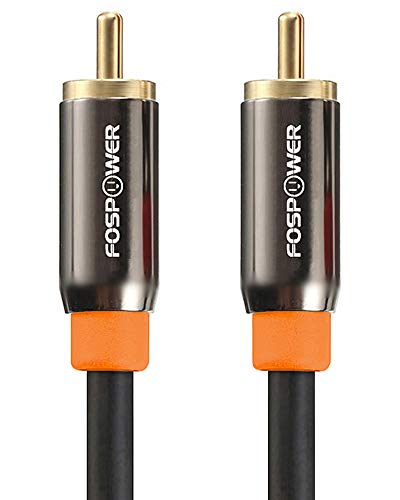
Brand: FosPower
Format: Coaxial S/PDIF RCA cable, 3 ft length. Features orange color-coded connectors for quick identification and compatibility with most digital coaxial ports.
- Best for: Setups that rely on coaxial S/PDIF connections where space is tight.
- Why selected: Strong compatibility with hard-to-reach ports and clear color-coding for easy matching.
- Caution: Coaxial cables can be bulkier at longer lengths; consider matching length to your device distance.
Warrky Optical Audio Cable – 6 ft

Brand: Warrky
Features: Features Japanese Toray fiber optic cores for uncompressed PCM, Dolby Digital Plus, DTS-HD, and 5.1/7.1 surround sound. 24K gold-plated connectors offer a snug fit. Nylon-braided jacket provides durability and tangle resistance. CL3-rated for in-wall installation.
- Best for: Home theater enthusiasts needing durable, space-saving, high-quality optical cables.
- Why selected: Premium materials and a slim housing accommodate tight TV mounts and entertainment centers.
- Caution: Ensure to remove protective caps before plugging in; no tools required.
Amazon Basics Toslink 3.3 ft
Brand: Amazon Basics
Length: 3.3 ft. Features: Multi-channel digital optical audio output; gold-plated connectors; protective caps and buffer tubing.
- Best for: Compact media setups or streaming boxes with limited space.
- Why selected: Short length reduces signal loss over long runs while maintaining reliability.
- Caution: Remove protective caps before use; ensure the distance to devices fits the cable length.
Buying Guide
What type of cable should you choose? If you need an optical, TOSLINK connection, prioritize fiber-optic cables that are certified for multi-channel audio to support Dolby and DTS formats. For coaxial digital audio, look for RCA connectors with color coding to simplify setup and reduce misconnection. Length matters: shorter cables minimize potential signal loss and are easier to route in tight spaces, while longer runs require sturdier jackets and possibly in-wall rated construction.
What features matter most? Look for gold-plated connectors to resist corrosion, a flexible or braided jacket for durability, and a fiber core designed to minimize signal degradation. If your installation involves mounting behind a TV or inside a cabinet, consider slim housings and a cable that can bend without kinking.
When is a specific product better? Choose KabelDirekt or Warrky for higher-end optical connections with robust build quality and space-friendly design. Opt for Amazon Basics options for value-oriented, reliable performance with straightforward compatibility. For hard-to-reach coax ports, FosPower’s 3 ft option offers practical routing without excess length.
Installation tips: Always unplug devices before connecting cables. Remove protective caps only when ready to connect. Keep cables away from heat sources and avoid tight bends to preserve signal integrity.
FAQ
- What is a Toslink cable used for? It transfers digital audio signals from a source like a TV or game console to a receiver or soundbar using optical light signals.
- Is a longer optical cable better? Not necessarily. Longer cables can introduce more attenuation; choose the length you need and avoid excess slack for neater routing.
- Do optical cables affect sound quality? When connected properly, optical cables provide clean, interference-free transmission. Quality, connectors, and jack alignment matter more than the brand alone.
- Can I install these in-wall? Some cables are CL3-rated and suitable for in-wall installation. Check product specifications before running through walls.
- Should I remove protective caps? Yes. Remove caps before connecting to ensure proper contact and signal transfer.
- Are coaxial S/PDIF cables compatible with optical devices? No. Optical (TOSLINK) and coaxial (RCA) use different signaling methods; use the appropriate type for your ports.