Best Digital Audio Mixing Consoles for Home Studio and Live Performance
Looking for a digital audio mixing console that balances pro features with ease of use? This guide highlights five top options that suit both home studios and live settings. Best for studio pros, best for live gigs, and best for tablet control—each pick is explained with who it’s for and why it stands out. Use this overview to compare preamps, faders, I/O, and DAW integration at a glance.
| Product | Best For | Key Benefit |
|---|---|---|
| Behringer X32 | Studio and Live | 32 MIDAS preamps, comprehensive control |
| Behringer X32 Compact | Smaller Studio/Stage | Compact footprint with 40 inputs and 25 buses |
| Behringer X AIR XR18 | Tablet-Controlled Remote Sessions | Wi-Fi enabled, iPad/Android control |
| Allen & Heath CQ-12T | Live Venues & Studios | 10 mic/line inputs, 7″ touchscreen |
| Yamaha MGX12 | Budget-Lite Studio | Built-in USB interfaces and DSP |
The top picks below are evaluated for compatibility with typical home studios and small to mid-size live settings. Each entry includes who it’s best for, why it was selected, and a practical caution if a limitation is present.
Behringer X32: 40-Input, 25-Bus Digital Console

Best for versatile studios and live venues needing extensive routing and audiophile preamps. The X32 provides 32 MIDAS-designed preamps, 25 buses, and fully automated 100 mm faders. It supports powerful scene management and DAW control, making it a strong choice for engineers who need deep routing with reliable performance. Best for producers who run complex live sessions or studio mixes and want precise control over dynamics and effects.
Who it’s for: Small to mid-sized studios, live sound engineers, and touring acts seeking robust routing and flexible control.
Why selected: It combines extensive I/O with professional preamps and DAW integration, enabling a seamless workflow from live to studio.
Caution: The depth of features may require a learning curve for new users accustomed to simpler consoles.
Behringer X32 Compact: Portable 40-Input Console

Better for compact studios or small live rigs needing a powerful, space-efficient mixer. The X32 Compact mirrors the core X32’s capabilities in a smaller footprint while retaining 40 inputs, 25 buses, and deep scene management. It’s especially suitable for venues and home studios where space is at a premium but routing and DAW control remain critical.
Who it’s for: DJs, small venues, or home studios that want pro features without a full-sized console.
Why selected: It delivers near-full X32 functionality in a portable package.
Caution: Fewer physical controls than larger models may slow some workflow tasks for very complex sessions.
Behringer X AIR XR18: 18-Channel Digital Mixer

Best for tablet-first workflows and wireless control in compact setups. The XR18 is an 18-input digital mixer with 16 MIDAS preamps, built-in Wi‑Fi, and an integrated USB interface. Its Tri-mode Wi‑Fi router enables direct operation without external routers, making it ideal for mobile setups, podcasts, or small bands that value remote control from a tablet.
Who it’s for: Mobile crews, small recording setups, and streaming teams that prioritize wireless control.
Why selected: The built-in Wi‑Fi and tablet control simplify setup and remote operation.
Caution: Fewer channels than larger desk options may limit multi-mic live setups.
Yamaha MGX12: 18-Ch Digital Console
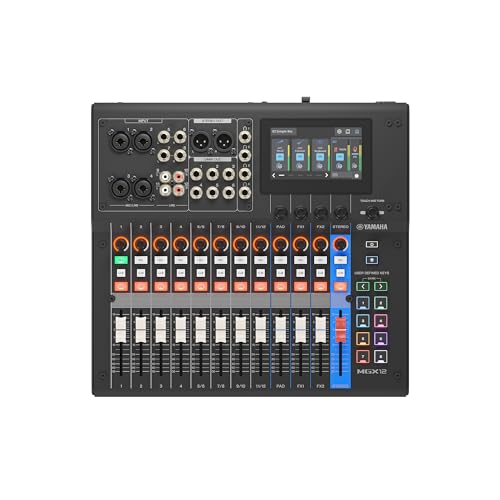
Great for budget-conscious buyers who still want digital features and an integrated software bundle. The MGX12 includes dual USB-C audio interfaces, a built-in DSP processor, and a 4.3″ touchscreen with control knobs. It’s well-suited for small studios and home setups that benefit from digital routing and built-in effects without a steep price tag.
Who it’s for: Beginners or budget-minded studios needing USB-C I/O and DSP capabilities.
Why selected: The MGX12 offers a compact, feature-rich entry into digital mixing with practical software bundles.
Buying Guide: Key Purchase Considerations
What matters most in a digital mixer
Channel count, bus architecture, preamp quality, and user interface should align with your typical workflow. Consider whether you need built-in USB interfaces, Wi‑Fi control, or DAW integration.
Which features drive workflow efficiency
Motorized faders, scene recall, and reliable DSP effects help maintain consistency between live and studio sessions. A touchscreen or tablet control can speed up setup in dynamic environments.
Portability versus expansion
Smaller desks save space but may limit I/O. Larger models offer more buses and channels but require more space and power. Plan for future needs when choosing a model.
Connectivity and compatibility
Check compatibility with your recording software, interfaces, and mic preamps. MIDAS preamps are a common benchmark for sound quality in Behringer consoles.
Reliability and support considerations
Consider warranty terms, parts availability, and firmware updates. A console with widely available spare parts and community guidance reduces downtime.
Frequently Asked Questions
What is a digital mixing console used for?
A digital mixing console blends multiple audio sources, routes signals, applies effects, and outputs a final mix for recording or live sound.
Do I need built-in USB or DAW control?
USB is common for studio recording or direct interface with a computer. DAW control helps integrate the mixer with production software.
Is a tabletop or rack-mount configuration better?
Tabletop desks are portable and cost-effective; rack-mount models suit permanent installations or professional venues.
What should I consider when choosing between 16, 18, or 40 inputs?
Match input count to your typical source count and future plans. More inputs provide flexibility but increase complexity and cost.