
Best Digital Audio Out to Component Converters for Clear Analog Sound
Direct digital-to-analog audio conversion requires reliable, bias-free hardware. This guide highlights five top options that convert optical or digital audio signals to RCA analog output, making them ideal for older speakers, DVRs, and game consoles. Each pick targets a specific buyer type—whether you want the best overall sound, best budget option, or easiest setup. The table below summarizes key details to help you compare at a glance.
| Product | Best For | Key Benefit |
|---|---|---|
| AUTOUTLET 192kHz DAC Optical to RCA | Home theater enthusiasts | High 192 kHz sampling with built-in amplifier |
| PROZOR 192KHz DAC Optical to RCA | Budget-conscious buyers | Affordable 192 kHz option with built-in amp |
| XPTSFDU HDMI ARC to RCA | TV-based setups | 3-in-1 inputs for ARC, optical, and coax |
| LiNKFOR SPDIF Toslink to RCA | Simple compatibility | Easy optical-to-RCA with sturdy amplification |
| PROZOR 192Khz 5.1CH Optical to RCA | 5.1-channel needs | Supports 5.1CH output |
Choosing the right converter depends on input options, output quality, and how much you value features such as 192 kHz support, built-in amplification, or multi-input flexibility. The following sections examine each product’s strengths, best-use scenarios, and any limitations you should know before buying.
AUTOUTLET 192kHz DAC Digital to Analog Converter

Best for: Home theater enthusiasts seeking high-fidelity analog output from optical sources. The converter supports 192 kHz sampling and uses a dual-channel operational amplifier to provide a stronger RCA signal, helping loudspeakers render clearer midrange and detail. Matching the right DAC with a stereo amplifier can reduce distortion in digital-to-analog conversion.
Why chosen: It offers professional input processing with 24-bit/192 kHz support and an integrated amplifier, which helps prevent low-volume RCA output common with bare DACs. The paired optical-to-RCA design reduces the need for extra adapters.
Caution: Ensure your optical source is sending a compatible PCM signal; some devices auto-switch to non-PCM formats that can affect playback.
PROZOR 192KHz DAC Optical to RCA Converter

Best for: Budget-oriented setups that still want high-quality digital-to-analog performance. This model emphasizes a built-in audio amplifier and 192 kHz capability, improving RCA line-out volume and clarity without added gear.
Why chosen: Its integrated amplifier helps overcome common low-RCA-volume issues found in simpler DACs, and the 32/44.1/48/96/192 kHz support covers most home entertainment formats.
Limitation: Optical input may be limited in some TVs’ audio modes; verify your TV’s PCM output setting to ensure compatibility.
XPTSFDU HDMI ARC to RCA Audio Converter

Best for: TVs and soundbars that rely on ARC to send audio; ideal for multi-input setups with easy switching. This 3-in-1 converter accepts HDMI ARC, Toslink, and coaxial inputs and outputs RCA, optical, coaxial, and 3.5mm. It can manage 192 kHz sampling with 24-bit depth.
Why chosen: The broad input array provides flexibility when you upgrade or rearrange devices. However, the device requires selecting a single input via a DIP switch, and TV ARC behavior can vary by model.
Limitation: The device does not support built-in CEC control, so volume control via the TV remote may not work without manual adjustments.
LiNKFOR Digital Optical SPDIF Toslink to Analog RCA DAC Converter

Best for: Systems that require a simple, plug-and-play optical-to-RCA solution to pair with older speakers. The converter uses a built-in amplifier to boost RCA output and supports 192 kHz sampling.
Why chosen: It provides a straightforward path from Toslink to analog with clear channel separation and a short setup for most TVs and media players.
Caution: Like other optical-to-analog devices, ensure PCM output is selected where necessary to avoid unwanted surround formats or misinterpreted audio signals.
PROZOR 192Khz 5.1CH Optical to RCA Converter
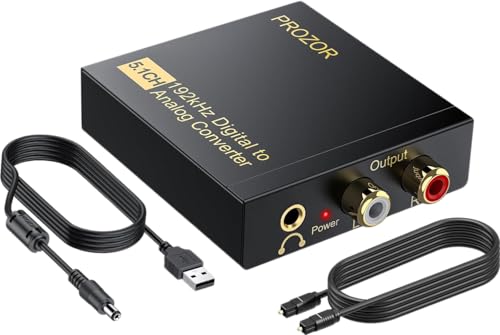
Best for: Users who want to drive two-channel stereo or 5.1-channel DAC outputs from optical input with a focus on 192 kHz fidelity. It supports 5.1 channel encoding passthrough to compatible outputs.
Why chosen: The 192 kHz sampling rate and 24-bit SPDIF input offer detailed audio reproduction, suitable for movies and music alike. The device supports multiple input formats and outputs to L/R RCA and 3.5mm, covering common speaker setups.
Limitation: If your source is 5.1 encoded, verify whether the target speakers can reproduce surround information via the RCA path, as channel mapping might default to stereo output.
Buying Guide
What should you consider when selecting a digital-to-analog converter for optical or SPDIF sources?
- Input compatibility: Confirm whether you need Toslink, coaxial, or HDMI ARC, and ensure the converter’s inputs match your equipment.
- Output needs: Decide if you require pure RCA stereo output or additional 3.5mm/optical outputs for flexible setups.
- Sampling rate and bit depth: For best sound, target devices supporting 192 kHz and 24-bit, recognizing that some content won’t exceed 48 or 96 kHz.
- Integrated amplification: An internal amplifier can boost low RCA levels, simplifying setups that involve older speakers.
- Ease of use: Some models use DIP switches or require PCM mode activation on the source; consider your comfort with setup steps.
- Surround formats: If you need 5.1-channel outputs, verify how the device maps codecs like Dolby Digital or DTS to stereo RCA outputs.
FAQ
- Can I use these converters with a TV and external speakers? Yes, connect the TV’s optical or HDMI ARC output to the converter and use RCA speakers or an amplifier.
- Do these devices work with all TVs? Most work with PCM-compatible outputs; some need specific audio mode settings on the TV.
- Is 192 kHz better for all content? Higher sampling rates can improve detail for compatible sources, but not all media will benefit from it.
- Will these convert surround sound to stereo? Many converters downmix to stereo; check the product’s 5.1 support if you need specific channel mapping.
- Do I need an external power supply? Most models include a power supply in the package; verify the included cord type when purchasing.
- Can I control volume with the TV remote? Some models do not support CEC volume control; volume adjustments may require manual changes on the converter or amp.