
Best Digital Coax to Optical Converters for Seamless Audio Transfer
Answering the search for reliable digital audio conversion, this guide highlights top options that convert between coaxial and optical (Toslink) formats. These devices are ideal for expanding compatibility between legacy receivers, soundbars, and newer TVs. Best for home theaters, gaming setups, and media rooms where multiple digital sources are used and lossless audio matters.
Below is a concise buyer’s table for quick comparisons. Each product is chosen for clear signal conversion, ease of use, and compatibility with popular audio formats like LPCM 2.0, DTS, and Dolby Digital. Consider your primary input and output needs, distance considerations, and whether you prefer a built-in cable or a plug-and-play adapter.
| Product | Best For | Key Pros | Limitations |
|---|---|---|---|
| PROZOR 192K Bi-Directional Optical Converter | Users needing bidirectional conversion with high sampling | Supports up to 192 kHz, bidirectional, triggers via input switch | Noisy environments may require shielded cables |
| Bi-Directional Coax Digital Audio Adapter | Two-way conversion with plug-and-play | No drivers required, flexible input options | Basic feature set, no advanced processing |
| LiNKFOR 192kHz Coaxial to Optical Converter | Longer reach with built-in cables | Built-in Toslink and coaxial cables, 192 kHz | Built-in cables add bulk |
| Azduou Bi-Directional Digital Audio Converter | Compact, flexible two-way conversion | Bi-directional, easy setup | Limited feature details in listing |
| LUKFOCAB Bi-Directional Converter | High-definition two-way audio with repeater | 192 kHz support, input switch, repeater capability | More complex feature set may require careful setup |
PROZOR 192K Bi-Directional Optical Converter

The PROZOR device is a bi-directional converter, enabling Coaxial to Coaxial/Toslink or Toslink to Coaxial/Toslink. It supports LPCM 2.0, DTS, Dolby Digital (AC3), and 5.1 channel audio, and claims up to 192 kHz sampling with 24-bit depth. This makes it suitable for home theaters that require flexible routing between a TV, receiver, or soundbar. Best for users who want a single unit to handle multiple directions of signal flow without extra adapters.
Best for: Home theater setups where a single box handles input direction changes. Why selected: Bidirectional ability reduces the need for additional adapters. Caution: Ensure you select the correct input with the handy switch to avoid unintended direction changes.
Bi-Directional Coax Digital Audio Adapter

This is a straightforward two-way converter that swaps between Coaxial and Toslink inputs, or Toslink and Coaxial outputs. It’s plug-and-play with no software required, offering noise-free transmission and high-definition audio to amplifiers and speakers. Best for users who want simple, reliable transitions between common digital formats without extra features.
Best for: Quick, reliable conversion with minimal setup. Why selected: No drivers, making it ideal for older receivers or TV setups. Caution: It focuses on core conversion, so advanced features are limited.
LiNKFOR 192kHz Coaxial to Optical Converter
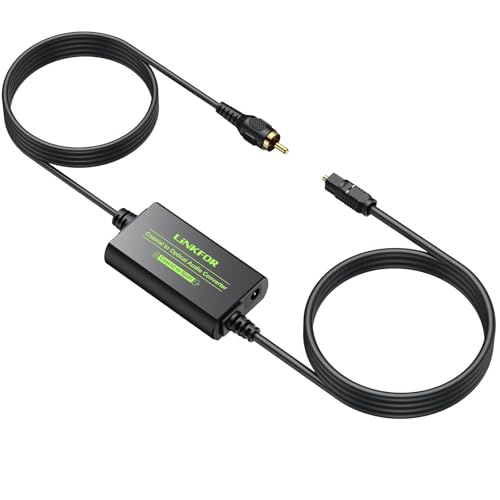
LiNKFOR’s model combines a built-in Toslink and Coaxial cable with a 192 kHz sampling rate capability. It supports LPCM 2.0, DTS, Dolby Digital, and 5.1 channel formats, offering a clean, lossless pathway for long-distance connections. Best for: Setups where built-in cables simplify installation and reduce extra accessories. Why selected: Its integrated cables help reduce clutter and ensure stable connections. Caution: The included cables add distance but may limit flexibility for compact spaces.
Azduou Bi-Directional Digital Audio Converter

Azduou offers a bi-directional adapter that supports Optical-to-Coaxial and Coaxial-to-Optical signals. It emphasizes high-definition, noise-free output for amplifiers and speakers, with plug-and-play setup. Best for: Users who want a compact, two-way converter with easy installation. Why selected: Simple operation and reliable two-way conversion. Caution: Detailed supported formats beyond the listed ones may vary by batch, so verify compatibility with your devices before purchasing.
LUKFOCAB Bi-Directional Converter
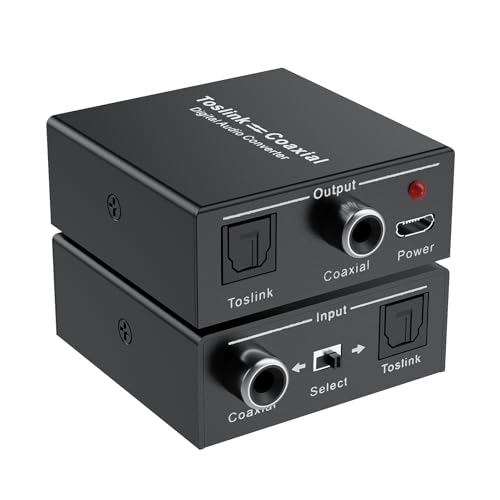
The LUKFOCAB unit supports two-way audio conversion and includes an input switch to choose between SPDIF Optical/Toslink or Coaxial input. It claims 192 kHz sampling and high-definition output, with a built-in repeater function to extend signal distance. Best for: Users needing a robust two-way converter that also extends signal reach. Why selected: Combines conversion with repeater capability, useful for longer runs. Caution: The feature set is slightly more complex, so follow setup instructions to avoid misconfigurations.
diaogenlee Optical & Coaxial Bi-Directional Converter

This model emphasizes bi-directional operation with three usage modes: digital to analog, analog to digital, and digital to analog interconversion. It supports output of coaxial and optical signals simultaneously and can operate as a splitter as well. Best for: Multi-output needs in home theaters or multi-room setups. Why selected: Flexibility in modes and simultaneous outputs. Caution: Distance and cable type influence performance; check your room layout before installing.
Monoprice Digital Coax & Optical Toslink to R/L Stereo

Monoprice’s converter focuses on converting digital Coaxial or Optical (Toslink) signals into analog stereo RCA outputs. It’s tailored for those who want to connect digital sources to legacy amplifiers or receivers. Best for: Users upgrading from analog input devices to digital sources without changing their existing audio chain. Why selected: Proven approach to bridging digital and analog domains. Caution: It outputs analog stereo only; if your setup requires digital pass-through, this may not fit.
Buying Guide: Coaxial To Optical Converters And More
- Choosing bidirectional vs unidirectional: If you frequently swap between Coaxial and Toslink sources, a bidirectional model saves adapters and simplifies setup.
- Supported sampling rates and formats: Look for 192 kHz/24-bit support for lossless audio. Confirm compatibility with LPCM, DTS, Dolby Digital, and multi-channel formats your gear supports.
- Built-in cables vs external cables: Built-in Toslink and Coaxial cables reduce cable clutter and ensure a stable connection, but can limit placement flexibility.
- Distance and cable quality: Optical cables offer longer reach than coax. If you need long runs, consider devices with built-in fiber and clear transmission specs.
- Power requirements: Some units require USB power; ensure your setup provides power access if needed.
- Output options: Decide whether you need a conversion only or a repeater/splitter feature to drive multiple receivers or zones.
- Ease of use: Plug-and-play models are best for quick setups, while feature-rich models suit advanced home theater configurations.
Frequently Asked Questions
- What is the difference between coax and optical audio?
- Do these converters support Dolby Digital and DTS?
- Can I use a converter to extend audio distance?
- Is one-way or two-way conversion better for my setup?
- Do built-in cables affect placement?
- Are these devices plug-and-play?
Coax uses electrical signals over coaxial cable, while optical uses light signals over fiber. Optical can be less susceptible to interference and supports similar digital formats.
Yes, many models list support for Dolby Digital (AC3) and DTS, along with LPCM 2.0. Verify formatting on each product page before purchasing.
Some converters act as repeaters, extending the signal distance. Check for built-in amplification or repeater features if this is a need.
Two-way (bidirectional) conversion is more flexible when two devices can act as both source and sink, reducing the number of adapters required.
Yes, built-in cables add length and can limit placement options. Plan your layout to accommodate the cables without excessive tension.
Most listed options are plug-and-play with no driver installation. Some may require basic setup like selecting input direction via a switch.