
Best Digital Optical to 5.1 RCA Converter for Home Theater and TVs
If you need to convert digital optical or coaxial audio signals to 5.1 or 2.1 channel analog RCA, this guide highlights five solid options. These converters are best for upgrading older speakers, AV receivers, or soundbars that lack digital inputs but still want immersive surround or enhanced stereo sound. The top picks vary by use case—from dedicated 5.1 compatibility to simple two-channel amplification—so you can choose based on your setup, devices, and room layout.
| Product | Brand | Best For |
|---|---|---|
| PROZOR 192Khz Digital to Analog Audio Converter | PROZOR | 5.1CH/Dolby/DTS setups |
| AUTOUTLET 192kHz DAC Digital to Analog Audio Converter | AUTOUTLET | Professional-grade audio processing |
| SOUTHSKY 5.1/2.1 Audio Rush Digital Sound Decoder Converter | SOUTHSKY | Legacy AV receivers |
| PROZOR 192KHz Digital to Analog Audio Converter (7ft cable) | PROZOR | Integrated amplifier needs |
| Rybozen Digital to Analog Audio Converter 192KHz | Rybozen | Dual output (RCA and 3.5mm) |
PROZOR 192Khz Digital to Analog Audio Converter
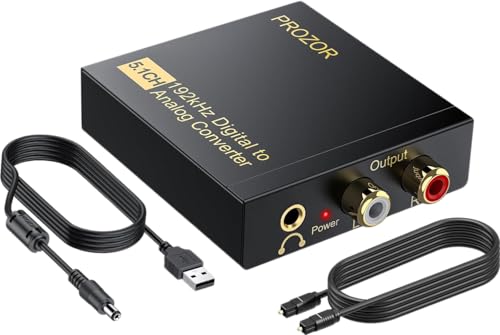
Best for: Home theater setups needing 5.1 capable digital-to-analog conversion. This unit accepts optical or coaxial input and outputs L/R and 3.5 mm audio. The features emphasize a 192 kHz, 24-bit DAC with 5.1 channel support via Dolby AC-3 and DTS. It is well-suited for HDTVs, Blu-ray players, and game consoles connected to legacy speaker systems.
Why selected: It combines high sampling rate support with Dolby/DTS compatibility in a compact form factor, making it a strong all-around choice for 5.1 capable playback on older receivers.
Caution: The 5.1 channel output is dependent on the source being encoded in a compatible format. Ensure your content uses a 5.1 or stereo PCM/bitstream available for proper decoding.
AUTOUTLET 192kHz DAC Digital to Analog Audio Converter

Best for: Users needing a robust, purpose-built optical-to-RCA adapter with a built-in amplifier. This model aims at preserving signal integrity with 24-bit/192 kHz sampling and dual-channel amplification for clearer output.
Why selected: It emphasize professional input signal processing and 32–192 kHz range, which helps maintain fidelity when converting to analog. The included 7-foot cable adds convenience for larger setups.
Caution: Like many converters, the optical input must be PCM-compatible; check compatibility with your device’s audio output format to avoid format mismatches.
SOUTHSKY 5.1/2.1 Digital Sound Decoder Converter
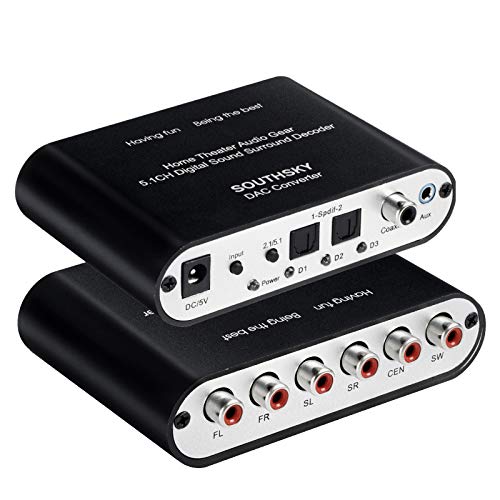
Best for: Older AV receivers, where a single device can switch between 5.1 and 2.1 configurations. It supports optical and coaxial inputs with 6 RCA outputs to deliver surround or stereo sound.
Why selected: The dual-mode operation and a one-key switch simplify using both 5.1 and 2.1 options. It suits rooms where you alternate between movie night and casual music listening.
Caution: The device requires manual input channel switching; if your setup frequently changes formats, a model with auto-sensing might be more convenient.
PROZOR 192KHz Digital to Analog Audio Converter (7ft Cable)

Best for: AV enthusiasts needing a complete optical-to-RCA conversion with built-in amplification. This model emphasizes a 192 kHz sampling rate and 24-bit SPDIF inputs, making it suitable for Blu-ray and gaming setups that demand higher fidelity.
Why selected: The built-in amplifier helps overcome low RCA output levels often found in budget receivers, and the 192 kHz/24-bit support preserves audio clarity. It is ideal for amplifying otherwise quiet sources.
Caution: The optical output on some configurations may require PCM or LPCM encoding; confirm TV or player settings align with the converter’s output expectations.
Rybozen 192kHz DAC Converter

Best for: Viewers who want simultaneous RCA and 3.5mm outputs while converting from optical or coaxial to analog. This model is straightforward for two-channel listening and small speaker setups.
Why selected: It supports up to 192 kHz sampling with 24-bit depth and provides both RCA and 3.5mm outputs, offering flexible connection to different speaker types.
Caution: Not suitable for true 5.1 surround when the source is encoded for multi-channel playback; it excels in clear stereo or simple two-channel setups.
Buying Guide
- What type of input do you need to convert? Look for Toslink (optical) or coaxial inputs and ensure the device supports your source’s format (PCM, DTS, Dolby).
- What output do you require? If you just need stereo, a two-channel RCA output is enough. For older receivers, choose devices with 5.1-capable or 6-channel RCA outputs and Dolby/DTS compatibility.
- Do you need an amplifier in the converter? Some units include a built-in amplifier to raise RCA output levels, which helps with low-signal sources.
- Sampling rate and bit depth matter. Prioritize 192 kHz / 24-bit support for higher fidelity, but verify that your content and source can deliver those specs.
- Ease of use and setup. Consider models with auto-sensing or simple one-key switch features if your setup changes often.
- Room and speaker compatibility. For true 5.1 sound, ensure your AV receiver and speakers support the format your source outputs; converters may not create genuine surround unless the source provides multi-channel data.
Frequently Asked Questions
- What is the main purpose of a digital optical to RCA converter? It translates digital audio signals from optical or coaxial inputs into analog RCA outputs so you can drive older speakers or amplifiers without digital inputs.
- Can these converters deliver true 5.1 surround sound? Some devices offer 5.1-capable output options, but true surround requires appropriate source material and a compatible AV system; many devices provide 2.0 or 2.1 channel outputs with support for decoding applied by the receiver.
- Do I need to set my TV or player to PCM? Yes. In many cases, you should set the source to PCM or LPCM to ensure stable, clean analog output.
- Is a built-in amplifier necessary? If your RCA output sounds weak, a converter with a built-in amp can provide a louder, clearer signal without needing separate hardware.
- Will these work with all TVs and players? Compatibility depends on supported formats (PCM, Dolby, DTS) and the device’s output options. Check your device’s audio settings and format support before purchasing.
- Do I need additional cables? Most units include a Toslink or coaxial cable and a power adapter; some require you to purchase separate cables for longer runs or specific connections.