Best Digital Sign Media Player Guide for Businesses
Bright, reliable digital signage starts with the right media player. This guide highlights five top options, focusing on ease of setup, CMS compatibility, and 4K or 2K playback capability. Each product is evaluated for small to large business needs, from storefront menus to corporate communications. Below, you’ll find a quick summary table and detailed sections to help you compare performance, connectivity, and software features.
| Product | Brand | Key Strength | Connectivity | CMS/Cloud |
|---|---|---|---|---|
| Amazon Signage Stick | Amazon | Seamless unattended operation | Wi‑Fi, USB | CMS compatibility |
| OptiSigns OptiStick | OptiSigns | Android‑based 4K, remote management | Wi‑Fi/Ethernet | OptiSigns platform |
| EZ AD TV Digital Signage Player | EZ AD | Cloud‑controlled with templates | Wi‑Fi | Cloud templates |
| fnetic 4K HD Digital Media Player | fnetic | 4K playback with broad file support | HDMI, Optical | Local playback, USB/SD |
| SmartSign2go Pro | SmartSign2go | Cloud management, easy cloud edits | HDMI | Cloud software trial |
Amazon Signage Stick

The Amazon Signage Stick provides auto‑launch in kiosk mode for unattended operation, making it ideal for steady, hands‑off digital signage. Setup is straightforward: install the free Amazon Signage app and connect to your CMS. It supports integration with leading CMS providers, with a subscription typically required for ongoing use. This option emphasizes reliability and simple deployment for businesses that need consistent content delivery without constant on‑site management.
OptiSigns OptiStick Digital Signage Player

OptiStick runs Android‑based 4K UHD playback, with quad‑core performance and both WiFi and Ethernet connectivity. It is designed for remote screen management and is pre‑installed with the OptiSigns Player. The platform supports 160+ integrations, allowing teams to deploy a wide range of content apps and templates. Management is centralized via the OptiSigns portal or Admin app, making it suitable for multi‑screen deployments across locations.
EZ AD TV Digital Signage Player

EZ AD TV focuses on 4K playback with a comprehensive content gallery and cloud control. A notable feature is the free plan, which supports various image and video formats, up to 50 slides, and basic tech support. Premium plans unlock more features, including extensive templates and content management tools. The Template Builder, Video Studio, and YouTube Loader streamline content creation and publishing, with a mobile app for on‑the‑go updates.
fnetic 4K HD Digital Media Player
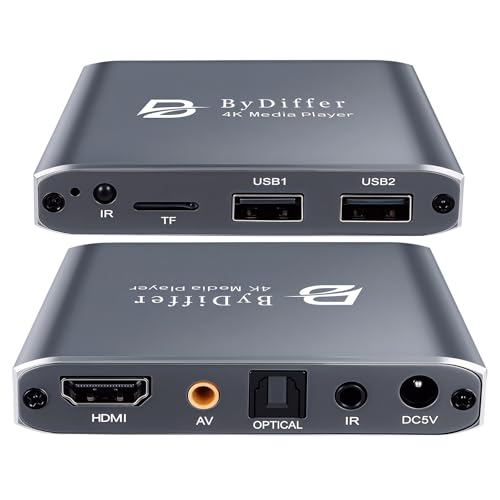
The fnetic 4K HD player supports 4K playback from USB or microSD sources, with HDMI output for TVs, monitors, or projectors. It includes advanced H.265/HEVC decoding and supports USB drives up to 8TB or microSD cards up to 1TB. Dual USB ports allow connecting multiple devices, though only one drive is read at a time. File system compatibility includes FAT32, exFAT, and NTFS, with broad media format support for flexible signage setups.
SmartSign2go Pro 4K UltraHD

SmartSign2go Pro enables simple plug‑and‑play digital signage by turning any HDMI TV into a business sign. The cloud‑based software allows content management from anywhere on PC, Mac, iOS, or Android. Its editor supports text, images, boxes, lines, layering, transparency, videos, and animations, offering flexible design options for seasonal campaigns, menus, and promotions. A two‑week software trial gives you a quick, low‑risk start to evaluate the platform.
Buying Guide
Key purchase considerations help ensure the chosen digital sign media player aligns with your business goals and technical environment:
- Content management and updates: Choose a system with a CMS that fits your team’s workflow and supports remote updates, scheduling, and templates. Consider whether a free plan suffices or if paid plans unlock essential features such as AI tools or advanced templates.
- Playback quality and file support: For storefronts or menus, 4K playback looks premium, but ensure the device supports your typical file formats (video, images, audio) and devices (USB, microSD, network storage).
- Connectivity and reliability: Evaluate Wi‑Fi vs. Ethernet needs, power requirements, and the device’s ability to operate in unattended mode. Look for options with kiosk mode, remote monitoring, and failover capabilities if uptime is critical.
- CMS compatibility: Some players are built to integrate with specific CMS ecosystems. Confirm compatibility with your preferred CMS or cloud platform, and verify any subscription costs involved.
- Scalability: If you plan to deploy across multiple locations, prioritize devices that are easy to deploy, manage, and update remotely. Consider bulk licensing, central content creation, and per‑location management.
- Security and privacy: Ensure your device supports secure connections, regular software updates, and access controls to protect content and devices in public or semi‑public spaces.
- Support and updates: Check vendor support availability, firmware updates, and the availability of templates and content‑creation tools to keep signage fresh and engaging.