
Best DJ Mixer for Android Tablet: Top Picks for Mobile Mixing
Answering the common question, these Android-friendly DJ mixers are designed for tablet use, offering USB or Bluetooth connectivity, compact form factors, and essential mixing controls. The best options suit beginners seeking easy setup, mobile performers needing portability, and hobbyists streaming or recording at home. Below, find five solid choices aligned with the Android tablet experience, plus a practical buying guide and quick FAQs to help you decide.
| Product | Best For | Key Benefit |
|---|---|---|
| Hercules DJControl Mix | Smartphones and tablets on the go | 2-deck control with jog wheels and DJay app integration |
| Behringer X Air XR12 Tablet-Controlled Digital Mixer | Live mixing with Wi‑Fi routing | Integrated Wi‑Fi module for direct operation |
| Pyle PMXU83BT.5 | Home studio and streaming | 8 channels, built-in MP3, USB/BT recording |
| Yamnweo MW-6 | Portable home studios and streaming | DSP presets, compact 6-channel design |
| Boeska 4 Channel DJ Mixer | Small gigs and karaoke | 4-channel with phantom power and built-in effects |
Hercules DJControl Mix – Bluetooth Wireless DJ Controller
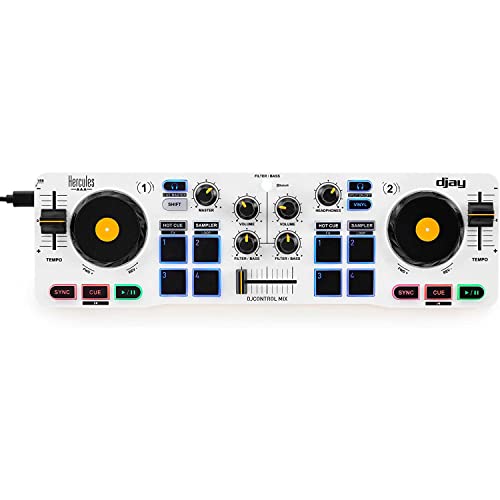
The Hercules DJControl Mix is a Bluetooth-enabled DJ controller compatible with Android devices via the included djay app. It features jog wheels, faders, knobs, and pads on a compact 2-deck layout. Best for beginners and mobile performers using a tablet or phone for on-the-go mixing, it offers essential controls without a full-size mixer setup. Limitations include reliance on a compatible app for core mixing tasks, so users should confirm device and app compatibility before purchase.
Behringer X Air XR12 Tablet-Controlled Digital Mixer
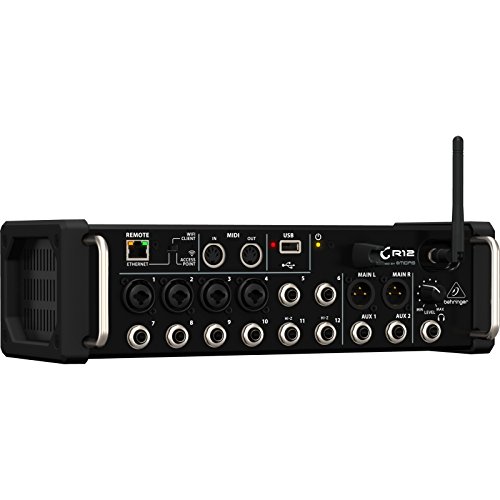
The Behringer XR12 is a tablet-controlled digital mixer with integrated Wi‑Fi for direct operation. It’s best for small venues or home studios where a digital mixer with wireless control is advantageous. The XR12 supports multi-channel mixing and networked control, but users should be aware of setup complexity and potential needs for compatible tablets or apps for full functionality.
Pyle PMXU83BT.5 8 Channel Bluetooth Studio Mixer

The Pyle PMXU83BT.5 offers pro sound with 8 channels, USB recording, and built-in MP3 playback. Its Bluetooth 4.0 streaming and multiple input options make it versatile for home studios or podcasting. It’s well-suited for users needing a straightforward, feature-rich mixer for computer work, streaming, or casual performances. A potential limitation is that some users may require additional outboard gear for larger live setups.
Yamnweo MW-6 White 6-Channel Mixer

The Yamnweo MW-6 is a compact 6-channel mixer with DSP preset effects, designed for live streaming, podcasting, and family parties. It’s best for users who want a portable unit with built-in effects and straightforward controls. A limitation could be the fewer channels compared to larger mixers, which may restrict complex setups.
Boeska 4 Channel DJ Mixer
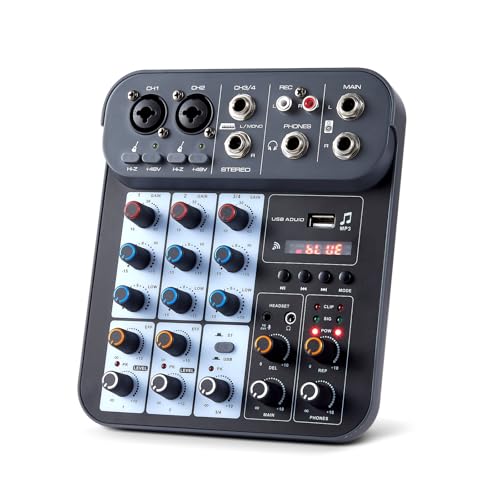
The Boeska 4 Channel DJ Mixer provides 4-channel capability with mic inputs, DSP effects, and a built-in phantom power supply. It’s ideal for small gigs, karaoke, or home studios seeking a budget-friendly option with essential processing and monitoring. A potential caveat is that it may lack the advanced features of larger, higher-priced models.
Buying Guide: What To Look For In An Android Tablet DJ Mixer
- Connectivity: Check Bluetooth vs. USB and whether the mixer supports direct tablet control. Android compatibility often hinges on app availability and wireless features.
- Channel Count: For mobile setups, 4–8 channels provide sufficient flexibility for mics, playback, and external sources.
- Built‑In Effects and Processing: DSP effects, EQ, and filters help shape sound without extra gear. Consider whether you need 2-band or 3-band EQ per channel.
- Power and Portability: Lightweight units with battery or USB power are best for tablet-based on-the-go use.
- Latency and Recording: If streaming or recording to a tablet, low-latency performance and USB/recording options matter.
- App Ecosystem: An active app ecosystem (like Algoriddim’s Djay) can greatly influence usability on Android tablets.
- Future expandability: Consider whether the mixer can accommodate additional inputs or external controllers as your setup grows.
Practical Considerations For Android Tablet Users
When selecting a mixer for an Android tablet, prioritize models with robust Bluetooth or USB audio interfaces, simple setup, and software compatibility. Tablet users should verify that the app used for mixing is actively supported and that the device meets any minimum latency requirements. If live performance is a priority, choose a unit with stable Wi‑Fi or wired control options to ensure reliable operation during gigs.
Quick Comparison At A Glance
- Best For Beginners On The Go: Hercules DJControl Mix
- Best For Wireless Live Control: Behringer X Air XR12
- Best For Home Studio And Streaming: Pyle PMXU83BT.5
- Best For Portable Podcasters: Yamnweo MW-6
- Best Budget 4-Channel: Boeska 4 Channel DJ Mixer
Frequently Asked Questions
- Do these mixers work well with Android tablets? Yes, most are designed for Android tablets via USB or Bluetooth and compatible apps.
- Is 4 channels enough for basic mixing? For solo performances and simple setups, 4 channels are typically sufficient; more channels provide greater flexibility.
- Can I record directly to my tablet? Several models offer USB recording or built‑in MP3 playback, useful for direct tablet recording or streaming.
- Do I need external software to use these mixers? Some models rely on companion apps for full control; others function with basic hardware controls and an app.
- Are wireless connections reliable for live gigs? Wireless connections can be convenient, but for critical gigs, consider models with a stable wired option or robust Wi‑Fi/BT setup.
- What should I consider before buying? Channel count, connectivity options, software compatibility, and portability are key factors for Android tablet use.