
Best DJ Soundboard for Beginners: Easy Mixers to Start Your First Sets
New to DJing and want a simple, reliable soundboard to learn the basics? This guide highlights beginner-friendly DJ soundboards and compact mixers that help you practice beatmatching, blending, and basic effects without a steep learning curve. Each option is chosen for accessibility, compatibility with popular software, and clear control layouts. The top picks suit first-time DJs, podcasters transitioning to live streams, and hobbyists seeking straightforward performance tools.
| Product | Why It’s Great for Beginners |
|---|---|
| AlphaTheta DDJ-FLX2 | Smart Fader beatmatching, USB-C, and app compatibility for a quick start with the music you already own. |
| Numark Party Mix III | Built-in lights and easy software access; ideal for casual home parties and learning the basics. |
| Hercules DJLearning Kit MK II | Two-deck setup with DJUCED software; simple hardware layout designed for beginners. |
| SINWE Live Sound Card | Professional-style features with podcast/streaming focus; good for voice work and basic music mixes. |
| KILOGOGRAPH F999 Plus | Deluxe accessories and beginner-friendly controls; strong value for home studios and streaming. |
AlphaTheta DDJ-FLX2 Compact 2-Channel DJ Controller

The AlphaTheta DDJ-FLX2 is designed for beginners who want a compact, user-friendly controller with proportionally sized faders and intuitive layouts. Best for learners who prefer a hands-on approach to beatmatching and quick-start mixing. The Smart Fader feature automatically aligns volume, BPM, and bass as you crossfade, helping new users stay in sync across genres. It also supports mixing from popular streaming and DJ apps like Apple Music, Spotify, Tidal, rekordbox, and djay, which broadens the music source options for practice. Consider this model if you want a ready-to-make-music setup without extra gear.
Who it’s best for: first-time DJs who want a compact, all-in-one solution and easy access to music from multiple apps. Why selected: its automation aids learning while still offering hands-on control for manual practice. Caution: reliance on auto-beatmatching may slow independent technique development if overused; use it as a learning scaffold rather than a replacement for practice.
Bonkyo Professional Audio Mixer, F999 Live Sound Card
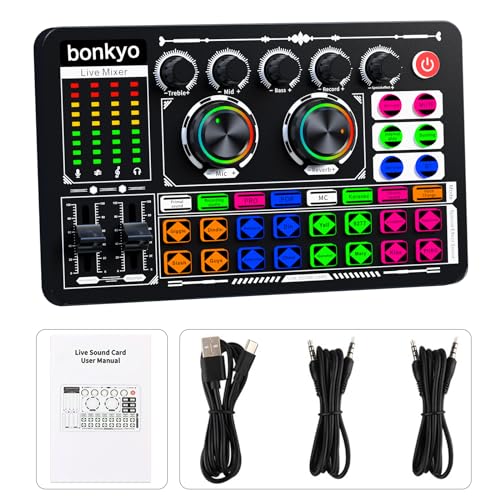
The Bonkyo F999 Live Sound Card is a feature-rich mixer aimed at newcomers who want a single, integrated solution for streaming, podcasting, and casual DJing. It combines multiple inputs, built-in effects, and a DSP-based processing path. This unit supports live broadcast on various platforms, includes 2-way mic inputs, and offers a range of voice effects and noise-reduction tools. Best for users who want a robust, studio-like setup for live streams and podcasts with room for practical hands-on control. Choose this if you need a versatile device that blends music and voice work in one setup. Limitation: the depth of advanced DJ-specific controls may feel limited compared to dedicated DJ controllers.
Hercules DJLearning Kit MK II

The Hercules DJLearning Kit MK II provides a two-deck beginner-friendly DJ controller with DJUCED software. It’s well-suited for learners who want clear jog wheels and a straightforward signal path. This kit helps new DJs practice beatmatching, transitioning, and basic effects in a compact, portable package. Best for students and hobbyists who value a guided software environment and a compact, education-focused setup. Caution: entry-level control surfaces may limit advanced performance features as you progress; plan to upgrade when your mixing demands grow.
SINWE Live Sound Card Audio Mixer

The SINWE F988 Live Sound Card targets podcasters and streamers who want professional-sounding voice capture with basic music mixing. It supports an intelligent noise reduction path, multiple recording modes, and built-in DSP features. It’s best for beginners who want clean vocal tracks alongside simple music playback, making it suitable for podcasting, livestreaming, and home studio work. Choose this if you prioritize audio clarity for voice with some music mixing; avoid if you need heavy DJ-specific cueing and performance FX beyond basic modes.
KILOGOGRAPH Podcast Sound Board – F999 Plus

The KILOGOGRAPH F999 Plus is a beginner-friendly soundboard with enhanced cables and a layout designed for quick learning. It includes multiple input options, built-in effects, and a broad set of connectivity choices for PC, mobile, and streaming setups. Best for creators who want a versatile, all-in-one solution for live streaming, podcasting, and music mixes. It’s particularly suitable for users who value ready-to-use accessories and a straightforward control scheme. Limitation: as a soundboard-focused device, it may lack the deeper DJ performance features found on higher-end controllers.
Buying Guide
What should you consider when choosing a beginner DJ soundboard?
- Intended use: Are you learning to DJ primarily, or do you also plan to stream or podcast? If streaming, prioritize built-in effects and good mic input paths.
- Software compatibility: Look for devices that work with DJ software you already know (Serato, rekordbox, djay, DJUCED).
- Number of decks: For beginners, a 2-channel setup is usually enough to learn the basics of cueing and mixing.
- Portability and size: A compact unit helps you practice anywhere; consider a bus-friendly form factor if you travel.
- Controls and layout: A clear, intuitive layout reduces the learning curve. Jog wheels, faders, and cue controls should be easy to reach.
- Connectivity: Check input/output options (mic, line, USB) and whether it supports USB-C for modern laptops and tablets.
- Automation vs. hands-on control: Some models offer auto beatmatching or pacing aids; use them to learn but gradually rely on manual mixing for skill development.
FAQ
Is a built-in sound card necessary for beginners?
Not always, but a built-in sound card simplifies setup and can improve stability for home practice and streaming.
Do I need professional-grade software to start?
No. Many beginner devices include or support entry-level software, which is sufficient to learn basics and build confidence.
What’s the best starter setup for podcasters?
A soundboard with strong mic input, basic voice processing, and easy USB recording is ideal for podcasting as you learn to mix music and voice.
Can I upgrade later without replacing my entire setup?
Yes. Begin with a compact, affordable unit and move to a more capable controller or mixer as your skills grow.
Are LED lights and built-in effects important?
They’re nice for demonstrations and practice in low-light spaces, but not essential for learning core DJ skills.
What should I avoid when buying my first soundboard?
A device with a poor layout, limited software support, or insufficient I/O options can hinder learning and future expansion.