
Best Docking Stations With Speakers for a Clutter-Free Workspace
Answering the need for a clean, productive desk, these docking stations with built-in speakers combine charging, display, and audio in one device. They’re best for remote workers, students, and professionals who want fewer cables without sacrificing sound or connectivity. Below is a quick overview of five top options and what each one is best for.
| Product | Best For | Key Benefit |
|---|---|---|
| j5create USB-C Dual 4K Speakerphone Dock Pro | Conference-heavy workstations | Two 4K HDMI outputs + built-in speakerphone |
| Logitech Logi Dock | Calender-integrated teams meetings | Wireless connectivity with six beamforming mics and calendar sync |
| SiriusXM Portable Speaker Dock (SXSD2) | On-the-go audio with docking | 2.1 speaker array with portable design |
| Azpen Fast Charging Wireless Charger DockAll | Wireless charging plus speakerphone | 4-in-1 station with built-in microphone |
| Bose SoundDock Series II (Renewed) | Compact, reliable speaker dock for legacy devices | Proprietary Bose sound quality in a dock |
Note: The list includes devices with varying emphasis on docking, charging, and audio. Each entry includes who it’s best for and a potential limitation to consider before purchase.
j5create USB-C Dual 4K Speakerphone Dock Pro

The JCDS337 combines a full workstation dock with integrated speakerphone capabilities. It offers two 4K HDMI outputs, multiple USB ports (including USB-A 10Gbps and USB-C 10Gbps), gigabit Ethernet, and Power Delivery pass-through. Built-in caller controls simplify meetings, while omnidirectional mics and Acoustic Echo Cancellation provide clear conference audio. This is best for teams that rely on frequent video conferences and need desktop-grade AV in one device.
Best for: Small to mid-size meeting rooms or home offices where high-quality conferencing audio and multiple displays are required. Choose this if you want an all-in-one desk hub with native meeting controls.
Caution: The audio performance is strong for rooms of modest size, but room acoustics can still affect mic pickup in larger spaces.
Logitech Logi Dock, All-in-One Docking Station
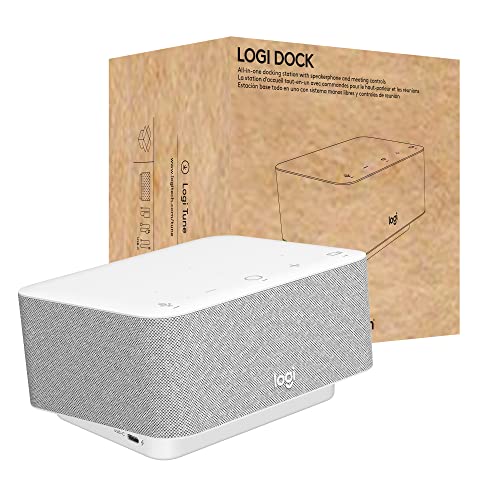
Logi Dock streamlines workspace management by connecting and charging multiple peripherals and two monitors. It supports calendar syncing via Logi Tune, enabling easy meeting joins with a single press. The built-in six-microphone array focuses on voice capture, while noise-reduction algorithms help minimize background noise. This option emphasizes productivity and seamless meeting integration for users who run a feature-rich agenda from their desk.
Best for: Professionals who want calendar-aware, plug-and-play conferencing with minimal desk clutter and strong mic performance. Choose this if you value integrated software features and a clean, connected desk.
Caution: The device prioritizes productivity features over pure audio fidelity; consider a separate high-end speaker if you need studio-quality sound.
SiriusXM Portable Speaker Dock (SXSD2)

The SXSD2 combines a 2.1 speaker array with a portable design and a fold-away handle. It’s ideal for users who need a docked speaker system that travels well. A remote control is included for convenient operation away from the dock. This option emphasizes audio output and portability in a single compact unit.
Best for: Users who want a rugged, portable docking audio solution for travel or shared spaces where mobility matters. Avoid if you require modern USB-C docking or integrated high-end conferencing features.
Caution: The system emphasizes speakers over modern docking versatility; compatibility with newer laptops may be limited by connector type and port availability.
Azpen Fast Charging Wireless Charger DockAll
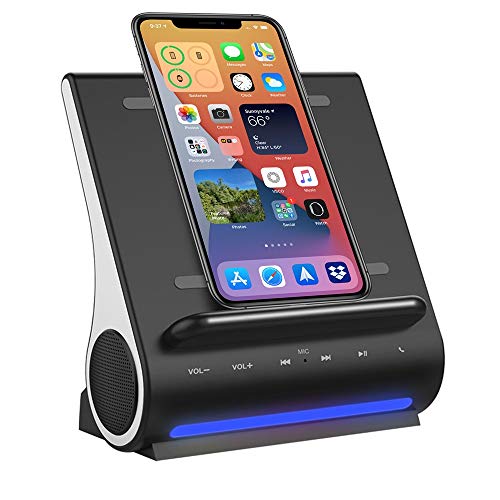
Azpen’s DockAll combines wireless charging with built-in Bluetooth speakers and a microphone for hands-free calls. It supports vertical or horizontal wireless charging placement and provides 15W charging for many devices. While it adds audio and charging in one compact device, the emphasis is more on charging and general audio than on professional conferencing quality.
Best for: People who want a simple, space-saving dock with wireless charging and occasional speakerphone use. Choose this if you prioritize convenience over meeting-room-grade audio clarity.
Caution: The charging is case-friendly up to 5 mm, but metal cases or thick rugged cases may impede wireless charging capability.
Anker Laptop Docking Station, 13-in-1 USB C Docking

This Anker dock expands a laptop into a desktop setup with triple display capability and a wide port selection. It supports up to three external displays, 4K output, USB-C data and power delivery, plus USB-A, Ethernet, SD/microSD, and audio. It is built as a versatile hub for power users needing a robust workstation, though it does not emphasize built-in speakers as a primary feature.
Best for: Power users who require extensive display and peripheral support from a single cable. Choose this if you need multiple display outputs and fast data transfer over USB-C.
Caution: Audio quality is not a primary feature; consider a dedicated speaker solution if conferencing audio is critical.
Buying Guide
What to consider when choosing a docking station with speakers
- Speaker quality and mic performance: If conferencing is frequent, prioritize devices with built-in beamforming mics and echo cancellation, such as the Logi Dock or J5create dock.
- Display outputs and resolution: Check how many 4K or 1080p displays you need and whether HDMI or DisplayPort is supported. Some docks offer dual 4K HDMI or multi-display support.
- Power delivery and charging: Ensure the dock can charge your laptop at the required wattage without switching adapters. PD pass-through is a common benefit.
- Port variety: Consider USB-C, USB-A, Ethernet, SD/microSD, and audio jacks. A combination aligns with most office setups.
- Portability vs. desktop use: Detachable hubs and compact designs suit travelers; larger docks suit fixed home offices with multiple displays.
- Software integration: Calender sync, meeting controls, and easy device management can improve daily workflows, especially for teams using Zoom or Meet.
- Compatibility: Verify compatibility with your operating system (Windows or macOS) and your devices’ ports (USB-C/Thunderbolt, etc.).
- Reliability and future-proofing: Look for devices with robust build quality and active support for firmware updates and security features.
FAQ
- What is a docking station with speakers best used for? – It’s ideal for users who want an all-in-one solution for charging, screen expansion, and audio output for conferences or media playback.
- Do I need a separate speaker system if I have a Logi Dock or J5create dock? – Not necessarily, but for studio-grade audio or large rooms, adding external speakers can improve sound quality beyond built-in speakers.
- Can these docks support multiple monitors? – Yes, several models offer dual or triple display capabilities via HDMI or DisplayPort.
- Is wireless charging a reliable feature on these docks? – Wireless charging is convenient, but performance depends on device compatibility and case thickness; metal cases can disrupt charging.
- Will these docks work with both Windows and macOS? – Most are designed for cross-platform use, but some features (like certain display modes) may differ on macOS.
- Should I prioritize audio features over display outputs? – It depends on your use case. If meetings are central, prioritize mics and speaker quality; if video editing, prioritize display support.