
Best USB C to Dual XLR Cables for Clean Live Sound
Direct answer: USB C to dual XLR cables are ideal for converting modern USB C devices into professional, balanced stereo outputs for mixers, amps, or powered speakers. They are best for musicians, DJs, and content creators seeking portable, plug‑and‑play audio solutions without external audio interfaces. The following picks balance compatibility, DAC quality, and build durability to suit on‑stage, studio, or on‑the‑go use.
| Product | ||
|---|---|---|
| Disino USB C To Dual XLR | Mobile musicians and on‑the‑go setups | High‑quality DAC with 32bit/384kHz output |
| Jozzai USB A To Dual XLR | Desktop studios and home rigs | HiFi level decoding chip for pure signal |
| Smithok USB C To 2 XLR | USB C laptops and mobile devices | Hifi chip with robust shielding |
| SiYear USB C To 2XLR | Broad device compatibility | Wide compatibility and high‑quality DAC |
| NUOSIYA Dual XLR To USB C | Live performers and outdoors | 32bit/384kHz DAC with braided build |
Disino USB C To Dual XLR Male Audio Cable

The cable converts USB C sources to two XLR outputs for devices like mixers, amplifiers, and powered speakers. It is plug‑and‑play with laser‑marked output directions for left and right channels. This is a one‑way transmission tool and XLR outputs are for audio signal output only, not input. Best for mobile DJs or performers who need a compact USB C to dual XLR path with minimal setup.
Who it’s best for: mobile musicians and content creators who use USB C devices and need direct XLR stereo output without a dedicated audio interface. Why selected: strong DAC capability at 32bit/384kHz, improved signal‑to‑noise ratio, and broad compatibility with modern phones and laptops. Caution: avoid for two‑way audio needs or any scenario requiring XLR input signals.
Jozzai USB A To Dual XLR Male Cable

This cable converts USB A interfaces (computers or phones) into two XLR outputs for power amps, active speakers, or mixers. It emphasizes low‑compression music files for best sound quality and uses an HiFi level decoding chip to ensure purity and low noise in the signal. Best for desktop studios or home setups where source devices still rely on USB A. Caution: designed for output only; not intended to capture audio input.
Who it’s best for: users with USB A sources or older equipment needing dual XLR outputs. Why selected: reliable two‑channel output with shielded, plated conductors and durable construction. Choose this if you’re prioritizing signal purity and robust build. Limitation: USB A sources are common but not universal for newer devices, so compatibility with your device must be checked.
Smithok USB C To 2 XLR Male Cable

Smithok presents a USB C to dual XLR solution with a high‑quality HIFI decoder chip and heavy‑duty XLR shells. The Y‑splitter puts left and right channels on different XLR outputs, ready to feed mixers or active speakers. It’s suitable for USB C devices like mobiles or laptops that require a clean, low‑noise analog path. Best for modern laptops and phones that want strong audio fidelity with practical shielding. Limitation: users must enable external output in device audio settings when connecting to a computer.
Who it’s best for: creators who want clear, professional sound from USB C devices. Why selected: robust shielding, true HIFI decoding, and the distinct left/right channel labeling aid quick setup. Avoid if you need in‑line microphone input or if your device lacks external output control options.
SiYear USB C To Dual XLR Male Cable

SiYear’s USB C to dual XLR outputs are designed for smartphones and tablets, enabling a straightforward path to power amplifiers and active speakers. It highlights wide compatibility, including many brands and OS environments, with a DAC chip that aims to deliver Hi‑Fi sound. This is a practical option for creators with diverse devices who want a single cable to cover multiple setups. Caution: treat as a one‑way digital‑to‑analog path; it does not support audio input via XLR.
Who it’s best for: users with a broad device ecosystem (phones, tablets, laptops) who want a single cable solution. Why selected: broad compatibility and a built‑in DAC that supports high‑fidelity audio. Better for: performers who tour with various devices and need dependable, versatile cabling. Limitation: ensure your source device supports external audio routing to the USB C port.
NUOSIYA Dual XLR To USB C Audio Cable
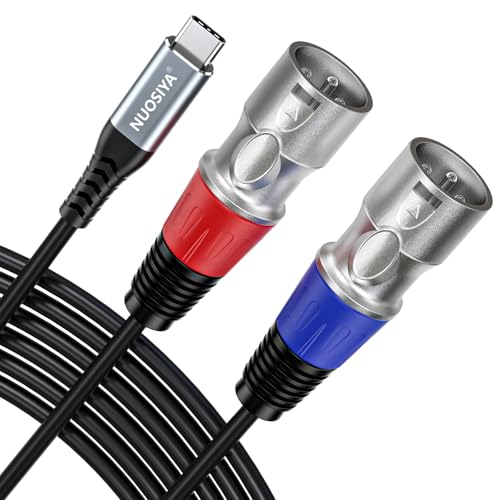
NUOSIYA offers a USB C to dual XLR output with a 32bit/384kHz DAC and a braided, durable build for outdoor or high‑demand environments. The device favors left (blue) and right (red) channel labeling for quick, accurate setup with mixers or powered speakers. It emphasizes high SNR and improved sound purity, useful for performers seeking professional grade audio on the go. Caution: as with many USB‑to‑XLR cables, it’s a one‑way path; you cannot use XLR inputs through this cable.
Who it’s best for: live performers and outdoor gigs where durability and reliability matter. Why selected: high‑end DAC, braided housing, and good shielding reduce interference. Choose this if you need a rugged option for travel and rough handling. Limitation: the device is one‑way; you cannot route XLR input signals back through the cable.
Buying Guide: What to Consider Before You Buy
What device are you using as the source? USB C vs USB A sources may require different cable types or adapters. If your device is USB C, prioritize DAC quality and compatibility with your OS. For USB A sources, confirm the exact output path and whether the device requires any driver or software adjustments.
Is the cable one‑way or bi‑directional? Most USB to XLR cables are only for output. Ensure you’re not selecting a model that claims input capabilities unless you truly need two‑way audio or a powered interface.
What is the DAC quality? Look for 32bit/384kHz or similar high‑fidelity specs, especially if you perform live or produce high‑quality recordings. A higher SNR (signal‑to‑noise ratio) means less background hiss and cleaner sound.
What’s the build like? Braided nylon or metal shells offer better durability for stage use. If you travel often, consider a cable with robust shielding and strain relief.
What is the minimal latency requirement? While many USB to XLR paths are near real‑time, some setups may introduce delay. For live performance, test with your mixer or amplifier to confirm timing is acceptable.
FAQ
- Can I use these cables to record audio? Answer: These cables are designed for output to XLR inputs; they are not intended for XLR input into the USB device.
- Do I need drivers for these cables? Answer: In most cases, these cables are plug‑and‑play and do not require drivers, but some devices may require external output settings adjustments.
- Will USB C always work with XLR inputs? Answer: Compatibility depends on the DAC and the device; verify that your source device supports external audio output over USB C or USB A.
- Are these cables suitable for professional stage use? Answer: Yes, many models offer robust shielding and high‑fidelity DACs ideal for live sound, provided you test with your equipment beforehand.
- What does “one‑way” mean in this context? Answer: It means the cable transmits audio from the USB/XLR source to the XLR outputs only and does not accept audio through XLR back into the USB device.
- Which cable should I buy if I have a USB C phone and a mixer? Answer: Consider the Disino or Smithok models for strong DAC performance and direct USB C to dual XLR output compatible with mixers.