Best External DVD Drives for PC and Laptop Use
Discover the best external CD/DVD drives designed to add optical reading and burning capabilities to PCs, laptops, and Macs. This guide highlights top picks, compatibility notes, and what to consider before buying. All models below offer plug-and-play setup, fast data transfer, and broad OS support to help you read, burn, and duplicate discs with ease.
| Product | Brand | Key Feature | Connectivity |
|---|---|---|---|
| Amicool External DVD Drive | Amicool | USB 3.0 + Type-C, 8x DVD read | USB 3.0, Type-C |
| Rioddas External CD/DVD Drive | Rioddas | Plug & Play, fast 5Gbps USB 3.0 | USB 3.0 |
| ROOFULL External CD/DVD Drive | ROOFULL | Dual connectors, 5Gbps | USB 3.0, USB-C |
| JKNJX External DVD Drive | JKNJX | 8x DVD, 24x CD, USB 3.0 | USB 3.0, USB-C |
| ORIGBELIE External CD/DVD Drive | ORIGBELIE | USB 3.0 Type-C, 8x/24x speeds | USB 3.0, USB-C |
The following sections profile five strong contenders for supplementing a PC or laptop with optical reading and burning capabilities. Each entry includes a concise overview, compatibility notes, and practical use considerations to help you decide which drive best fits your setup.
Amicool External DVD Drive With USB-C

The Amicool external optical drive offers a plug-and-play solution that requires no driver installation. It supports USB 3.0 and Type-C connections, delivering data transfer speeds up to 5 Gbps for smooth playback and quick disc operations. It reads and writes a variety of discs including DVD+R, DVD, DVD-R, CD-ROM, CD-R, and CD-RW, with a maximum DVD read speed of 8x and CD read/write speeds up to 24x. It’s designed for laptops and desktops lacking an internal optical drive and is broadly compatible with Windows, macOS, and Linux. Note that it is intended for computer use; it is not compatible with TVs or Chromebooks. This drive is particularly suitable for users who frequently alternate between USB-C and USB-A devices.
Key considerations: verify your computer’s USB-C or USB-A port availability; ensure you’re using a powered USB hub if needed; confirm media compatibility for your typical disc usage. This model’s dual-interface capability can simplify setups across multiple devices.
Rioddas External CD/DVD Drive For Laptop

Rioddas emphasizes plug-and-play simplicity with USB-powered operation and no external power adapter required. It performs well when plugged into a high-power USB port on the back of a desktop motherboard for optimal reliability. The drive supports USB 3.0 (backwards compatible with USB 2.0) with transmission speeds up to 5 Gbps and includes robust fault tolerance to minimize freezing and errors during playback or burning. An integrated eject button helps in cases where a disk stalls, and copper mesh technology further stabilizes data transmission. This model is a versatile option for users who need a dependable, widely compatible drive for PC, Mac, or Linux.
Key considerations: if you frequently move drives between devices, ensure any required back-port USB connections are accessible; consider a USB 3.0/hub arrangement for desktop configurations to maximize stability during long sessions.
ORIGBELIE External CD/DVD Drive

ORIGBELIE offers a slim, portable solution with USB 3.0 and Type-C connectors for fast data transfer up to 5 Gbps. It supports 8x DVD read/write speeds and 24x CD read/write speeds, providing efficient performance for common tasks such as software installation, media playback, and data backup. The drive is broadly compatible with Windows, macOS, and Linux, with a note that on Mac systems you may need to insert a disc before the icon appears. It’s suitable for users who want a compact drive that’s easy to carry between work and home or classrooms, especially when space is at a premium.
Key considerations: plan for Mac usage by understanding how macOS shows the device; desktops should connect to back USB ports to ensure adequate power and performance; confirm disc types you plan to use most often.
JKNJX External DVD Drive With USB 3.0/Type-C

JKNJX emphasizes both convenience and performance with USB 3.0 and Type-C connectivity, delivering up to 5 Gbps transfer speeds. It supports 8x DVD read/write and 24x CD read/write, ensuring smooth playback and reliable burning. The drive is designed for broad compatibility across Windows, Linux, and macOS, and it includes a simple plug-and-play setup that requires no drivers or external power. It’s a practical option for users who frequently travel or run multiple operating systems, offering straightforward integration with most laptops and desktops.
Key considerations: verify whether your device requires a disc to trigger a Mac icon on some systems; if using with a desktop, connecting to a rear USB port can stabilize power delivery for consistent performance.
ROOFULL External CD/DVD Drive For Laptop And Mac
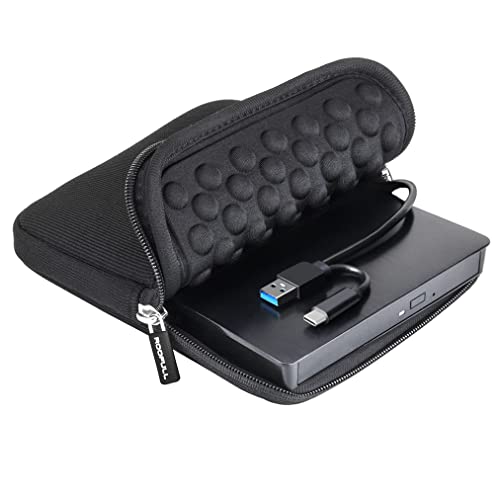
ROOFULL’s external drive is a well-established option with USB 3.0 and USB-C connectivity, providing up to 5 Gbps data transfer rates and up to 8x DVD read/write speeds and 24x CD read/write speeds. It ships with a protective carrying case for portability and is compatible with Windows, macOS, and Linux. The dual-connector design simplifies use with a wide range of laptops and desktops without needing adapters. It’s ideal for users who want a rugged, travel-friendly drive that still delivers solid performance for disc reading and burning.
Key considerations: check whether you need the carrying case for travel; ensure the desktop setup uses a rear USB port for stable power delivery; confirm your software supports disc burning if you intend to copy or archive discs.
Gotega External DVD Drive For PC And Mac

Gotega offers a straightforward USB 3.0 external DVD/CD drive with broad computer compatibility across Windows, Mac, and Linux. It provides up to 8x DVD write speeds and up to 24x CD write speeds, with plug-and-play setup that requires no software installation. The device is compact and lightweight, making it suitable for students and professionals who need a reliable disc drive without extra setup steps. It is not compatible with Chromebooks or certain streaming devices, but it covers the majority of traditional PC and laptop configurations.
Key considerations: consider total data throughput for large backups; ensure you keep the USB cable and ports free from interference during high-speed transfers; review device compatibility with any specialized software you use for burning or ripping.
Buying Guide: Key Purchase Considerations For External DVD Drives
Purpose and usage patterns drive the best option. If you primarily watch DVDs or back up data, prioritize drives with strong read speeds (up to 8x for DVDs) and reliable write speeds (up to 24x for CDs). USB 3.0 is common and provides solid performance, while USB-C compatibility adds future-proofing for modern laptops.
Compatibility is essential. Look for drives labeled as compatible with Windows, macOS, and Linux to maximize versatility. Note Mac-specific quirks, such as icon appearance rules or disc readiness messages, which can affect initial use. Dual connectors (USB-A and USB-C) reduce the need for adapters and simplify setups across devices.
Power considerations matter for desktops and some laptops. Some drives are bus-powered via USB, which can be convenient but may benefit from a powered USB hub or back-panel USB ports on a desktop. If you work with large or long sessions, aim for stable connectivity to minimize drive errors or read interruptions.
Build and portability influence user experience. Compact, portable drives with protective cases suit students and travelers, while bulkier builds may offer a more rugged feel for everyday desk use. Eject mechanisms and reliability of the drive’s optics are practical factors during routine copying, ripping, or installation tasks.
Software and licensing often come into play. While many drives are plug-and-play, some users rely on specific burning or ripping software. Ensure your chosen drive’s compatibility aligns with the software you intend to use, especially if you create backups or archive large media collections.