Best Behind the TV DVD Player Mounts for a Cleaner Entertainment Setup
Behind-the-TV mounting helps hide clutter and create a streamlined media space. The selections below focus on compact, adjustable wall mounts designed to secure DVD players, cable boxes, modems, and other slim devices behind your television. Each option prioritizes easy installation, robust fit, and cable management to deliver a neat viewing area without sacrificing accessibility.
| Product | Device Fit | Depth Range | Key Benefit |
|---|---|---|---|
| Mount Plus MP-06-02 Cable Box Mount | Small to wide devices | 38–67 mm | Adjustable height/length for tight spaces |
| HumanCentric Cable Box And Modem Mount (B077T994P4) | Cable boxes, modems, DVD players | 1.2–1.8 inches | Compact option with easy install |
| HumanCentric Cable Box And Modem Mount (B077T45BXR) | Small to wide devices | 1.8–2.9 inches | Another versatile size choice |
| HumanCentric Adjustable Device Wall Mount (B079RXYLWQ) | Small to wide or narrow devices | 1.5–3.75 inches | Wide vertical and horizontal fit |
| Chunxiao Adjustable Wall Mount | Small and narrow devices | 0.6–1.8 inches depth | Multiple mounting options |
Keep reading for concise, objective product notes, installation tips, and a practical buying guide to help you choose a behind-the-TV mount that keeps your DVD players and ancillary devices neatly out of sight while remaining accessible when needed.
Mount Plus MP-06-02 Cable Box Mount Review
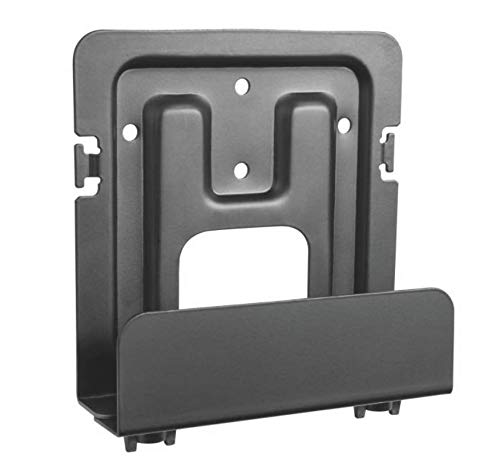
The Mount Plus MP-06-02 is an adjustable wall mount designed for compact and wider devices behind the TV. It supports vertical height up to 10 inches with a 3.5 to 10 inch length and a shallow depth range of 38 to 67 mm. Installation is streamlined with included drywall screws and anchors, and the bracket tightens securely around the device to minimize movement. This model emphasizes hiding cables for a clean, organized viewing space, especially when paired with a wall-mounted TV.
HumanCentric Cable Box And Modem Mount (B077T994P4)

This HumanCentric mount provides a compact solution for smaller media devices, including cable boxes and modems. It offers a vertical height limit of 10 inches, a length of 3.5 to 10 inches, and a depth of 1.2 to 1.8 inches. The kit includes drywall screws and anchors for straightforward installation. It’s designed to sit behind the TV so you can hide cables for a tidy wall setup without sacrificing device access when needed.
HumanCentric Cable Box And Modem Mount (B077T45BXR)
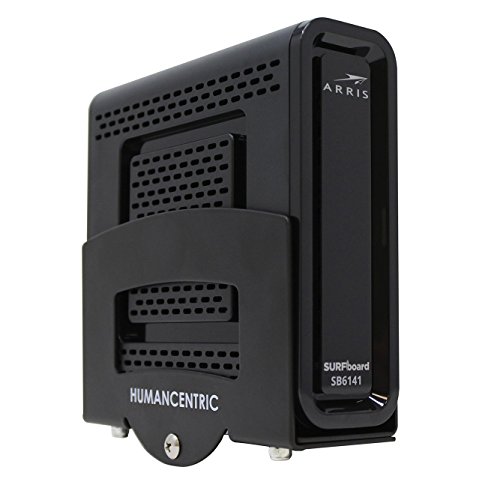
This variant from HumanCentric shares the behind-the-TV mounting concept with a slightly different depth range of 1.8 to 2.9 inches, accommodating a broader set of slim devices. The product includes hardware for quick mounting and aims to reduce clutter by routing wires neatly behind the television. Suitable for use with DVD players or streaming devices alongside other small media hardware.
HumanCentric Adjustable Device Wall Mount (B079RXYLWQ)
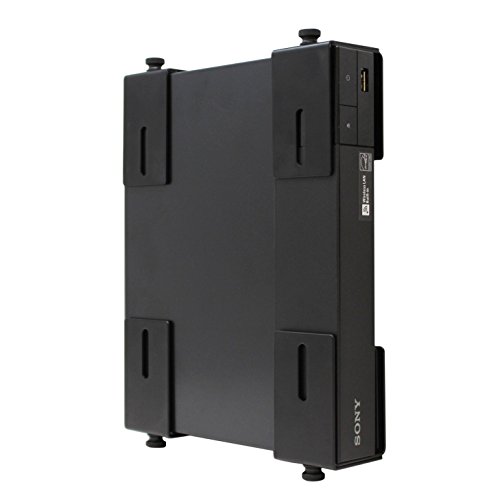
The HumanCentric adjustable device wall mount offers a broader vertical range (6 to 24 inches) and a length of 5.5 to 20 inches, with a depth of 1.5 to 3.75 inches. It is designed for versatile device sizes and can secure multiple components behind the TV or on a wall surface. Included hardware supports secure installation, and the bracket is adjustable to keep devices steady and wires concealed for a cleaner entertainment setup.
Chunxiao Adjustable Wall Mount Behind TV

The Chunxiao behind-TV wall mount is designed for small to narrow devices with a depth range of 0.6 to 1.8 inches and height up to 9 inches, accommodating devices from streaming boxes to DVD players. The mount supports up to 15 pounds and offers two VESA hole distances for flexibility. The design emphasizes a clean, minimal profile behind the TV while providing stable support and straightforward installation for a clutter-free setup.
Buying Guide: Behind-The-TV Mounts For DVD Players And Small Devices
Important considerations span fit, mounting method, and cable management. Assess device dimensions versus the mount’s vertical and horizontal range, including height, length, and depth, to ensure a secure fit behind your television. Look for adjustable brackets that adapt to varying device sizes and VESA compatibility if you plan to reuse the mount with future equipment.
Mounting layout matters. Options include fixed behind-TV brackets, shelf-style setups, and adjustable arms that provide some tilt or swivel for access. In tight spaces, choose a mount with a slim depth to minimize protrusion and avoid interfering with wall sockets or the TV stand. Dual mounting positions (behind TV or under a shelf) offer flexibility as your media setup evolves.
Installation ease is key for DIY buyers. Pay attention to included anchors, screws, and clear installation instructions. Drywall-safe hardware reduces risk during mounting, while adjustable clamps and quick-tighten features help ensure a secure fit without tools for every use. Cable management features—such as built-in clips or channels—help hide wires along the wall for a clean appearance.
Durability and safety matter. Choose mounts made from sturdy materials with corrosion resistance and weight ratings suited to the heaviest device you plan to mount. If your wall mounting involves a TV, verify clearance from vents, power cords, and HDMI cables to prevent strain on connectors. Finally, consider future upgrades; a versatile mount with adjustable height and depth may be more economical than multiple single-purpose solutions.