Best Earphones for Watching TV: Clear Dialogue and Private Listening
Whether you’re watching late-night dramas or catching every line in a sports broadcast, the right TV earphones or wireless headphones can improve clarity and reduce strain. This guide highlights five wireless models that are well-suited for American TV viewers, including seniors and anyone who wants private, adjustable sound without blaring the volume. Each pick targets different setup needs, from easy plug-and-play to stronger lip-sync performance and long battery life. Use the quick-product table to compare key features at a glance.
| Product | Best For | Key Benefit | Connection |
|---|---|---|---|
| ANTOANE TTA Wireless Headphones | Seniors, daily TV viewing | Low-latency dialogue clarity | Transmitter base, Optical/AUX/RCA |
| Avantree HT4186 | TV watchers with mixed outputs | No lip-sync delays | Transmitter with Optical/AUX/RCA |
| Earbay Bluetooth TV Headphones | Long sessions, multi-device use | Ultra-low latency, long range | Optical/AUX/RCA; Bluetooth |
| Mutbam Wireless Headphones | Simple setup, elderly users | One-time pairing, easy use | Multiple TV ports |
| Mutbam Alternative Note | Additional option for families | Varied connections | Same as Mutbam above |
Buyer tips: prioritize models with low latency (under 50–40 ms), wide TV compatibility (optical, RCA, AUX), and a comfortable fit for long viewing sessions. If you want true private listening, look for a base station or transmitter that’s easy to set up and remains stable during movement around the room.
ANTOANE TTA Wireless Headphones for TV

Features include crystal-clear TV dialogue and low-latency audio under 40ms, ensuring voices stay synchronized with the screen. The transmitter base, full cable kit, and illustrated manual support easy setup for seniors or first-time users. Best for seniors or viewers who require clearer dialogue without upping the TV volume. A potential limitation is compatibility with legacy or non-standard TV outputs, so verify available connections (Optical, AUX, RCA) before buying.
Best for: seniors or daily TV watchers who need clear dialogue with simple setup and reliable sync. Choose this if you want strong speech clarity and a dedicated transmitter for steady wireless audio.
Avantree HT4186 Wireless Headphones for TV

These neckband headphones work with TVs that output Optical, RCA, or 3.5mm AUX via the included transmitter. They’re designed for private listening with no lip-sync delays (latency under 50ms). The model is best for households with mixed device outputs and older TVs. Limitation: not compatible with HDMI-only TVs or soundbars with HDMI ARC that require different routing.
Best for: viewers who must connect to a variety of TV outputs and want near-zero lip-sync delay without disturbing others.
Earbay Wireless Headphones for TV with Dock

Earbay’s Bluetooth 5.4 headphones deliver under 40ms latency and a long-range (up to 100 ft/30 m) for freedom of movement. The 2-in-1 charging dock minimizes daily plugging-in, delivering up to 40 hours of playback on a full charge. Best for: seniors or heavy TV users who want long playtime and a simple, dock-based charging workflow. Caution: ensure your TV supports one of Optical, RCA, AUX, or Bluetooth for seamless setup.
Best for: long viewing sessions and multi-room listening with a straightforward charging dock.
Mutbam Wireless Headphones for TV
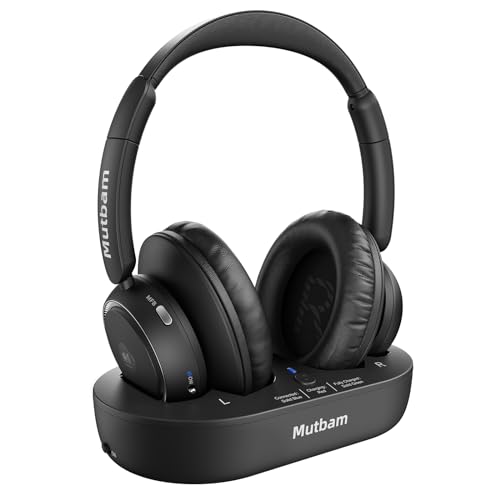
Mutbam emphasizes easy setup with a one-time pairing between headphones and a transmitter base. It supports Optical, RCA, AUX, and Bluetooth connections to suit most TVs, making it suitable for seniors who prefer a simple daily-use model. Best for: viewers who want a straightforward, no-fuss setup right out of the box. Limitation: fixed pairing may reduce flexibility if you want to switch between multiple TV sources quickly.
Buying Guide: Key Purchase Considerations
- Low latency matters: Look for models with less than 50 ms latency to keep dialogue in sync with on-screen action.
- Connection versatility: Opt for Optical, RCA, and AUX compatibility or Bluetooth, depending on your TV ports.
- Battery life and charging: Longer playtime reduces charging frequency; consider a dock or base station for convenience.
- Comfort and fit: Choose over-ear or neckband designs that stay comfortable during long viewing sessions.
- Independence and volume control: Independent volume for each ear can help users with hearing loss or asymmetrical hearing.
- Privacy and ease of use: Simple pairing, clear manuals, and stable wireless range minimize setup friction.
Frequently Asked Questions
- Q: Do these earphones work with all TVs?
A: Most models support Optical, RCA, or AUX connections; some also support Bluetooth. Check your TV’s output ports before buying. - Q: Is there noticeable lip-sync delay with wireless TV headphones?
A: Reputable models strive for under 50 ms latency to minimize lip-sync issues. - Q: Can I use these headphones with devices other than a TV?
A: Many models support Bluetooth pairing with phones, tablets, or computers for general media listening. - Q: Which option is best for seniors who want simple setup?
A: Headphones with a dock charging base and one-time pairing are typically easiest for seniors. - Q: Do wireless TV headphones affect TV speakers?
A: When using a dedicated transmitter, the TV’s internal speakers aren’t affected; you simply listen via headphones.