Best External CD Drives for Mac: Top Picks for Mac Users
Finding a reliable external CD/DVD drive that works seamlessly with modern Mac systems can be challenging. This guide highlights five proven options that deliver easy plug-and-play performance, fast read/write speeds, and broad compatibility with MacOS, Windows, and Linux. Whether you need to read old discs, back up data, or burn CDs and DVDs, these drives are practical, portable, and Mac-friendly.
Summary of Selected Products
| Product | Key Benefit | Interface | Compatibility |
|---|---|---|---|
| ROOFULL External CD DVD Drive (B07V4J3WBW) | Proven, durable drive with dual USB-C and USB-A; fast 5 Gbps | USB 3.0, USB-C | Mac, Windows, Linux |
| Rioddas External CD/DVD Drive (B07DLRG9VH) | Plug & Play with robust fault tolerance | USB 3.0 | Mac, Windows, Linux |
| ROOFULL External CD DVD Drive (B0895Y8ZQW) | Versatile reader/writer with dual connectors | USB 3.0, USB-C | Mac, Windows, Linux |
| ROOFULL External CD/DVD Drive (B08X45PVLG) | Trusted option with long track record and case | USB 3.0, USB-C | Mac, Windows, Linux |
| Laurensory External DVD Drive (B09LXVV8P7) | Multi-function drive with USB 3.0 and high speed read/write | USB 3.0 | Mac, Windows, Linux |
ROOFULL External CD DVD Drive for Laptop and Mac
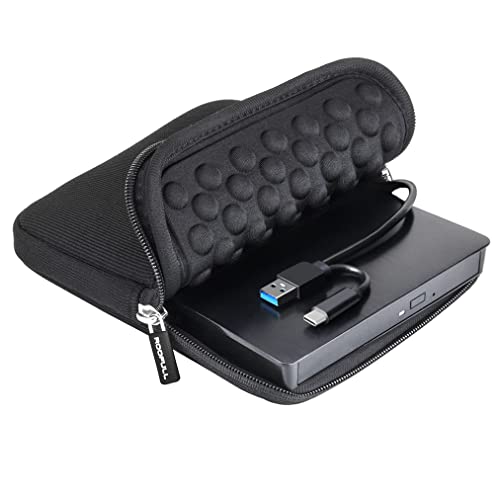
The ROOFULL ECD829-Y model is a compact external drive designed for everyday Mac and PC use. It supports all common CD and DVD formats (excluding Blu-ray and 4K). The drive emphasizes plug-and-play setup with USB 3.0 and USB-C dual connectors, allowing straightforward use on most laptops and desktops without extra adapters. Read/write speeds reach up to 8X for DVDs and 24X for CDs, with data transfers up to 5 Gbps. A protective carrying case is included for portability and on-the-go use. This model is known for its durability and simple operation, ideal for playing movies, backing up data, or installing software on a MacBook or iMac.
Key features include:
– Simple plug-and-play on Mac with a desktop disc icon appearing after insertion
– Dual connectors (Type-A & Type-C) for broad compatibility
– Fast USB 3.0 data transfer up to 5 Gbps
– Supports common formats (CD/DVD) except Blu-ray/4K
– Includes carrying case for portability
Rioddas External CD/DVD Drive with USB 3.0

Rioddas offers a straightforward, plug-and-play external drive that is powered via USB. It requires no dedicated power adapter and is compatible with USB 3.0, delivering fast transfer speeds up to 5 Gbps. The device is designed to minimize freezing and errors during playback or burning, thanks to strong fault tolerance. A notable feature is an eject button that helps release discs even if the host computer fails to recognize the drive, reducing common frustration during operation. This drive is a robust option for Mac users seeking reliable disc reading and writing on a budget without sacrificing performance.
Highlights:
– USB-powered, no external power needed
– USB 3.0 with up to 5 Gbps transfer speeds
– Physical eject button for reliability
– Copper mesh transmission for stable data flow
– Broad OS compatibility including Mac, Windows, and Linux
ROOFULL External CD DVD Drive for Mac (White)

This ROOFULL drive is a trusted choice for Mac users who want a reliable reader, writer, and ripper in one compact package. It features dual connectors (USB-C and USB-A) for easy plug-and-play with most laptops and desktops. The drive supports CD-ROM, CD-R/RW, DVD-ROM, DVD±R/RW, and other common formats, but does not support Blu-ray or 4K discs. The device is designed for seamless automatic recognition on Mac after inserting a disc, with recommended software and steps provided for optimal performance. It is a proven option with more than a million users relying on its ease of use and solid performance.
Notable points:
– High-speed USB 3.0 with up to 5 Gbps transfer
– Dual connectors for broad compatibility
– All common CD/DVD formats supported (excluding Blu-ray/4K)
– Plug-and-play with no complex setup
ROOFULL External CD DVD Drive With SD Card Reader

This ROOFULL model includes an SD/TF card reader along with USB 3.0 ports, effectively turning the drive into a small USB hub. It is a multi-function option suited for transferring photos and videos from memory cards, in addition to reading and writing CDs and DVDs. It supports both USB 3.0 and USB-C connections, ensuring compatibility with modern Macs and PCs. The drive is designed for straightforward plug-and-play use with automatic recognition across major operating systems, including macOS. It is a practical option for users who frequently transfer media from cameras and other devices.
External DVD Drive USB C Superdrive for Mac (BUNUD)

The BUNUD model combines a 5-in-1 design with a USB-C compatible interface, making it a flexible option for MacBook users who need additional USB ports, SD/TF card input, and USB charging capabilities alongside CD/DVD read/write. It supports a wide range of Windows, Linux, and Mac OS versions. While offering broad functionality, users should be aware of power considerations when running multiple devices on a single USB hub. The built-in SD/TF reader is a useful addition for photographers and videographers who frequently transfer media from cameras.
Buying Guide: Key Purchase Considerations
- Mac compatibility and ease of use: Look for plug-and-play drives that show up automatically on macOS without requiring driver installs. Dual USB-C and USB-A connectors improve compatibility with newer and older Macs alike.
- Interface and speed: USB 3.0 or higher provides faster read/write speeds (CD up to 24X, DVD up to 8X). USB-C support is a plus for newer machines and future-proofing.
- Power requirements: Many external drives are bus-powered via USB. If you plan to use the drive with a laptop on the go, ensure it can operate without an external power brick or has a robust USB power option.
- Disc formats and limits: Most drives read and write CD-R/RW and DVD±R/RW but do not support Blu-ray or 4K discs. Consider what formats you actually need.
- All-in-one features: Some models include SD/TF card readers or additional USB ports, turning the device into a small hub. This can simplify workflows for photographers and designers.
- Portability and build: A protective carrying case or compact design enhances portability for travel or student use. Durability matters if you frequently transport the drive.
- Software and setup: Many drives offer recommended software for ripping, burning, and reading discs. Check whether the manufacturer provides setup steps specific to macOS for best results.
When choosing the best external CD drive for Mac, evaluate your typical use cases—whether you primarily play discs, back up data, or rip media—and balance portability with performance. All five options highlighted here deliver reliable Mac-compatible functionality with straightforward operation, making them solid candidates for users who still rely on optical media.