Best External DVD Players for Android Tablets
Finding a reliable external DVD drive that works well with an Android tablet can be challenging. This guide highlights five top-rated options that connect smoothly to Android devices and tablets, offering features such as USB-C compatibility, multi-OS support, and portability. Read on to compare their capabilities and choose the best fit for backups, media playback, or discs on the go.
| Product | Brand | Interface | Key Benefit |
|---|---|---|---|
| Archgon External CD/DVD Drive | archgon | USB | Android connectivity and learning-at-home use |
| Laurensory External DVD Drive | Laurensory | USB 3.0 / USB-C | Wide OS compatibility and fast data transfer |
| Kadlun External CD/DVD Drive | Kadlun | USB 3.0 / USB-C | Multiple ports and SD/TF card support |
| BPAKDU External CD/DVD Drive | BPAKDU | USB 3.0 / Type-C | 1 USB-C port, 4 USB-A ports and card slots |
| ASUS ZenDrive V1M | ASUS | USB-C | Built-in cable storage and M-DISC support |
Note: All products listed support typical CD/DVD reading and writing functions, but performance and compatibility vary by tablet model and operating system. Check device power requirements and USB port availability on your Android tablet before purchasing.
Archgon External CD/DVD Drive For Android

Archgon offers an externally powered CD/DVD drive that highlights Android connectivity. It can transfer and preserve photos, videos, music, and data from Android devices to a disc, while also enabling playback of CD/DVD media on Android OS devices. The drive supports streaming educational content for students and families working from home. It’s described as compatible with Windows 10 and Mac, but it is designed with Android tablets in mind for easy playback and backup workflows. This model emphasizes a seamless rip-and-backup workflow from mobile devices to physical discs, catering to media collectors and learners needing offline access.
Key features include Android-focused transfer, backup, and playback, plus the convenience of a free Android app. The setup is relatively straightforward for users who want to digitize content or use discs as a supplementary storage solution on the go.
Laurensory External DVD Drive For Laptop
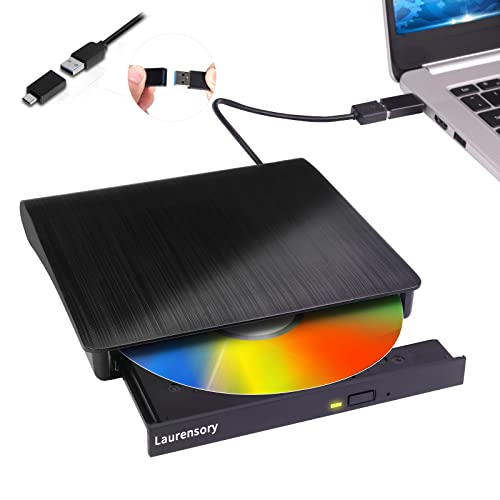
Laurensory presents a versatile external CD/DVD burner and player designed for laptops but compatible with Android tablets when connected to compatible USB ports. It supports multiple OS environments, including Windows, Linux, and macOS, and claims high-speed data transfer via USB 3.0/2.0. The device can burn CDs and DVDs, rip media, and back up files. While the product description targets laptops, its broad compatibility and portable form factor can extend to Android tablets with appropriate USB-C or USB-A adapters, making it a strong option for on-the-go backups or media reading and writing tasks.
Highlights include a multi-functional drive, wide OS support, and practical usage for transferring and backing up media. It’s particularly suitable for users who want a single device that can handle reading and burning across different platforms while traveling with a tablet.
Kadlun External CD/DVD Drive Plus Card Slots

Kadlun’s external CD/DVD drive offers a multifunction design with an independent SD/TF card slot and additional USB ports. It can transfer data directly from SD/TF cards and supports a broad set of interfaces, including USB 3.0 and USB-C slots. The device is positioned as compatible with Windows, Linux, and Mac OS across a range of laptop and desktop configurations. Note that SD/TF cards cannot be used simultaneously, and some drive features depend on USB port type. It is marketed for broad compatibility, making it a viable option for Android tablets when combined with appropriate adapters and power considerations.
The drive emphasizes practical data transfer through multiple ports, making it suitable for photo and video imports, disc ripping, and general media management on the go.
BPAKDU 8-in-1 External CD/DVD Drive

BPAKDU’s 8-in-1 external CD/DVD drive blends reading, burning, and data transfer with a hub-like feature set. It includes a USB 3.0 port, an additional USB-C slot, USB-A ports, and SD/TF card slots. The design targets versatility for users needing to play discs, back up data, and connect peripheral storage. Some power-related setup notes are included for Windows compatibility, and the manufacturer offers troubleshooting guidance to address drive recognition issues. It’s positioned as a strong all-in-one option for users who require both disc and card-based data handling in one compact unit.
Consider this model if you want to combine disc reading/burning with extra USB connectivity and card slots in a single portable device, especially when working with Windows or macOS alongside an Android tablet via adapters.
ASUS ZenDrive V1M External DVD Drive

ASUS ZenDrive V1M emphasizes convenience with built-in cable storage and a USB-C interface, making it a neat option for ultrathin laptops and modern Android tablets with USB-C. It supports M-DISC, enabling long-term data storage for important media and documents. While primarily marketed for Windows and macOS, the USB-C interface and compact design make it a practical choice for Android tablet users who can provide compatible power and driver support, offering a balanced mix of portability and reliability for everyday disc tasks.
The ZenDrive stands out for cable management and long-term data preservation via M-DISC, appealing to users who want dependable offline storage alongside portable disc access on the go.
Buying Guide: Key Purchase Considerations
- Operating System and Tablet Compatibility: Confirm that the drive supports Android devices via USB-OTG or adapter cables. Some models emphasize Windows/macOS compatibility and may require adapters or power solutions for Android use.
- Interface and Power: USB 3.0/USB-C offers faster data transfer, but ensure your Android tablet has a compatible port and sufficient power. Some drives require an external power source for reliable operation with high-demand tasks.
- Read vs Burn Capabilities: If you need to create discs, look for drives that explicitly advertise burning capabilities and supported media formats. If you only need playback or backups, reading and ripping may suffice.
- Multi-Port Hubs and Card Slots: Drives with extra USB-A/C ports and SD/TF card readers provide added versatility for photographers, students, and travelers who frequently transfer media from cameras or phones.
- Durability and Portability: For tablet travelers, a slim, lightweight drive with a protective case is ideal. Cable storage (as seen in ASUS ZenDrive) reduces clutter in a portable setup.
- Software and App Support: Some drives mention companion apps for Android. Verify software availability and updates to ensure smooth backups, ripping, or playback on your device.
- Warranty and Support: Consider brands offering robust customer support and warranties, especially for use with mobile devices where power conditions can vary.
- Security and Longevity: For long-term data storage, prioritize drives with reliable disc writing quality and support for durable formats like M-DISC (as offered by ASUS ZenDrive).
Choosing the right external DVD drive for an Android tablet depends on how you plan to use it. If you need simple media playback and occasional backups, a compact USB-C model with decent compatibility may suffice. For photographers, students, or frequent travelers, a multi-port drive with card slots and high compatibility across OS ecosystems can deliver greater value and flexibility.