Best External DVD Players for Mac: Top Picks for Quick Read, Write and Rip
Choosing an external DVD drive that works smoothly with a Mac can simplify media playback, data backup, and disc ripping. The following selections are among the most compatible and reliable options for Apple devices, offering USB-C and USB-A connectivity, broad disc format support, and plug‑and‑play setup. This guide highlights five strong contenders, with practical details to help you decide which fits your Mac, laptop, or desktop setup best.
| Product | Connection | Disc Formats | Highlights |
|---|---|---|---|
| ROOFULL External CD DVD +/-RW Drive (B07V4J3WBW) | USB 3.0 & USB-C | CD/DVD +/-R/RW, CD-ROM, DVD-ROM (No Blu-ray) | |
| ROOFULL External CD DVD Drive (B08X45PVLG) | USB 3.0 & USB-C | CD-ROM, DVD-ROM, +/-R/RW, DL, VCD support | |
| ROOFULL External CD DVD Drive (B0895Y8ZQW) | USB 3.0 & USB-C | CD/DVD +/-R/RW, DL; includes burning and ripping | |
| Rioddas External CD/DVD Drive (B07DLRG9VH) | USB 3.0 (USB 2.0 compatible) | CD/DVD +/-R/RW, includes disc duplicator support | Plug & Play; built-in eject button; copper mesh tech |
| Gotega External DVD Drive (B07MJW5BXZ) | USB 3.0 | CD/DVD +/-RW; wide OS compatibility | High read/write speeds; broad compatibility |
ROOFULL External CD DVD +/-RW Drive for Laptop and Mac
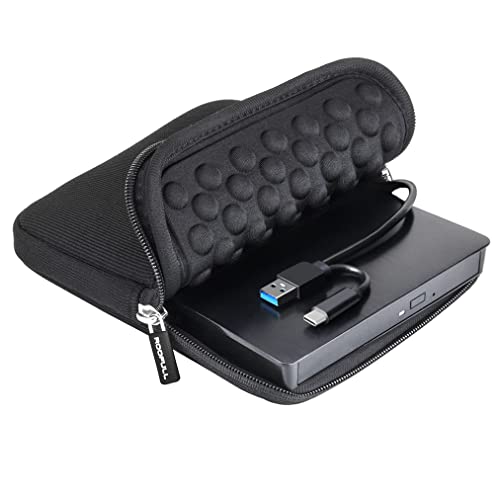
The ROOFULL ECD829-Y model is a long-standing option that emphasizes simplicity and durability for Mac and other computers. It supports standard CD and DVD formats, excluding Blu-ray and 4K discs, and is designed for plug-and-play use without driver installation. A dual USB-C and USB-A connection simplifies compatibility with modern Macs and older laptops. Read speeds reach up to 8x for DVDs and 24x for CDs, with USB 3.0 delivering up to 5 Gbps. The included protective carrying case makes it portable for travel and on-the-go setups.
ROOFULL External CD DVD Drive for Mac Laptop, USB-C

This ROOFULL model is marketed as a versatile external drive for Mac and Windows. It functions as both a reader and writer (burner/rewriter) capable of handling a variety of disc formats, with dual connectors and USB 3.0 for fast transfers. It relies on plug-and-play operation and is described as compatible with a broad range of Macs, PCs, and operating systems. The device supports typical disc formats and emphasizes auto-detection on insertion for Mac users.
ROOFULL External CD/DVD Drive for Mac Laptop (White)

Another ROOFULL option, the white ECD829-Y, emphasizes ease of use for Mac users. It supports reading, writing, and ripping CDs and DVDs, with plug-and-play setup and a desktop Mac display cue when a disc is recognized. It handles common formats and is suitable for back‑up tasks, software installations, and media playback. As with other ROOFULL models, Blu-ray and 4K discs are not supported, but USB 3.0/USB-C connectivity ensures quick data transfers.
Rioddas External CD/DVD Drive for Laptop

The Rioddas drive emphasizes Plug & Play operation with USB 3.0, providing high-speed data transfer up to 5 Gbps. It supports a broad range of disc formats and is designed to reduce playback stuttering and errors through robust construction and fault-tolerant features. An eject button is included to safely release discs if the host computer doesn’t recognize the drive, and the device is compatible with Windows, Mac, and Linux environments.
Gotega External DVD Drive for Laptop and PC

Gotega’s USB 3.0 external drive delivers up to 8x DVD write and 24x CD write speeds, with broad OS compatibility across Windows, Mac, Linux, and more. Its plug-and-play design minimizes setup steps, making it a practical option for users who want immediate access to CD/DVD functionality on various devices. It is not compatible with Chromebooks, Blu-ray discs, or TVs, as noted in its feature set.
Buying Guide: Key Purchase Considerations
- Connectivity: Look for USB 3.0 or USB-C interfaces for fast transfers. Dual connectors (USB-A and USB-C) offer the most versatility with different devices.
- Mac Compatibility: Ensure the drive supports macOS, and note that Paced macOS cues may appear on the desktop after disc insertion for certain brands. Plug-and-play simplicity reduces setup friction on Macs.
- Disc Formats: Most drives handle CD and DVD formats (CD-R/RW, DVD-ROM, DVD±R/RW). Blu-ray and 4K are not supported by these models; verify if you need Blu-ray support.
- Use Case: If you need ripping, burning, or backing up data, choose a model that emphasizes those features and includes software recommendations or notes on compatible apps.
- Portability vs. Durability: A protective case and slim design aid portable use, while rugged construction suits frequent travel between work and home.
- Power Requirement: USB-powered drives are common, but some configurations may benefit from a powered hub or extra USB power for stable performance—especially on older laptops.
- Software and Support: Check if the manufacturer provides recommended software for burning or ripping and whether there is customer support for troubleshooting.
These external drives provide practical, plug‑and‑play options for Mac users who need reliable optical media access without investing in internal drives. When selecting, prioritize compatibility with your Mac model, the types of discs you most frequently use, and your transfer speed requirements to ensure smooth media playback, backups, and data management.