
Find the Best External Speaker And Microphone For Laptop to improve video calls, streaming, and music from your laptop. Below is a quick comparison of the selected products so you can scan features at a glance.
| Product | Key Features |
|---|---|
| ROFALL USB Computer Speakers With Microphone | Built-In Mic, 2EQ Sound Modes, Plug & Play USB |
| AIRHUG Conference Speaker And Microphone | Bluetooth + USB-C, 360° Pickup, Noise Reduction |
| Dell SP3022 USB Computer Speaker | Mini Soundbar, AI Noise Echo Cancellation, Full Duplex |
| Cykvis 3-in-1 USB Computer Speaker With Microphone | 3-in-1 Hub, 360° Omnidirectional Pickup, 4-Mic Array |
| LIELONGREN USB Mini Sound Bar | Stereo Drivers, Passive Radiator, Single USB Cable |
ROFALL USB Computer Speakers With Microphone

This USB speaker combines built-in high-performance speakers with a smart chip to reduce ambient noise and improve clarity for calls and media. It offers 2EQ sound modes (Music/Move/Voice) to prioritize bass, balanced audio, or voice clarity. Set up is simple: plug in the USB, power on, and select “USB Audio 4.0” in your OS. The unit is designed for portability and straightforward plug-and-play use without drivers. Best suited for single-user desks or home office setups where easy configuration and voice clarity matter.
AIRHUG Conference Speaker And Microphone

AIRHUG is designed for collaborative calls with a 360° voice pickup and an upgraded full-duplex digital microphone capable of picking up voices within about 6 ft. It supports Bluetooth and USB-C simultaneously, allowing connection to two devices at once. Acoustic reminders help with operation, and the speaker claims high-fidelity playback with a 48kHz sampling rate. This device is aimed at small group meetings (4–6 people) and hybrid setups where flexible connection options and omnidirectional pickup are priorities.
Dell SP3022 USB Computer Speaker
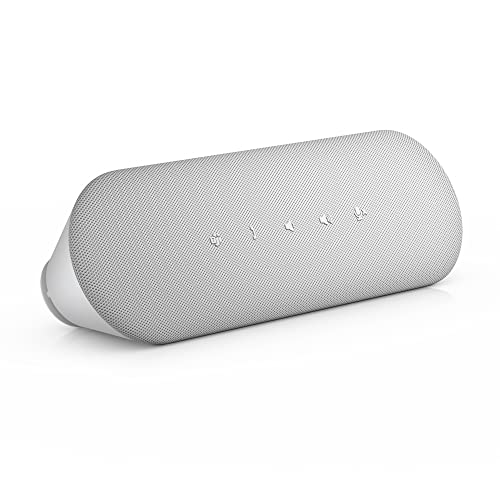
The Dell SP3022 is a compact soundbar speakerphone designed to sit under a monitor or next to a laptop. It features AI noise echo cancellation and full duplex audio, enabling multiple participants to speak simultaneously while maintaining clarity. LED indicators provide call and mute status, and the device is Microsoft Teams certified, which can simplify integration in business environments that use Teams. This model targets professional users needing a compact conference-grade audio interface for meetings.
Cykvis 3 In 1 USB Computer Speaker With Microphone

Cykvis combines a speaker, microphone, and USB hub into one unit. It uses a 4-mic array for 360° omnidirectional voice pickup with a claimed pickup range up to 16 ft, suitable for medium-sized conference spaces. The device emphasizes high-definition stereo sound with antimagnetic speaker design and a digital processing chip for clearer audio and noise filtering. The integrated 3-port hub and extended cable add convenience for desk setups with limited ports.
LIELONGREN USB Computer Mini Sound Bar
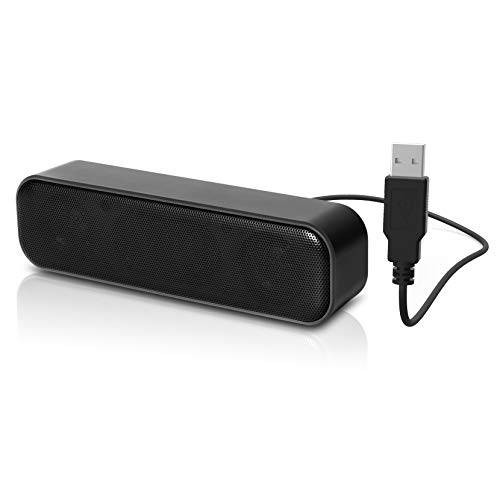
This compact USB sound bar offers dual 3W drivers plus a passive radiator for improved bass and louder output. It uses a single USB cable for both audio and power, simplifying cable management on laptops with limited ports. There is no physical volume knob on the unit, so volume is adjusted through the computer. This model is focused on portable desktop improvement for media playback and basic calls rather than multi-person conference mic systems.
Buying Guide: How To Choose An External Speaker And Microphone For Your Laptop
Selecting the right external speaker and microphone depends on how you use your laptop. Below are key considerations and comparison perspectives to match features to use cases.
Use Case: Single-User Calls And Media
- Priority: Clear stereo playback, built-in mic with near-field pickup.
- Good Choice: Compact USB sound bars (LIELONGREN, ROFALL) for portability and simplicity.
- Why: They improve laptop speakers and offer plug-and-play convenience without complex setup.
Use Case: Small Group Meetings (4–6 People)
- Priority: 360° voice pickup, full-duplex audio, noise reduction.
- Good Choice: AIRHUG or Cykvis for omnidirectional pickup and wider coverage.
- Why: Multi-mic arrays and conference speakerphones are designed to capture voices across a room and reduce background noise.
Use Case: Business/Professional Video Conferencing
- Priority: Echo cancellation, clear microphone pickup, certification for conferencing apps.
- Good Choice: Dell SP3022 for Teams-certified integration and AI noise suppression.
- Why: Certifications and advanced echo/noise cancellation improve reliability in corporate meeting settings.
Connectivity And Compatibility
- USB vs USB-C vs Bluetooth: USB and USB-C offer reliable, low-latency audio and often plug-and-play setup. Bluetooth provides wireless convenience but may introduce latency and battery management.
- Simultaneous Connections: Some devices support Bluetooth and USB simultaneously for multi-device workflows.
- Driver Requirements: Prefer plug-and-play models if you want quick setup; verify OS compatibility for advanced features.
Microphone Pickup Patterns And Range
- Near-Field Built-In Mics: Best for one-on-one calls; less useful for group rooms.
- Omnidirectional/Array Mics: Provide 360° coverage and extended range useful for group meetings.
- Pickup Distance: Match the mic’s claimed pickup range to your meeting space—6 ft for small groups, 10–16 ft for larger conference tables.
Audio Quality And Loudness
- Drivers And Radiators: Larger drivers and passive radiators improve bass and dynamic range.
- Full Duplex: Allows both sides to talk simultaneously without cutouts—important for natural conversation flow.
- Sample Rate/Bit Depth: Higher sampling rates (e.g., 48kHz) can yield clearer voice reproduction for conferencing.
Portability And Desk Footprint
- Compact Sound Bars: Fit under monitors or clip on screens for small desks.
- Portable Units: Lightweight USB speakers are easy to move between home and office.
- Integrated Hubs: Models with USB hubs add convenience for limited-port laptops.
Noise Reduction And Echo Cancellation
- AI Noise/Echo Cancellation: Helpful in noisy environments and improves speech intelligibility for remote participants.
- Smart Chips And DSP: Devices that advertise smart chips or DSP processing can better suppress ambient noise and manage microphone pickup.
Controls And Indicators
- On-Device Controls: Mute, volume, and call answer/end controls provide quick access during meetings.
- LED Indicators: Useful for knowing mute status and connection state at a glance.
Compare these perspectives against your primary needs—single-user audio, small group conferencing, or professional business setups—to select the external speaker and microphone combination that best fits your laptop workflow.