
Find louder, clearer ringtones and visual alerts for landline phones with devices designed for the hearing impaired, seniors, or noisy environments. Below is a quick comparison of top external ringer and amplification options selected for compatibility with landlines and phones used at home.
| Product | Type | Key Feature |
|---|---|---|
| Connected Essentials CEA-40 | Hardwired Ringer Amplifier | Up To 95dB + Flashing Light |
| AKOAK RJ11 Ringer Amplifier | Inline RJ11 Amplifier | Compact 75dB Output For Noisy Places |
| Serene Innovations Ringer & Flasher | External Ringer For Cell & Landline | Works With Vibration + LED Strobe |
| Mad Man Phone Volume Amplifier | Passive Induction Amplifier | No Bluetooth — Amplifies Speakerphone Audio |
| Lativu Landline For Seniors | Corded Phone With Loud Ringer | Up To 120dB Ringer + LED Flash + Speed Dial |
Telephone Ringer Amplifier With Flashing Light – CEA-40

This plug-and-play ringer amplifier connects directly to a standard BT telephone wall socket and requires no mains power or batteries. It boosts ring volume up to 95dB and adds a bright flashing light to alert users visually. Wall-mountable design fits common landline setups and digital voice adapters.
- Compatibility: Standard BT telephone wall sockets and many landline systems.
- Power: No external power required.
- Alerts: Loud ring and visual flash suitable for hearing impaired users.
AKOAK Loud Sound RJ11 Telephone Ring Amplifier
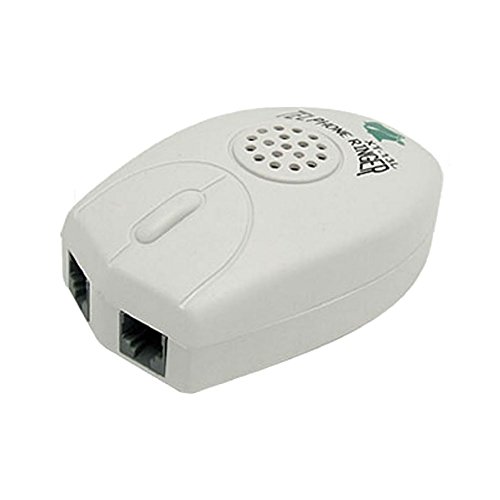
This compact inline unit connects via RJ11 and is intended to boost audible ring volume to about 75dB. Its small footprint makes it useful for noisy spaces or those wanting a discreet inline booster. The unit emphasizes clear, louder sound without complex setup.
- Volume Output: Approx. 75dB.
- Form Factor: Small inline RJ11 device for direct landline connection.
- Use Case: Noisy rooms or simple ring amplification needs.
Serene Innovations Cell Phone Ring Amplifier & Flasher

This unit is designed as a dual-purpose ringer for cell phones and landlines. It responds to a cell phone’s vibration to trigger a loud speaker and strobe LED, and it can connect to hearing-impaired landline phones to provide external alerts. Multiple output modes let users choose high, low, or off settings.
- Multi-Device: Works with cell phones (vibration-triggered) and landline adapters.
- Visual Alert: LED flasher for visual notifications.
- Settings: Adjustable loudness levels to match user needs.
Phone Volume Amplifier Sound Booster – Mad Man

The Mad Man passive amplifier uses induction (Near Field Audio) technology to boost speakerphone audio without Bluetooth or cables. Place a smartphone on top to amplify calls, music, or media. This approach is suited for louder speakerphone output rather than electrically coupling into a landline jack.
- No Pairing Required: Works without Bluetooth or wiring.
- Best For: Amplifying smartphone speakerphone audio and media.
- Limitations: Passive design — not a hardwired landline ringer replacement.
Lativu Landline Phone For Seniors – Loud Ringer

This corded landline phone is built with seniors and visually or hearing impaired users in mind. It features adjustable ringer volume up to 120dB, speakerphone up to 96dB, a flashing LED alert, and 9 one-touch speed dial positions including an SOS button. The phone integrates both loud acoustic alerts and visual indicators.
- Ringer Levels: Multiple levels including very loud (claimed up to 120dB).
- Visual Alert: LED flash for missed/incoming calls.
- Usability: Large buttons and optional photo speed dials for ease of use.
Buying Guide: Choosing The Right External Speaker Or Ringer For A Landline
Selecting the proper external speaker or ringer depends on specific needs and the existing phone setup. Below are the primary considerations to compare products effectively.
Compatibility With Your Phone System
Determine whether your landline uses a standard RJ11 jack or a BT wall socket. Hardwired amplifiers (like the CEA-40 and AKOAK) require the correct physical connection. Some devices are geared toward cordless systems or cell phones and may require adapters.
Loudness And Alert Type
Look for products that state output in dB when loudness is the priority. Devices with both audible and visual alerts (flashing LEDs or strobes) offer redundancy for mixed hearing and vision impairments. Consider environments with background noise when choosing dB levels.
Power Requirements And Installation
Some amplifiers are plug-and-play and draw power from the phone line (no mains), simplifying installation. Others require USB or wall power. Passive induction amplifiers need no power but are limited to boosting smartphone audio rather than wiring into a landline.
Form Factor And Placement
Inline RJ11 units are compact and sit between the wall jack and phone. Wall-mountable box units are visible and can be placed centrally for visual alerts. Passive desktop amplifiers sit beneath a smartphone and work best for speakerphone amplification.
Extra Features
Consider added capabilities like speakerphone support, answering machines, large buttons, speed dial, or call-blocking features when the device is part of a broader phone solution. These features can reduce the need for separate equipment for seniors or assisted living situations.
Use Case Comparisons
- Hearing Impaired/Seniors: Prefer hardwired amplifiers with high dB output and flashing lights (CEA-40, Lativu).
- No Wiring Changes Needed: Choose cell/landline hybrid flashers that respond to vibration or pair via Bluetooth for flexible placement (Serene Innovations, Ablefector-type units).
- Smartphone Speakerphone Boost: Use passive induction amplifiers for hands-free audio without pairing (Mad Man Booom Box).
- Compact Inline Solution: Use an RJ11 inline amplifier when you need a discreet, direct landline ring boost (AKOAK).
Durability And Ease Of Use
Simple controls, straightforward installation, and minimal maintenance matter for users who want reliable alerts without frequent adjustments. Battery-free options reduce upkeep, while rechargeable or USB-powered devices offer louder, continuous alerts if required.
Tip: Verify the device’s stated connection method against your home phone wiring and, if possible, check user documentation for compatibility with digital voice adapters or VoIP adapters.