
Best Flat Panel Computer Speakers for Slim Setups and Clear Desk Space
Looking for slim, space-saving computer speakers that deliver solid audio without clutter? These flat panel or ultra-slim designs suit small desks, monitor-mounted setups, or ultra-thin PC builds. The top picks below balance compact form with practical sound, helping office workers, students, and home-entertainment listeners get clear audio without dominating the desk. Each option is chosen for ease of use, compatibility, and value for money.
Summary table of selected products
| Product | |||
|---|---|---|---|
| HP 2T Flat Panel Speaker Bar | Flat panel | Slim desktop setups | Low-profile design with stereo output |
| XKX Computer Speakers for Desktop | USB-powered bar/soundbar | USB-equipped PCs and laptops | USB compatibility and easy clip-on use |
| [Upgraded] Computer Speakers for Desktop PC | USB plug-n-play | Windows, macOS, ChromeOS environments | Plug-and-play with broad OS support |
| Amazon Basics Stereo 2.0 Speakers | 2.0 desktop speakers | General PC/laptop audio | Simple USB-powered setup with inline volume |
| 1Mii 3.5mm Computer Speakers | 3.5mm wired speakers | Any device with AUX output | Wide compatibility and front volume control |
HP 2T Flat Panel Speaker Bar

The HP 2T Flat Panel Speaker Bar is a compact, low-profile PC multimedia speaker solution designed to sit on or above a monitor. Best for users who want minimal desk clutter and equal left/right channel audio in a slim footprint. The unit provides a right/left channel arrangement with a practical 1-watt output and a frequency range of 75–20,000 Hz. This makes it a good fit for basic computer audio, voice calls, and light media use. A potential limitation is that it’s a smaller system and may not deliver deep bass or very high volume for media-heavy listening.
XKX Computer Speakers for Desktop PC Monitor

These XKX USB plug-in computer speakers are designed for plug-and-play simplicity. They are compatible with Windows, macOS, ChromeOS, and Linux, making them a practical choice for mixed-device environments. They also include a USB-C adapter to support devices that only provide USB-C interfaces. Best for users who want straightforward USB connectivity and decent volume with rich bass for daily tasks, games, and casual media. A potential caveat is that they rely on USB power, so performance can depend on USB port power and interference from other USB devices.
[Upgraded] Computer Speakers for Desktop PC
![[Upgraded] Computer Speakers image](https://m.media-amazon.com/images/I/416h3bKRiuL._SL500_.jpg)
LIELONGREN’s upgraded USB computer speakers offer broad compatibility with Windows, macOS, ChromeOS, and Linux. They are plug-n-play and intended for easy setup on desktops and laptops, with a straightforward workflow for selecting USB playback on Windows. This option is best for users who want a simple, reliable USB speaker that works across multiple operating systems. Consider availability of advanced features like drivers or EQ controls; this model emphasizes ease of use over high-end audio tuning.
Amazon Basics Stereo 2.0 Speakers

Amazon Basics 2.0 stereo speakers deliver a balanced desktop audio solution with in-line volume control. They are USB-powered and designed for PC or laptop use, offering a simple setup without drivers. Best for users who want a basic, reliable audio upgrade for everyday computing, video calls, and light media. A notable limitation is that the system lacks advanced bass or surround features, focusing on reliable, straightforward sound.
5 PCS PC Motherboard Speaker Mini Buzzer
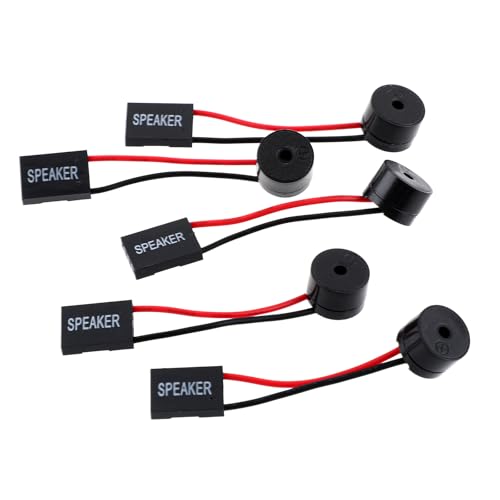
Though not a traditional external speaker, motherboard beeps provide POST diagnostics and system status feedback. Best for technicians or builders who need a basic audible signal during startup. These are wired to a 4-pin header and are intended for front-panel motherboard use. Use caution with compatibility: ensure the motherboard includes a compatible speaker header and that you understand the beep sequence. This option is more about diagnostic cues than full audio playback.
LENRUE G11 Computer Speakers

LENRUE’s G11 provides surge stereo sound with two large amplifier IC horns and built-in touch-enabled lighting for atmosphere. It is USB-C/USB powered and includes AUX audio support. Best for users seeking a compact, visually engaging desk setup with clear, distortion-free audio for movies, music, and games. A limitation is that light features may draw power and require careful cable management to avoid desk clutter.
Amazon Basics USB-Powered Computer Speakers

These compact USB-powered speakers offer easy plug-and-play with a front-mounted volume control. They’re ideal for laptop users and dorm setups where space is at a premium. The front-access volume control adds convenience, and the 3.5mm headphone jack offers private listening. Choose this if you want a minimal, portable solution without complex setup. A constraint is that performance depends on USB power and port quality, which can affect loudness.
1Mii 3.5mm Computer Speakers

The 1Mii 3.5mm speakers provide wide compatibility with devices that offer a standard 3.5mm AUX output. They deliver enhanced stereo sound from dual 3W drivers and feature a front rotary volume control for easy adjustments. Best for users with a mixed setup: desktops, laptops, consoles, or external monitors. Use this if you prefer a versatile 3.5mm connection and tactile volume control. A potential limitation is that the 3.5mm path may pick up more background mechanical noise from busy work desks.
Buying Guide: Flat Panel And Slim Computer Speakers
- Compatibility: Determine your device interfaces (USB, 3.5mm AUX, USB-C). USB-powered options simplify setup for laptops and desktops, while 3.5mm models offer wide compatibility with older devices.
- Form factor: Flat panel or slim soundbars save desk space and pair well with modern monitors. Consider whether you need external bass (subwoofers are rare in slim designs).
- Speaker configuration: 2.0 systems are simple and effective for everyday tasks. If you want richer audio, look for dual drivers and passive radiators or a compact soundbar with stereo output.
- Power and placement: USB-powered speakers rely on robust USB ports. Place speakers for optimal stereo imaging, usually at or just below monitor height and equidistant from your ears.
- Controls: Front-facing volume controls are convenient. Some models offer on-device power switches or multi-function controls; consider whether you prefer inline or front panel access.
- Durability and setup: Plug-and-play models minimize driver requirements. If you’re assembling a multi-OS setup, choose products marketed as compatible with Windows, macOS, Linux, and ChromeOS.
Frequently Asked Questions
- What is the best flat panel speaker for a monitor setup? Answer: A slim speaker bar designed to sit under or on the monitor, providing stereo output without adding bulk to your desk.
- Do USB-powered speakers work with all laptops? Answer: They work with most laptops that provide a standard USB port and can supply sufficient power to the speakers.
- Are 2.0 speakers enough for movies? Answer: For basic movie audio, 2.0 can be adequate; for richer surround-like sound, consider a compact 2.1 or a small soundbar with enhanced bass.
- Can I use 3.5mm speakers with a USB-only device? Answer: If the device lacks a 3.5mm jack, you’ll need a USB-powered option or a USB audio adapter.
- Is a dedicated subwoofer necessary for flat panel speakers? Answer: Not typically; flat panel and compact speakers usually don’t include subwoofers, prioritizing space-saving and clarity over deep bass.
- How should I choose between a soundbar and traditional desktop speakers? Answer: A soundbar is ideal for ultra-slim desks and monitor-sides, while traditional desktop speakers offer broader placement options and sometimes better bass performance.