Best HDMI Audio Extractor Bluetooth: Top Picks for Clear Audio
Answering the need for simple, reliable audio extraction from HDMI sources, these picks offer Bluetooth support and varied output options. The top products are best for home theaters, gaming setups, and office PCs that require easy, wired or wireless audio delivery without compromising video quality. This guide highlights five compatible models and explains who they’re best for, plus practical buying considerations.
| Product | Brand | Best For |
|---|---|---|
| HDMI Audio Extractor Converter 4K 30Hz | ASHATA | Bluetooth-enabled rooms, soundbars, and PCs |
| HDMI Bluetooth Audio Extractor Splitter | Wiistar | HDTV setups needing real-time audio sync |
| HDMI ARC Audio Extractor | DOREWINAUD | TVs with ARC, easy Bluetooth streaming |
| J-Tech Digital Premium 4K HDMI + Audio | J-Tech Digital | 2.1/5.1 audio from HDMI to RCA/Optical |
| OREI 4K 60Hz 18G HDMI 2.0 | OREI | High-bandwidth HDMI with Dolby/DTS passthrough |
ASHATA HDMI Audio Extractor Converter 4K

The ASHATA model functions as an HDMI audio extractor that transfers sound to BT, SPDIF, or a 3.5mm output. It supports Bluetooth 5.0, enabling wireless pairing with smartphones, tablets, laptops, or Bluetooth speakers. It handles up to 4K 30Hz video input and output, which helps preserve video quality while delivering reliable sound to external systems. Best for multimedia setups where wireless audio playback is a priority and the user wants a simple plug-and-play option.
Best for: small home theaters, PC and laptop workspaces, and Bluetooth-enabled speaker setups. A key limitation is the need for compatible Bluetooth devices and the absence of higher video refresh support beyond 4K 30Hz. Choose this if you want a single device that covers multiple audio outputs with a Bluetooth option.
Wiistar HDMI Bluetooth Audio Extractor Splitter

This unit acts as a Bluetooth-enabled audio splitter with HDMI passthrough. It supports 2.0 and 5.1 audio outputs and uses Bluetooth 5.3 for streaming. It is designed to synchronize audio with video in real time, reducing latency for TV viewing, gaming, or streaming. Best for users who want a flexible Bluetooth-enabled extractor with broad device compatibility.
Best for: home theater fans and gaming setups needing stable Bluetooth audio with real-time lip-sync. Limitation: while it supports multiple formats, certain complex audio configurations may require compatible sources and receivers to avoid misalignment.
DOREWINAUD HDMI ARC Audio Extractor & Bluetooth 5.3

The DOREWINAUD model focuses on HDMI ARC extraction, routing TV audio to RCA or 3.5mm outputs. It includes Bluetooth 5.3 for high-definition streaming and supports PCM signals via the optical/TOSLINK input. It’s ideal for converting ARC-enabled TVs to analog or Bluetooth compatible sound systems. Note: It supports PCM only and does not decode Dolby or DTS on some outputs.
Best for: users with ARC-capable TVs who want a straightforward way to send audio to external amps or Bluetooth devices. Caution: if you require Dolby or DTS decoding, verify support on your intended output format before purchasing.
J-Tech Digital Premium 4K HDMI + Audio (JTDAT5CH)
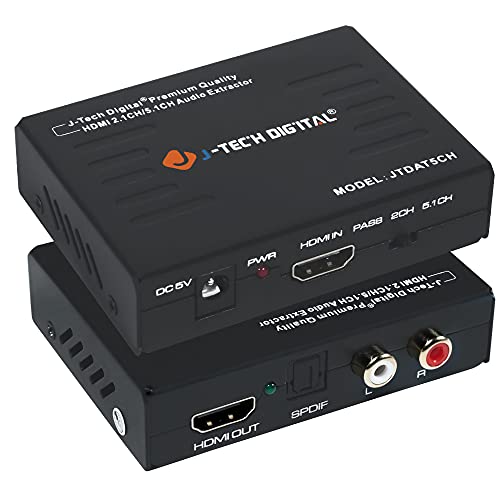
This extractor converts HDMI audio to either 2-channel stereo or 5.1-channel output, with no ARC support. It supports up to 4K@30Hz and high-bandwidth HDMI specs, including deep color and HDCP. It’s plug-and-play and works where ARC is not available, making it suitable for older receivers or soundbars without HDMI inputs.
Best for: setups needing a reliable HDMI to RCA/optical path without ARC. Limitation: no ARC support means some home theater configurations may require a different device for full audio routing.
OREI 4K HDMI 2.0 Audio Converter (HDA-912)

The OREI HDA-912 delivers 4K 60Hz pass-through with Dolby/DTS support for multi-channel audio via SPDIF or 3.5mm. It supports HDR formats (HDR10, Dolby Vision) and CEC bypass, though it does not provide ARC. It includes dual-voltage power and an international adapter, making it versatile for different regions. Best for: home theaters requiring broad audio passthrough and streaming formats beyond basic PCM. Caution: no ARC support means you’ll need separate control for some TVs.
BJardinier HDMI Audio Extractor Splitter

BJardinier’s unit offers 4K@30Hz extraction and 3.5mm audio output, suitable for a broad range of devices including gaming consoles and PCs. It’s a lightweight, plug-and-play option that supports typical HDMI sources without ARC. Best for: users seeking a compact extractor with straightforward 3.5mm output. Limitation: may require manual input-output compatibility checks for higher-end audio formats.
Buying Guide
What should you consider when choosing an HDMI audio extractor with Bluetooth?
- Output options: Do you need Bluetooth, SPDIF, or 3.5mm? Consider what your speakers or receivers support.
- Video compatibility: Look for 4K 30Hz or higher if you plan to preserve video quality from modern sources.
- Audio formats: If you require Dolby Digital or DTS passthrough, verify that the device supports your target format. Some units only pass PCM.
- ARC vs. non-ARC: ARC-enabled extractors simplify setup with ARC-capable TVs, but many devices do not support ARC and work fine with standard HDMI input.
- Bluetooth version and latency: Higher Bluetooth versions (5.x) often offer lower latency and better pairing with modern devices.
- Power supply and portability: Some models are plug-and-play with USB power; others need a wall adapter. Consider placement and cable management.
Frequently Asked Questions
- Do HDMI audio extractors always add Bluetooth? Yes, many models include Bluetooth, but it’s not universal. Check the features carefully.
- Can I use an HDMI audio extractor with any TV? Most TVs are compatible, but ensure your TV’s outputs and the extractor’s inputs match (HDMI input, desired audio output).
- Is ARC required for best results? Not always. ARC-capable devices simplify some setups, but many extractors work without ARC and still deliver good sound.
- What is the main benefit of using an HDMI audio extractor? It isolates audio from HDMI video to feed external speakers, soundbars, or wireless headphones without changing video settings.
- Will these devices downmix 5.1 to stereo? Some units do not downmix; verify the output format before relying on RCA outputs for multi-channel audio.
- Do I need special software to use Bluetooth audio extractors? Generally no; most devices pair like standard Bluetooth devices without software.