
Best HDMI Screen for Car Entertainment: Top Car Monitors and Players
The best HDMI screen for a car enhances in-vehicle entertainment with clear video, flexible inputs, and easy installation. This guide highlights five top options suited for road trips, backseat viewing, and dashboard streaming. Ideal buyers include families seeking kid-friendly screens, frequent travelers needing rear-seat entertainment, and drivers who want easy CarPlay/Android Auto access on the go. Below, you’ll find quick comparisons and detailed product sections to help you choose the right HDMI-enabled screen for your vehicle.
Quick Product Comparison
| Product | Display | Inputs | Best For |
|---|---|---|---|
| Podofo 10.1” HD Monitor | 1024×600, 16:9 | HDMI, VGA, AVI, DVD, CCTV | Backup camera display and car security systems |
| GOnavidio 12” Dual Car DVD Players | 1366×768 | HDMI Input | Kids’ backseat entertainment, two screens |
| WONNIE 12″ Headrest DVD Player | 1920×1080 | HDMI Input/Output, AV Out | Backseat viewing with easy two-seat setup |
| AINAVI 16” Android 13 Headrest Monitor | 1920×1200 | HDMI, USB, Wi‑Fi | Android apps and streaming on longer trips |
| AUSATOYN Car TV Adapter | N/A (adapter) | HDMI Input, CarPlay/Android Auto wireless | Wireless CarPlay/Android Auto with HDMI capability |
Podofo 10.1” HD Monitor for Mini TV & Car
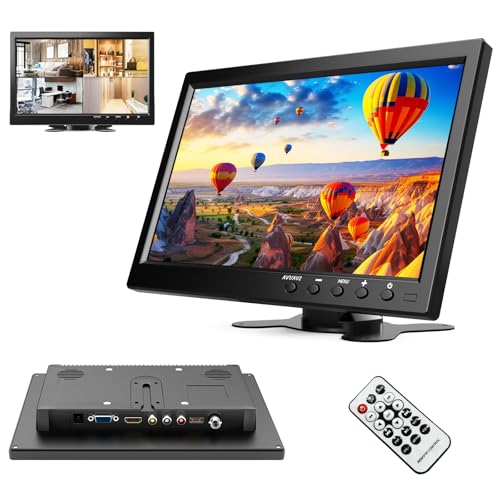
The 10.1-inch Podofo monitor delivers 1024×600 RGB with a 16:9 aspect ratio and built-in speaker. It supports VGA, AVI, HDMI, DVD, PC, CCTV and can power from 9–30V DC. This makes it a suitable display for backup cameras, home security systems, or a compact car monitor. Best for drivers who want a versatile screen that can switch between camera feeds and media playback without a separate player. Caution: ensure your vehicle’s power supply matches the 9–30V DC range.
GOnavidio 12″ Dual Car DVD Players with HDMI Input
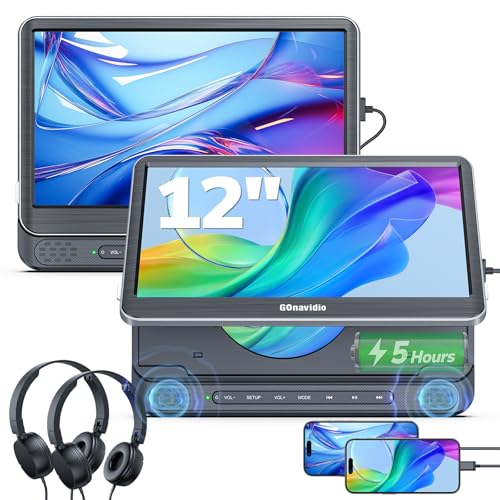
The 12-inch dual car DVD players offer a 1366×768 screen with HDMI input, making it easy to connect phones, Firestick, gaming consoles, or a computer. Their 5-hour playback and two independent screens make them ideal for families on long trips. Best for households seeking two independent viewing zones. Choose this if you want two screens with on-the-go HDMI versatility; avoid if you need built-in long-life batteries, as the units rely on car power or adapters.
WONNIE 12″ Headrest DVD Player with Mount Bracket

This 12-inch headrest monitor delivers 1080P clarity and includes mounting brackets and headrest straps for flexible installation. It supports HDMI Input/Output and AV connections, enabling synchronized playback on a larger screen or a projector. Best for backseat viewing with easy installation. The limitation is the lack of built-in battery; relies on a vehicle power source or adapters.
AINAVI 16 Inch Android 13 Car Headrest Monitor

The 16-inch Android 13 headrest monitor provides a high-resolution 1920×1200 touchscreen with 4K video support. It supports multiple media formats and offers WiFi connectivity for streaming apps via Google Play Protect. Best for users who want built-in apps and a larger display during road trips. Consider that Android-based devices may require regular app management and storage space for updates.
AUSATOYN Car TV Adapter with HDMI Input

The AUSATOYN adapter turns factory CarPlay or Android Auto into wireless experiences and adds an HDMI input to a car screen. It enables streaming through devices like Fire TV Stick or Chromecast to the dashboard display. Best for upgrading older cars with wireless CarPlay/Android Auto and HDMI display capability. Caution: check compatibility with your car’s infotainment system and power availability before purchase.
Buying Guide
What should you consider when buying an HDMI car screen?
Display size and resolution affect viewing comfort on long trips. Larger screens with 1080P or higher deliver crisper images, especially for media and movies. Dimension and mounting options should fit your vehicle’s interior and seating arrangement.
What inputs do you need?
HDMI input is essential for connecting media devices. VGA, AVI, and DVD inputs broaden compatibility with older devices. Consider a model with dual inputs if you plan to switch between rear-view camera feeds and media playback.
Power and installation considerations
Check voltage requirements (3–30V DC typical). Ensure easy installation with headrest brackets or dash mounting. Built-in speakers improve sound without needing extra audio equipment, but external speakers or Bluetooth audio can enhance output in noisy cabins.
Smart features vs. simple displays
Android-based screens offer apps and streaming, while basic monitors focus on HDMI/VGA playback. For kids, smart features may justify higher cost; for passengers who want straightforward playback, a simpler monitor can be preferable.
Reliability and compatibility
Choose devices with clear input compatibility for your devices (phones, Fire TV, game consoles). Beware of units that require proprietary apps or frequent updates that may complicate use in older cars.
Price vs. value
More features generally increase price. Weigh the importance of screen size, HDMI versatility, and mounting options against your budget and how often you’ll use the device.
FAQ
- What is the main difference between a headrest monitor and a dash-mounted screen?
Answer: Headrest monitors are designed for rear-seat viewing with easy passenger access, while dash-mounted screens are typically for the driver and front passenger with more centralized controls. - Can these HDMI car screens be used with CarPlay or Android Auto?
Answer: Some devices include wireless CarPlay/Android Auto adapters or HDMI inputs to connect compatible devices, while others offer separate headrest players with their own interfaces. - Do I need a built-in battery?
Answer: Most car HDMI screens rely on the car’s power supply or a separate adapter; built-in batteries are uncommon in larger headrest units. - Is 1080P necessary for road trips?
Answer: 1080P provides crisper images for movies and games, especially on larger screens, but many 12” or 16” displays deliver good quality at 720P–1080P depending on the source. - Will HDMI inputs work with my phone or streaming device?
Answer: Yes, many HDMI-enabled car displays support connections from phones, Fire TV Sticks, gaming consoles, and PCs, provided you have the correct HDMI cables and adapters.