
Best HDMI to 5.1 Audio Adapters and Extractors for Home Theater
Answering the common buyer need: find reliable HDMI to 5.1 audio extractors that convert HDMI sound to optical or 3.5mm formats for legacy receivers. This guide highlights five solid options, with clear suitability notes for different setups. Ideal buyers include: TV owners needing soundbar compatibility, users with older AV receivers, and those upgrading from PCM stereo to surround sound without changing cables.
Summary of selected products
| Product | Brand | Output Formats | Best For |
|---|---|---|---|
| VPFET HDMI Audio Extractor 4K | VPFET | Optical DTS 5.1, PCM 2.0, 3.5mm | TVs/PS4/5, compact setup |
| 4K HDMI to Optical + PCM 5.1/7.1 | AllAboutAdapters | Optical PCM, DTS/Dolby Digital | Transcoding to analog/optical for old receivers |
| HDMI ARC/ eARC to Optical | YEUGICEO | Dolby/DTS 5.1, PCM 2.0 | TVs lacking analog outputs |
| PROZOR HDMI eARC/ARC to Optical | PROZOR | PCM 2.0, Dolby 5.1, DTS 5.1 | High-fidelity eARC/ARC to optical |
| AUTOUTLET eARC to Optical | AUTOUTLET | Dolby 5.1, DTS 5.1, PCM 2.0 | Simple plug-and-play eARC/ARC to optical |
VPFET HDMI Audio Extractor 4K HDMI To Optical And 3.5mm

Best for compact setups where a user needs both optical and analog outputs from a single HDMI source. It supports 5.1 on optical and 2.0 on 3.5mm, with a 4K/HDCP1.4 pipeline. The device works well when the HDMI source is 1080p–4K with limitations noted for apps like Fire TV or gaming consoles at 4K. Choose this if your primary need is extracting multi-channel audio to an older AV receiver without upgrading cables.
Best for: small living rooms, shared TVs with a combined audio path, and users who primarily use optical or 3.5mm outputs.
4K HDMI To Optical Audio Converter + PCM 5.1/7.1
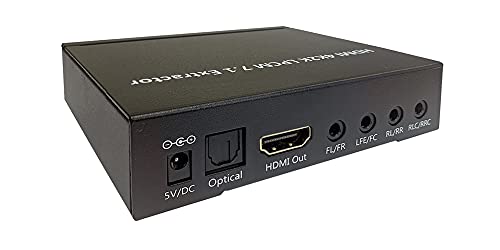
This model excels at decoding uncompressed LPCM 7.1/5.1 into analog outputs while delivering compressed bits via optical for downstream decoders. It suits users upgrading from a PCM-only system to a multi-channel experience without replacing the entire HDMI chain. Best for those with a modern HDMI source and an older AV receiver that still benefits from optical audio.
Best for: users needing robust digital-to-analog translation and easy EDID control to obtain desired formats.
YEUGICEO HDMI ARC/eARC To Optical Audio Extractor

Best for TVs with ARC/eARC that lack traditional analog outputs. It transmits Dolby, DTS 5.1, and PCM 2.0 via optical, enabling a soundbar or receiver to reproduce multi-channel sound. The device includes a toggle to switch between ARC-IN and HD-IN, clarifying its use with different input sources. Suitable for modern TVs without standard audio outputs but not ideal for 7.1 channel setups.
Best for: TV viewers who want to route TV audio to an external sound system without upgrading their TV’s ports.
PROZOR HDMI eARC/ARC To Optical Audio Extractor

Best for users seeking high-resolution audio conversion from HDMI eARC/ARC to optical with dependable 192kHz/24-bit support. It handles PCM 2.0 and multi-channel Dolby 5.1/DTS 5.1, making it a solid choice for home theaters that rely on an optical path. It emphasizes correct HDMI port usage to avoid compatibility issues and provides a straightforward plug-and-play experience.
Best for: home theater setups prioritizing high-fidelity audio and reliable eARC/ARC to optical conversion.
AUTOUTLET HDMI eARC To Optical Audio Adapter

Best for simple plug-and-play setups where users want to convert eARC/ARC to optical with Dolby 5.1 and DTS 5.1 support. It highlights a straightforward, driver-free installation and supports up to high-quality 24-bit/192kHz audio. A limitation is that it may require downstream equipment to support the highest channel formats for full effect.
Best for: straightforward eARC/ARC to optical conversion without software or complex configuration.
Buying Guide: Key Considerations For HDMI To 5.1 Audio Converters
- Output formats: Confirm whether you need Dolby Digital, DTS, PCM, or multi-channel capabilities. Optical outputs are common for older receivers; 3.5mm is a simpler, stereo option.
- HDMI version and bandwidth: If you plan 4K at 60Hz or HDR, verify the device supports the required bandwidth. Some extractors cap at 1080p when certain features are used.
- ARC/eARC support: eARC enables higher-bandwidth, lossless audio formats. If your TV uses ARC or eARC, choose a model designed for that path and confirm compatibility with your soundbar or receiver.
- EDID and switch options: Look for devices with EDID toggles or clear input mode selections to ensure your preferred audio format is delivered.
- Ease of use: Consider plug-and-play designs with minimal configuration, especially when you swap sources (Blu-ray, streaming sticks, game consoles).
- Power requirements: Some converters require USB power. Ensure a convenient power source is available and safe for your setup.
- Limitations and compatibility notes: Some devices do not support certain formats or high-channel counts. Check device notes about 4K passthrough, ARC behavior, and 7.1 compatibility.
FAQ
- What is HDMI to 5.1 audio extractor used for?
It converts HDMI audio signals into separate output formats such as Optical or 3.5mm, enabling surround sound on legacy receivers or speakers without HDMI inputs.
- Do these adapters support 4K video passthrough?
Many models support 4K at 30 Hz or 60 Hz depending on the device and mode, but some may limit output when using certain audio formats. Check the product specs for your source’s resolution requirements.
- Is ARC or eARC required for best results?
ARC/eARC support helps preserve high-quality audio, but many extractors work with standard HDMI sources by converting the audio downstream to optical or analog outputs.
- Can I use these devices with a game console?
Yes, but ensure the console output format matches what the extractor and downstream receiver can decode. Some devices note limitations with 4K or specific modes.
- What output should I choose if my receiver is stereo only?
Use the 3.5mm or PCM 2.0 path when the optical output is not compatible with your receiver. For surround sound, optical or DTS/Dolby formats should be used if supported.
- Do I need to update firmware?
Most of these devices are plug-and-play without firmware updates. If updates are available, follow vendor instructions for safety and compatibility.