Best HDMI to Optical Audio Extractors for TV Sound
Rapidly upgrade your home theater by converting HDMI audio to optical output with reliable extractors. This guide highlights five solid options, each suited for different setups—from modern ARC/eARC TVs to legacy audio systems. Whether you want cleaner sound, easier setup, or compatibility with Dolby and DTS formats, these picks help you connect your TV to soundbars, receivers, or headphones without losing audio quality. The top picks below are best for different buyers: movie lovers, audio purists, budget seekers, and users upgrading older speakers.
| Product | Best For | Key Benefit |
|---|---|---|
| eSynic ARC/eARC Extractor | Modern TVs with ARC/eARC | 192kHz high sampling; clear status indicators |
| Neoteck ARC/eARC Extractor | High-fidelity audio to soundbars | LED status; supports 24bit/192kHz |
| VPFET HDMI ARC/eARC Extractor | TVs with ARC/eARC only | Dual outputs: optical and coaxial |
| OREI 4K Audio Converter | High-res video setups | 4K pass-through; wide format support |
| Amazon Basics HDMI Audio Extractor | Budget-friendly HDMI audio extraction | Simple SPDIF output |
Note: Each product below is evaluated for compatibility with common home theater needs, including PCM 2.0, Dolby Digital, and DTS formats. Consider your TV model, the availability of an optical input on your speaker system, and whether you require eARC support or a straightforward ARC-to-optical conversion.
eSynic Professional ARC/eARC Audio Extractor

The eSynic device converts HDMI ARC/eARC input to optical output, enabling a clean connection from TVs to soundbars or home theater systems. It supports high sampling rates up to 192kHz and 24-bit depth, preserving audio detail for PCM 2.0 and multi-channel formats like Dolby 5.1 and DTS 5.1. The adapter includes indicators to show the current audio signal status, helping users confirm operation at a glance. Best for users with HDTVs that feature ARC/eARC and a need for a straightforward optical path to speakers or headphones.
Who it’s best for: buyers with modern HDR TVs needing a reliable ARC/eARC to optical bridge. Why selected: robust 192kHz/24-bit support and clear status indicators improve usability in complex setups. Limitation: only supports HDTV ARC/eARC inputs; other HDMI devices aren’t supported.
Neoteck ARC/eARC Audio Extractor

The Neoteck unit focuses on pure digital audio extraction from an TV’s eARC/ARC port to an optical output, minimizing interference from other signals. It provides at-a-glance LEDs to indicate 5.1 or 2.0 channel status, helping users ensure the correct audio format is transmitted. It supports high-resolution audio up to 192kHz and formats like Dolby 5.1 and DTS 5.1. Best for systems where you want a clean, faithful audio signal to a soundbar or separate receiver. Caution: LED indicators help; they do not replace manual checks if compatibility issues arise with certain TVs.
VPFET HDMI eARC Audio Extractor

The VPFET adapter converts HDMI eARC to optical and coaxial outputs, solving TV audio limitations when other outputs are unavailable. It explicitly notes compatibility for HDTV ARC/eARC ports and highlights 192kHz sampling with high-quality conversion. Best for TVs that only offer a single ARC/eARC path but need multiple output formats. Choose this if you want flexible output options and a dedicated eARC pathway. Limitation: does not support full HDMI device compatibility beyond ARC/eARC output.
OREI 4K 60Hz Audio Converter (HDA-912)

The OREI converter supports 4K video pass-through up to 60Hz and offers support for LPCM, Dolby Digital, DTS, and related multi-channel formats through its digital-to-analog or digital outputs. While it does not provide ARC support, it is well-suited for high-resolution video setups where audio must be extracted for external speakers via SPDIF or analog outputs. Best for home theaters focusing on video quality with reliable audio passthrough. Caution: no ARC support; designed for standard HDMI inputs with audio extraction to external outputs.
Amazon Basics HDMI To HDMI And Audio Extractor
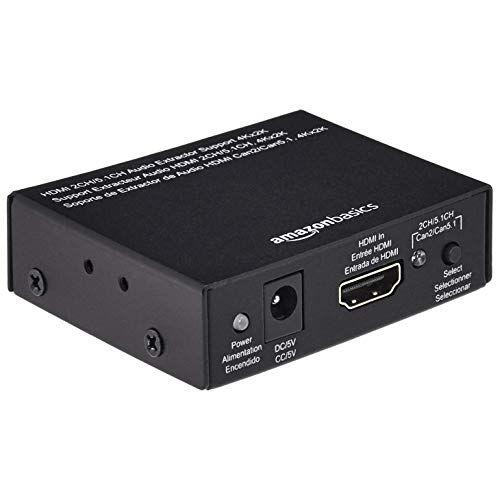
The Amazon Basics extractor focuses on HDMI-to-HDMI audio extraction with an SPDIF output suitable for basic setups. It’s a practical, budget-conscious option when you need a simple, solid path for TV audio to a sound system without complex features. Best for buyers prioritizing affordability and straightforward SPDIF audio. Limitation: limited detail on high-resolution formats and fewer format indicators than some premium models.
J-Tech Digital Premium HDMI To HDMI + Audio
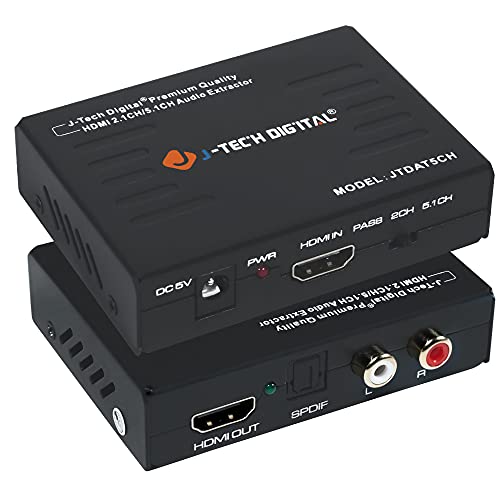
The J-Tech Digital unit extracts digital audio from an HDMI input to either a 2-channel analog output or a 5.1-channel output. It does not support ARC, making it a good fit for setups that do not rely on ARC functionality. It supports up to 4K@30Hz video with EDID pass-through and HDCP compatibility. Best for older or non-ARC TV configurations needing a straightforward audio path. Caution: lacks ARC support and newer surround formats that require ARC-enabled devices.
Buying Guide
- What output do you need? Optical (Toslink) is common for soundbars and older receivers; coaxial offers similar capabilities in some setups.
- Do you require ARC/eARC support? If your TV relies on ARC/eARC for audio return, pick a converter explicitly supporting ARC/eARC inputs.
- What formats must you support? If you need Dolby Digital, DTS, and PCM at high sampling rates, verify 24-bit/192kHz support.
- Video compatibility matters. If you’re preserving 4K/HDR, ensure the extractor passes through the correct video spec without degradation.
- Indications and ease of use. LED indicators or on-device status can simplify setup and troubleshooting.
Frequently Asked Questions
- What is HDMI ARC and why use an extractor? ARC allows audio to travel from the TV to a sound system via a single HDMI connection; an extractor provides alternative output paths when the TV lacks other ports.
- Can these devices handle Dolby Atmos? Most basic extractors support Dolby Digital and DTS; Atmos typically requires compatible ARC/eARC paths and devices.
- Will these work with any TV? Compatibility varies by model and HDMI port capabilities; check ARC/eARC support and input/output availability on your TV.
- Do I need both optical and coaxial outputs? If your audio system accepts only one type, choose an extractor offering your needed format.
- Is plug-and-play possible? Many are plug-and-play but some require EDID or format selection depending on TV-sound system compatibility.
- Are there latency or lip-sync concerns? High-quality extractors aim to minimize delay, but some setups may require manual lip-sync adjustments in the TV or receiver settings.