
Best HDMI to Stereo Audio Solutions for Clear TV Sound
Finding the right HDMI to stereo audio adapter can simplify connecting modern TVs to older or multiple audio systems. This guide highlights five top options that convert HDMI audio to L/R analog or 3.5mm/optical outputs. Best for: small homes with soundbars, older receivers, or setups needing simple, plug-in audio extraction. The top picks cover ARC compatibility, 2.0/5.1 output modes, and easy setup for different TV brands.
| Product | Output Type | Best For | Notes |
|---|---|---|---|
| XPTSFDU HDMI ARC Adapter | L/R + 3.5mm | Tvs with ARC only, needing PCM2.0 | ARC only, needs ARC port and PCM setting |
| VPFET HDMI Audio Extractor | Optical or 3.5mm | AV receivers needing multiple outputs | HDMI ARC not supported |
| J-Tech Digital HDMI Audio Extractor | RCA Optical | 4K sources with ARC support | ARC must be manually engaged |
| Adoreen 192KHz ARC/eARC to RCA | RCA Stereo | ARC/eARC TVs to RCA systems | USB powered; supports PCM/LPCM |
| Amazon Basics 4K HDMI To Audio Extractor | SPDIF & Stereo | Simple HDMI to two-channel audio | 4K@30Hz support; basic features |
XPTSFDU HDMI ARC Adapter With 3.5mm And L/R

The XPTSFDU adapter converts audio from an ARC-enabled TV back to L/R channels and a 3.5mm port, enabling connection to soundbars, speakers, or amplifiers. It is best for buyers using TVs with ARC that lack a traditional audio output. It requires an ARC-enabled HDMI port and PCM output on the TV settings for reliable playback. A noted limitation is that some TVs may need ARC mode selected manually in settings.
VPFET HDMI Audio Extractor To Optical And 3.5mm

This HDMI audio extractor sends audio to optical or 3.5mm outputs, making it suitable for AV receivers that require a separate digital or analog feed. It supports 2.0/5.1/Pass modes and 4K input up to 10.2 Gbps. It does not support ARC/eARC and does not support TV input as the source. Choose this if your setup uses a non-ARC TV and needs flexible mode selection.
J-Tech Digital 4K HDMI Audio Extractor

The J-Tech Digital extractor supports up to 4K@60Hz and ARC, routing audio to RCA or Optical outputs. It notes that ARC requires manual engagement on the unit, and the RCA outputs provide standard 2-channel PCM audio without TV remote control support. Best for users needing Dolby/DTS compatibility through external speakers while preserving high-resolution video.
Amazon Basics 4K HDMI To HDMI And Audio Extractor
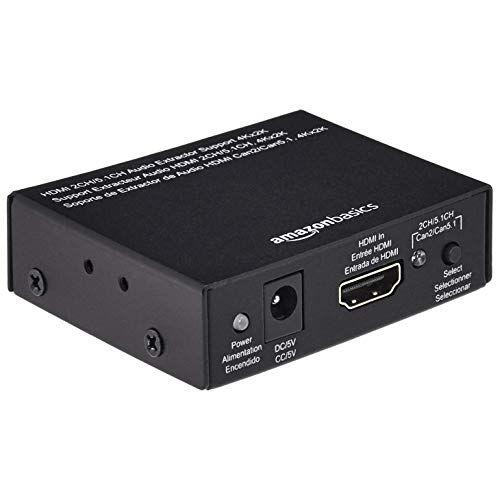
Amazon Basics offers a 4K@30Hz extractor with HDMI input and separate SPDIF and stereo outputs. It is a straightforward option for those who need to extract two-channel audio from compliant HDMI sources with minimal setup. It does not list ARC support, so use this when ARC is not required for your configuration.
Adoreen 192KHz ARC/eARC To RCA

The Adoreen device is designed to work with ARC/eARC-enabled TVs to convert to 2-channel RCA output. It includes a separate USB power requirement and emphasizes PCM/LPCM compatibility. Best for users with ARC/eARC TVs seeking a simple, powered converter that preserves stereo sound and minimizes setup complexity. A limitation is reliance on TV capabilities and USB power for operation.
Buying Guide
What to consider when shopping for HDMI to stereo audio adapters:
- ARC/eARC Support: If your TV uses ARC/eARC to output sound, ensure the converter explicitly supports ARC/eARC and note whether manual activation on the receiver is required.
- Output Options: Decide between RCA, 3.5mm, or optical outputs based on your existing speakers or receivers. Some devices support multiple outputs simultaneously.
- Video Resolution Compatibility: Check whether 4K@60Hz or 4K@30Hz is required by your source. Some extractors cap at 4K@30Hz; if you need 4K60, verify compatibility.
- HDCP and Copy Protection: Ensure the extractor supports the HDCP version used by your content to avoid handshake issues.
- Power Requirements: Some units require USB power; plan a convenient power source to avoid dropouts.
- Audio Formats: If you need multichannel sound, confirm whether the device supports 5.1 or just stereo PCM. Some devices do not downmix 5.1 to stereo.
FAQ
- What is HDMI ARC and when do I need an ARC-compatible adapter? Answer: HDMI ARC allows audio to travel from the TV back to an audio device. Use an ARC-compatible adapter if your TV lacks a dedicated audio out and you want to route TV sound to an external system.
- Can I use these adapters with any TV? Answer: Most require an ARC/eARC-enabled HDMI port and proper TV settings. Always consult your TV manual to locate the ARC-enabled HDMI port and enable ARC/CEC as needed.
- Will these work with 4K content? Answer: Some adapters support 4K at 30 Hz or 60 Hz; verify the model’s maximum HDMI bandwidth and the TV’s output capabilities before purchasing.
- Do I need drivers or software? Answer: No drivers or software are typically required; most units are plug-and-play via HDMI and audio outputs.
- Which is best for a soundbar? Answer: If you need simple stereo playback, look for RCA or 3.5mm outputs. If you require a direct digital connection to a receiver, optical output options may be preferable.
- Is PCM/LPCM compatibility important? Answer: Yes. PCM/LPCM compatibility ensures standard stereo audio output without requiring encoding. If your TV uses pass-through formats, verify device support.