
Best HDMI to XLR Converter for Clear Studio-Grade Audio
Answering the need to extract clean audio from HDMI sources, this guide highlights five Amazon-ready options that convert or extract HDMI audio to XLR or balanced analog outputs. Best for home theaters, music lovers, and professional setups needing balanced outputs. Read on to see who each product is best for and why it was chosen, plus practical buying tips.
Buyer quick view:
| Product | Best For | Key Benefit |
|---|---|---|
| Sabary Optical to XLR Converter | Digital-to-analog fans with Toslink input | High-resolution 192kHz capable optical input to XLR output |
| MEEKI HDMI ARC to XLR Audio Converter (B0HDNKS4BQ) | TVs with ARC needing XLR sound | ARC-compatible HDMI to XLR stereo output |
| MEEKI HDMI ARC to XLR Audio Converter (B0HCV38S6J) | Same as above, alternate SKU | 192kHz support, PCM baseline |
| Fosi Audio ZD3 DAC Preamp with HDMI ARC | All-in-one DAC with XLR/RCA outputs | Fully balanced DAC with HDMI ARC input and remote |
| Amazon Basics 4K HDMI Extractor | General HDMI audio extraction | SPDIF and stereo outputs, simple integration |
Sabary Optical To XLR Converter
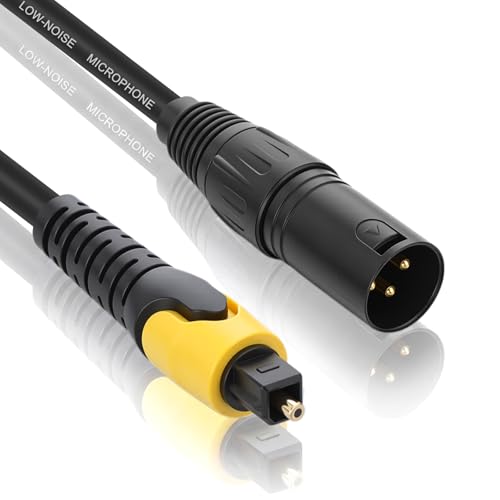
Features: Optical to XLR Audio Converter with 3.3 ft optical cable; converts SPDIF/Toslink to a single mono XLR output. One-way only (optical to XLR). Two-channel LPCM or PCM output; set source to PCM/LPCM. Not compatible with multi-channel like Dolby Digital 5.1. USB power required (cable included).
Best for: HDTVs or players with Toslink outputs that need a clean XLR or balanced connection to a mixer, soundbar, or amplifier. It’s particularly suited for users who already have an optical source and want a straightforward XLR path. Caution: one-way conversion means an optical source cannot accept XLR input back into the TV or receiver.
192KHz HDMI ARC To XLR Audio Extractor (MEEKI)

Features: HDMI ARC input to XLR stereo output; supports 192kHz sampling rate; 24-bit data; designed for HDTV to soundbar, speaker, or mixer setups. Note: Not compatible with eARC; ensure your TV port supports ARC, and provide USB power. The product emphasizes precise, low-noise audio transfer from HDMI ARC sources to balanced XLR equipment.
Best for: Home theaters or studios using HDMI ARC-enabled TVs and requiring a balanced XLR output to a mixer or amplifier. It’s a strong choice when PCM output is preferred and you’re avoiding multi-channel formats like Dolby or DTS. Caution: not compatible with eARC or 5.1-channel formats; configure source device to PCM for best results.
192KHz HDMI ARC To XLR Audio Extractor (MEEKI) — SKU 2

Features: Similar to the first MEEKI model, this unit provides HDMI ARC input to XLR stereo output with 192kHz support and 24-bit data. It reiterates the need to set the TV to PCM for compatibility and to power the device via USB. It’s designed to deliver precise audio without extra HDMI processing or downstream latency.
Best for: Users who want a second, possibly region-specific SKU with identical use-case for ARC-to-XLR extraction. Choose this if you’re cross-checking compatibility with a particular TV or amplifier. Caution: verify that your HDMI port supports ARC and that you provide USB power as required.
Fosi Audio ZD3 Desktop DAC Preamp

Features: Fully balanced DAC preamp with ES9039Q2M; supports HDMI ARC input and balanced XLR/RCA outputs; includes Bluetooth, USB, Optical, Coax inputs; versatile for home stereo systems and theater setups. It’s built to deliver high-resolution audio, with a remote for convenient control.
Best for: Audiophiles or home theater enthusiasts seeking a consolidated DAC with multiple inputs and a clear XLR output path. Choose this if you need balanced XLR along with HDMI ARC compatibility and broad input options. Caution: as a DAC, it’s part of a larger system; ensure compatibility with existing amplifiers or receivers and check if you need the remote for convenient volume control.
Amazon Basics 4K HDMI Extractor
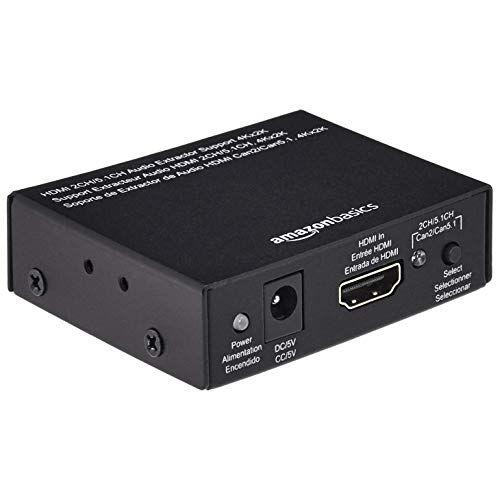
Features: 4K @ 30Hz HDMI to HDMI with an audio extractor; outputs SPDIF and stereo; suitable for Apple TV, Fire TV, Blu-ray players, and other HDMI sources. It does not specify XLR outputs; instead, it provides standard digital and analog audio outputs.
Best for: Use cases where a simple HDMI audio extractor is needed to feed to an analog or digital audio system. It’s a practical pick when XLR isn’t required or when a ready-made SPDIF/analog path is sufficient. Caution: if you specifically need XLR, this model does not provide a native XLR output; consider a dedicated ARC-to-XLR option instead.
Buying Guide: What To Consider When Choosing An HDMI To XLR Converter
What kind of HDMI source do you have?
HDMI ARC-enabled TVs or devices require different adapters than standard HDMI. If you have an ARC source, choose devices explicitly supporting HDMI ARC input and XLR output to ensure compatibility and proper signaling.
Do you need a one-way or two-way path?
Some converters are one-way (HDMI ARC/optical to XLR), while others are DACs that bridge digital to analog. Confirm whether you only need the XLR path or need additional inputs and processing in the chain (for example, a DAC with HDMI ARC input and both XLR and RCA outputs).
What sampling rate and bit depth are required?
Many options advertise 192kHz/24-bit support. If your source is high-fidelity audio, prioritize devices that explicitly support high-resolution PCM/LPCM and avoid those that limit to basic resolutions.
Compatibility and formats
Be mindful of formats not supported (Dolby AC3, DTS, eARC). Some devices require PCM output from the source. Check the product notes for supported formats to ensure your content plays as intended.
Power and installation
Several converters require external USB power. Plan where to place the power supply and ensure your power source is readily accessible during setup and use.
Practical setup tips
- Use a short, high-quality HDMI cable for ARC paths to minimize signal degradation.
- Connect the XLR output to a balanced input on your mixer or amp to maximize noise rejection.
- Set your source to PCM or LPCM when required to avoid encoding mismatches.
- Power the device when using it to ensure stable performance.
Trade-offs to consider
- ARC devices may not support all surround formats; if you require multi-channel audio, you may need a different route or a dedicated audio processor.
- One-way optical-to-XLR converters are great for upgrading legacy equipment but won’t pass audio back to the source.
- DAC-based options provide broader input types but add a layer of signal processing that may affect latency.
Quick comparison at a glance
- Sabary Optical to XLR: Best for optical-to-XLR with PCM output; simple and reliable.
- MEEKI HDMI ARC to XLR: Best for ARC-enabled TVs; direct HDMI ARC to XLR, PCM-friendly.
- Fosi ZD3: Best for a complete DAC with HDMI ARC input and multiple outputs; ideal for flexible setups.
- Amazon Basics HDMI Extractor: Best for generic HDMI audio extraction without XLR; consider for SPDIF/analog needs only.
FAQ
- Q: Do these converters work with all TVs?
A: Compatibility depends on ARC support and HDMI port type. Check if your TV supports HDMI ARC and set it to PCM for best results. - Q: Can I use two different audio outputs at the same time?
A: Most devices provide one primary balanced output (XLR) and may offer separate RCA or SPDIF options; consult the product spec for exact outputs. - Q: Is USB power required for ARC-to-XLR adapters?
A: Some models require USB power to operate; ensure you have a convenient power source. - Q: Will I lose surround sound formats using PCM/XLR?
A: Yes, PCM only carries two-channel audio; multi-channel formats like Dolby Digital or DTS may not be supported. - Q: Can I daisy-chain multiple adapters in one setup?
A: In general, avoid chaining adapters; use a dedicated DAC or extractor per signal path to prevent signal degradation. - Q: Which product is best for a home studio?
A: The Fosi ZD3 DAC Preamp stands out for studios due to its balanced XLR outputs, extensive input options, and high-resolution support.