Best Headphone Amplifier for PC: Clear, Powerful Desktop Audio Solutions
Looking for a dedicated headphone amplifier to improve PC sound without unnecessary complexity? This guide presents five top-value options that pair well with desktops, laptops, or gaming rigs. Each choice is chosen for different needs—budget-friendly entry points, compact portability, gaming features, or high-powered amplification for demanding headphones. Whether you’re an entry-level listener, a gaming enthusiast, or an audiophile seeking cleaner, louder dynamics, there’s a suitable pick here. The top products are best for: casual listening on a computer, portable use with a laptop, gaming setups, studio-like headphone clarity, and DIY-friendly, upgradeable designs.
| Product | Best For | Impedance Range | Output Power |
|---|---|---|---|
| Fosi Q4 | Budget-friendly desktop | 16–200 Ω | Standard desktop power |
| Neoteck Portable | On-the-go listening | 16–300 Ω | Moderate loudness |
| Fosi K5 Pro | Gaming and home PCs | 16–300 Ω | High dynamic range |
| Neoteck 3.5mm | Compact HiFi boost | 16–600 Ω | Mid-range power |
| Fosi K7 | Advanced desktop system | 16–600 Ω | High output |
Fosi Audio Q4 DAC Headphone Amp

The Fosi Q4 combines a DAC and headphone amplifier with USB, Optical, and Coaxial inputs, plus RCA and 3.5mm outputs. It drives headphones from 16Ω to 200Ω and can connect to powered speakers or a home stereo system. Ideal for budget-conscious users seeking plug-and-play audio without driver installations. Tunable bass and treble controls help tailor sound to each source. Best for entry-level PC audio setups, thin-budget desktops, or anyone needing a compact, versatile DAC/amp combo.
Who this is best for: casual listeners and students needing a simple upgrade for PC or TV audio. Limitation: bass/treble controls are basic and may not satisfy audiophiles seeking extreme accuracy.
Neoteck Portable 3.5mm Headphone Amplifier
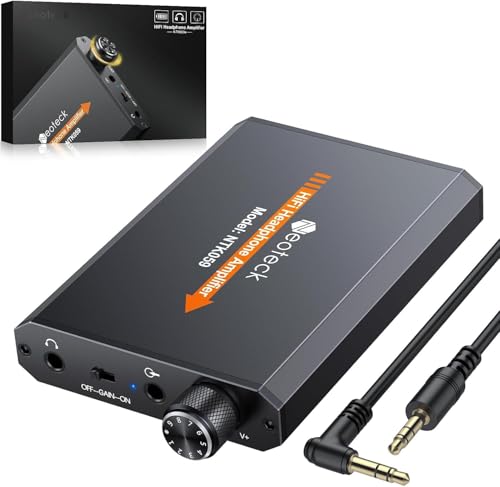
This compact Neoteck amp offers two-stage gain and a 3.5mm input/output, delivering improved clarity and louder output for 16–300Ω headphones. With SNR > 120dB and THD+N of 0.0003%, it provides a clean, distortion-free upgrade for portable use with laptops or phones. Its aluminum matte finish adds durability and a premium feel. Best for travelers, students, or anyone needing a lightweight desktop companion. Caution: very high-impedance headphones may require higher gain settings for adequate loudness.
Fosi K5 Pro Gaming DAC Headphone Amp

The K5 Pro adds a gaming-oriented feature set, including USB-C/optical/coaxial inputs and 3.5mm auxiliary plus RCA outputs. It uses a Texas Instruments NE5532-based design for low-noise, richer audio, and can drive headphones from 16Ω to 300Ω. Best for PC or PS5 setups needing richer ambience and better mic integration. Choose this if you value a robust DAC for gaming and daily listening; caution: the compact form may limit ultra-high-end audiophile upgrades.
Neoteck 3.5mm Headphone Amp With Bass Boost

This Neoteck model focuses on bass-boosted listening with a 16–600Ω range and a dedicated bass switch. It delivers high SNR (>100dB) and THD+N around 0.0005%, producing stronger bass without noticeable distortion. Best for bass-forward genres or general listening with varied headphones. Limitation: bass boost may color the sound for critical listening or reference-grade work.
Fosi K7 DAC Headphone Amp

The K7 is a comprehensive desktop DAC/amp with USB-C, coaxial, optical, Bluetooth aptX HD/LL, and microphone input. It provides balanced 4.4mm, single-ended 3.5mm, and RCA outputs, and supports up to PCM 384kHz/32bit with DSD256. This makes it a strong hub for a complete PC audio system, whether for music, gaming, or work. Best for power users who want flexible connections and high-resolution playback. Limitation: the setup can be more complex than entry-level devices.
Buying Guide: Key Considerations When Choosing a PC Headphone Amplifier
- Headphone impedance and power: Match the amplifier’s output to your cans (16–600 Ω). Higher impedance headphones benefit from more power.
- Inputs and outputs: Ensure you have the right connections (USB-C, USB-A, optical, coaxial) and the right outputs (3.5mm, RCA, or balanced).
- Sound tuning: Bass and treble controls, or DAC-only paths, affect tonal balance. Consider whether you prefer adjustable EQ or neutrality.
- Form factor and portability: Desktop units fit under monitors; portable units suit laptops and travel.
- Upgrade potential: Some models offer replaceable op-amps or add-on features for future improvements.
- Gaming vs. listening: For gaming, consider units with mic inputs, low-latency performance, and robust surround handling.
Frequently Asked Questions
- What is a DAC headphone amplifier, and do I need both?
A DAC converts digital audio to analog; the amplifier boosts headphone output. If your PC or device lacks good headphone output, a DAC/amp combo can improve clarity and volume. - Do I need a balanced output (4.4mm) or is single-ended enough?
Balanced outputs can provide cleaner, higher-power sound with some headphones. For many buyers, a good single-ended (3.5mm or RCA) suffices. - Will a headphone amplifier improve gaming audio?
Yes, especially if it increases dynamic range and reduces distortion at higher volumes, but ensure it has low-latency performance and appropriate inputs for your setup. - Can I use a headphone amp with active powered speakers?
Yes. Use the RCA or 3.5mm outputs to connect to powered speakers or an external amplifier. - Do these devices require drivers?
Many are plug-and-play, but some models may need drivers for certain USB inputs on specific systems. Check compatibility with your OS. - How do I choose the right impedance range?
If your headphones are 32–300 Ω, aim for an amp that can comfortably drive that range at reasonable volume without noise.