
Best Headphone Aux Cables With Mic for Beats and More
Direct answer: a headphone aux cable with a microphone is ideal for users who want in-line control and hands-free calls with wired headsets. This guide highlights five compatible options, showing who each is best for and why. The selections cover Beats-compatible cords, Skullcandy and Skullcandy-compatible remotes, and versatile TRRS cables you can use with laptops, phones, and gaming consoles. Each entry includes where to buy, key features, and practical notes to help you compare at a glance. This is useful for gamers, commuters, students, and professionals who need reliable wired audio with mic input.
Summary table of chosen products
| Product | Brand | Key Benefit | Best For |
|---|---|---|---|
| Cipher Replacement Audio Cable | cipher | Inline mic and control for Beats headphones | Beats Studio/Solo/Pro users needing durable inline mic |
| NewFantasia 3.5mm to 3.5mm Cable | NewFantasia | Remote/volume control compatible with Skullcandy headsets | Skullcandy Hesh and Crusher users |
| UGREEN 3.5mm 4-Pole TRRS 3FT | UGREEN | High-quality shielding and mic support | Gaming, calls, and multimedia on various devices |
| EARLA TEC Beats Cable Dark Blue | EARLA TEC | Inline mic with universal compatibility | Beats on-the-go with inline mic |
| MCSPER 2 Pack TRRS 5Ft | MCSPER | Two cables with mic for backup or multi-device use | Multiple devices requiring mic-enabled 3.5mm |
Cipher Replacement Audio Cable Cord Wire

This replacement audio cable is designed for Beats on-ear and studio lines, including Studio, Solo, Pro, and Mixr. It features an inline microphone and control for hands-free calls and music control. The cord is described as ultra-quiet and durable, with broad compatibility across iPhone and Android devices. Best for Beats users who want a reliable in-line mic in a single, replaceable cord. A potential limitation is that design and fit can vary by model, so verify compatibility with your specific Beats headset.
NewFantasia 3.5mm To 3.5mm Cable With Mic
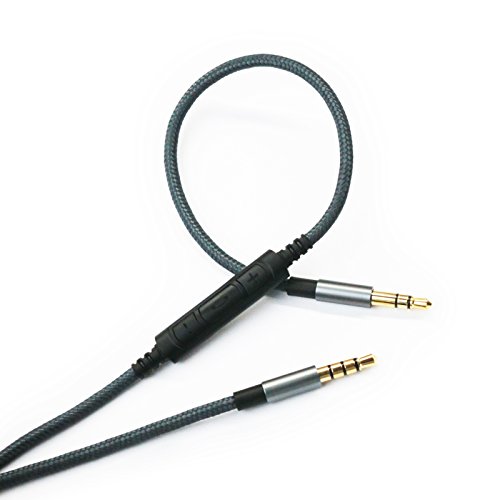
This cable offers remote control and microphone compatibility with Skullcandy Hesh series and similar headphones. It supports volume, play/pause, track change, and call answer/end. The 4.3-foot length provides comfortable reach, and the cable uses OFC wires with a tangle-free nylon braided exterior. Best for Skullcandy users who want integrated mic control. A limitation is that some Android devices may not support all remote functions as described, depending on OS and headset compatibility.
UGREEN 3.5mm Audio Cable 4-Pole TRRS 3FT

UGREEN’s 3.5mm TRRS cable provides mic-enabled connectivity with dual 4-pole jacks, 24K gold-plated plugs, and heavy shielding. The cable uses a silver-plated copper conductor, nylon braid, and an aluminum alloy shell for durability. It’s suitable for gaming, calls, and multimedia across devices with a 3.5mm jack. Best for users needing reliable mic transmission and minimal signal loss. A potential caveat is that very long runs can introduce slight signal drop; consider the 3-foot length for mobile use or a longer alternative if needed.
EARLA TEC Beats Cable With In-Line Mic Dark Blue

This EARLA TEC replacement cord is designed for Beats Solo/Studio/Pro and Detox models with an inline microphone and control. It specifies compatibility with Apple iPhone and other devices via the 3.5mm connector. The 1.4-meter length offers flexible use, especially for on-the-go listening. Best for Beats users who want a dedicated mic-enabled replacement. A limitation is that some inline controls may not function with non-Apple devices depending on device compatibility.
MCSPER 2 Pack TRRS 3.5mm Audio Cables
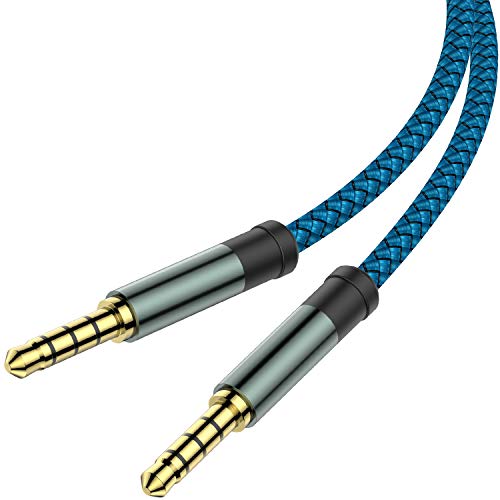
MCSPER offers a two-pack set of TRRS 3.5mm cables with mic function support. Each 5-foot cord uses a 4-conductor design with 24K gold-plated connectors and an aluminum shell for durability. It’s widely compatible with car stereos, iPads, PS4 headsets, and more. Best for users who want a spare or multi-device option. A limitation is that some users may encounter minor fit issues with thicker headphone jacks or cases; test with your gear before extended use.
Buying Guide
What should you consider when choosing a headphone aux cable with mic?
- Device compatibility: Ensure the cable supports your headset model and your phone/computer OS.
- Connector type and length: Choose 3.5mm TRRS for mic support and pick a length that fits your typical setup.
- In-line mic and control: Verify which functions (play/pause, volume, call answer) are supported on your devices.
- Durability and shielding: Look for nylon braiding, tangle-free design, and robust shielding to reduce noise and wear.
- One or two-pack options: If you want backups or shared use, a dual-pack offers value and convenience.
FAQ
- Q: Will these cables work with iPhone and Android devices?
- Q: Do these cables carry both audio and microphone signals?
- Q: What length is best for commuting or desk use?
- Q: Are there durability claims I can rely on?
- Q: Should I avoid any cables?
A: Most listings indicate broad compatibility, especially via the 3.5mm TRRS connector, but some inline controls may be limited on non-Apple devices.
A: Yes, most TRRS cables support full audio and microphone transmission when paired with compatible headsets.
A: 3 to 4.5 feet is versatile for most desks and travel; longer cords can add tangle risk.
A: Look for nylon braiding, reinforced joints, and gold-plated connectors for lasting performance, though real-world longevity varies by usage.
A: Avoid cables with flimsy connectors or poor shielding, as these often introduce noise or intermittent mic issues.