
Best Headphone Combo Jack Splitter for Sharing Audio and Microphones
Looking for a reliable headphone combo jack splitter to share audio or use a microphone on a single port device? This guide highlights top adapters that split a single 3.5mm CTIA/TRRS port into separate headphone and mic connections. Designed for gamers, travelers, students, and coworkers, these splitters help you use headsets with two plugs on devices that accept one combo jack. Each pick targets specific use cases, such as gaming headsets, travel, or classroom sharing, so you can choose the right fit for your setup.
Summary of chosen products:
- KINGTOP 3.5mm Headphone Mic Splitter Adapter — Best for PS4/PS5 and Xbox users who need a durable dual-female splitter
- StarTech.com Headset Adapter — Best for keeping legacy headphones usable with modern laptops and ultrabooks
- KAYQINHO 3.5mm Audio Splitter — Best for shared listening on multiple devices
- IIISOGNO 3.5mm Splitter 2-Headphone — Best for simple two-headphone sharing on mobile and PC
- onelinkmore 5-Port Splitter — Best for classroom or group listening with up to five outputs
KINGTOP 3.5mm Headphone Mic Splitter Adapter

The KINGTOP adapter uses a 1 male to 2 female configuration to connect dual-plug gaming headsets to a single-port device. It features 24K gold-plated connectors and standard TRRS wiring, with one 3.5mm male plug and two 3.5mm TRS female jacks for Mic and Audio. This splitter is compact and portable, suitable for PS4/PS5, Xbox One, Switch controllers, newer laptops, and Android phones. Best for gamers who need a simple, reliable headset/mic split on console and PC setups.
- Best for: gamers with dual-plug headsets seeking a portable, plug-and-play solution
- Limitations: Not intended for splitting two separate headphone outputs for simultaneous independent listening
StarTech.com Headset Adapter, Microphone and Headphone Splitter

The StarTech MUYHSMFF adapter converts a single 3.5mm audio jack into a separate headset and mic port, but it is not an audio splitter for two headphones. Its design focuses on keeping legacy equipment usable with modern laptops, Ultrabooks, smartphones, or tablets. Best for users who want to reuse older headsets with new devices without buying new hardware, especially on the go or while traveling.
- Better for: users needing mic and headphone separation for one headset across newer devices
- Limitation: Not suitable for two headphones sharing audio simultaneously
KAYQINHO 3.5mm Headphone Splitter

The KAYQINHO splitter provides dual headphone jacks ideal for sharing music or games. It uses a 24K gold-plated connector and oxygen-free copper for clear transmission with minimal signal loss. Widely compatible with PS4/PS5, Xbox, Nintendo Switch, PCs, tablets, and phones. Best for: Sharing audio between two listeners on a single device, with robust construction for travel and daily use.
- Choose this if: you want broad compatibility and reliable dual-output audio sharing
- Limitation: Built primarily for stereo audio sharing; microphone support depends on the host device and headset
3.5mm TRRS Splitter for 2 Headphones

This 2-pack of TRRS splitters supports two headsets with mic and audio, ideal for sharing music or group calls. It is compatible with most 3.5 mm TRRS devices, including phones, tablets, laptops, PCs, and game consoles. Note: to use the microphone, you’ll need a headset with a built-in mic. Best for: quick, straightforward sharing on devices that support TRRS connections.
- Best for: simple two-person listening with mic support on TRRS-enabled devices
- Limitation: Not all TRRS combos carry mic when using certain devices
Headphone Splitter, 5-Jack 3.5 mm
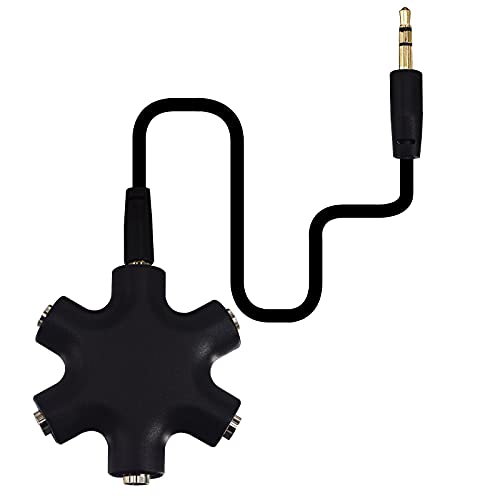
This 5-out splitter lets you share audio with up to five listeners via a single 3.5 mm input. It is compatible with any device featuring a 3.5 mm AUX port. Best for classrooms, group travel, or family use where multiple listeners need access to the same audio source. Limitations: more jacks can introduce modest signal degradation compared to a dedicated multi-channel amplifier.
- Best for: group listening in educational or entertainment settings
- Limitation: potential minor signal loss with many outputs
sovunis Multi Headphone Audio Splitter

The sovunis 5-way splitter enables sharing audio with up to five headphones. It emphasizes portability and broad device compatibility, making it practical for road trips, plane rides, or car trips. Best for: travelers or families needing a compact, light splitter for multiple listeners.
- Better for: simple, portable multi-headphone listening
- Limitation: does not provide separate mic functionality for all connected devices
ENVEL Headset Splitter Cable for PC

ENVEL’s headset splitter enables you to connect a stereo headset to both a PC audio port and mic port simultaneously. It uses oxygen-free copper for sound integrity and features a braided wire for durability. Best for: desktop users who need a reliable PC microphone and audio split without interfering with sound quality. Caution: ensure your PC’s port configuration matches the splitter’s TRRS layout to avoid miswired audio.
- Best for: stable PC audio and mic split with durable build
- Limitation: may require adapter compatibility with certain laptops
Cubilux 3.5mm to Double Audio Jack Sharing Splitter
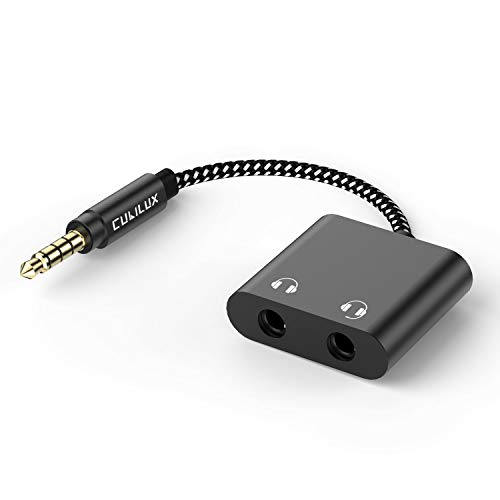
The Cubilux splitter converts a single 3.5mm jack into two headphone jacks, allowing two listeners to share music or movies. It features a gold-plated connector for improved signal quality and oxygen-free copper for stable transmission. It supports inline mic and remote control on compatible headsets. Best for: quick two-person sharing on mobile devices or laptops. Limitation: microphone support depends on headset and device pairing.
- Best for: two-person sharing with inline mic control
- Limitation: some mic functionalities may not pass through on all devices
Buying Guide: Key Considerations For Your Headphone Splitter
- What you share: If you need mic and audio for one headset, choose a TRRS splitter that provides both ports. If you only need audio, a TRS or simple audio splitter can be sufficient.
- Device compatibility: Check CTIA vs. OMTP configurations. Most modern devices use CTIA (mic on the tip/ring). Pick splitters labeled as CTIA-compatible to avoid mic issues.
- Number of outputs: For groups, consider 3, 4, or 5 outputs. More outputs may introduce some signal loss; ensure the device’s input can drive multiple jacks cleanly.
- Build and durability: Gold-plated connectors and braided cables improve durability and reduce signal loss over time. Portable users should prioritize compact designs.
- Mic support: Some splitters are not true mic splitters; verify whether the mic port is supported with your headset on your device.
- Travel vs. home use: Travel-friendly splitters are lighter and compact, while home setups may benefit from more robust, multi-port options.
FAQ
- Can a headphone splitter carry both mic and audio for two users? Yes, if the splitter is TRRS and the host device supports mic input on a single port.
- Will all devices support the mic with these splitters? Not always; some devices require specific mic compatibility or headset configurations.
- Is a 5-way splitter suitable for a classroom? Yes, it is designed for sharing audio with multiple listeners in a group setting.
- Do these adapters degrade sound quality? High-quality gold-plated connectors and copper wiring minimize loss, but some minor degradation can occur with many outputs connected.
- Are these compatible with gaming consoles? Some are suitable for consoles like PS4/PS5, Xbox, or Switch when paired with compatible headsets.
- What is the main difference between audio-only splitters and mic-enabled splitters? Audio-only splitters split sound without a microphone path; mic-enabled splitters provide separate mic ports for headsets with built-in mics.