
Best USB to 3.5mm Audio Adapters for Headphones and External Speakers
If you need to connect headphones or external speakers to a computer or console via a USB port, these USB-to-3.5mm adapters are the most reliable option. They convert a USB port into a TRRS or 3.5mm output, enabling stereo sound and, in many cases, microphone support. This guide highlights five solid choices and explains who each is best for, plus practical buying considerations to help you choose.
Summary table of selected products:
- MillSO USB to 3.5mm Audio Jack Adapter Stereo Aux USB External Sound Card
- STSAUX USB to 3.5mm Jack Audio Adapter (2-Pack)
- QAJOPFN USB Audio Adapter External Sound Card
- Syncwire 3.5mm Nylon Braided Aux Cable (not a DAC, but a solid plug-and-play option)
- MillSO USB to Dual 3.5mm Audio Jack Adapter
- JSAUX USB to 3.5mm Jack Audio Adapter
- UGREEN USB Sound Card Adapter
MillSO USB to 3.5mm Audio Jack Adapter
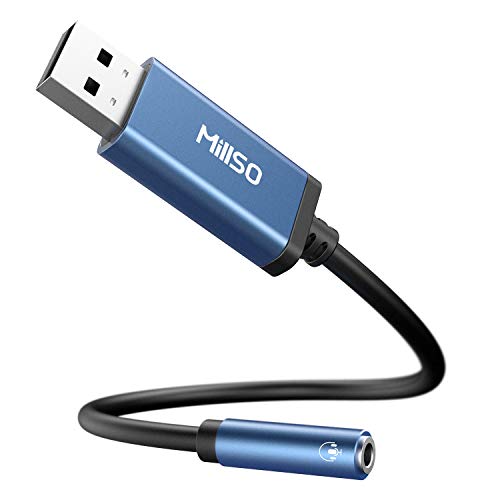
Best for users needing a simple USB-to-TRRS solution to restore or add a 3.5mm jack for headsets or speakers. Works well for office scenarios or light multimedia use.
What to know: This adapter converts USB to a CTIA 4-pole TRRS output, enabling listening and speaking with compatible headsets. It is driver-free and USB bus-powered, with a compact form factor. Important limitation: audio travels from USB to 3.5mm port only, not the other way around. Not compatible with iOS standard headphones, TVs, or car audio.
STSAUX USB to 3.5mm Audio Adapter (2-Pack)

Best for users who want a budget-friendly dual-pack solution with a high-resolution DAC for clearer audio on Windows, Mac, or Linux devices.
Highlights: 24-bit/96KHz high-resolution audio output with noise reduction; plug-and-play with no drivers. Best for computers that need a quick replacement of damaged ports. Not compatible with iOS microphone functionality; audio output only.
QAJOPFN USB Audio Adapter

Best for users needing a simple USB sound card substitute to extend mono microphone input and speaker output via USB, with plug-and-play setup.
Notes: It uses a built-in DAC for higher fidelity audio and is USB-powered with no external power. It supports mono microphone TRS input; does not support TS or TRRS microphone functionality. Choose this if you primarily need a practical, low-cost replacement for damaged desktop audio ports.
Syncwire 3.5mm Nylon Braided Aux Cable

Best for users who simply need a durable, high-quality 3.5mm auxiliary cable for extending or linking devices with an existing USB audio solution.
Limitations: This option is a cable, not a USB sound card. It does not convert USB to 3.5mm or add a DAC. Choose this if you already have a USB adapter and need a reliable cable to connect devices, while avoiding case or case-related fit issues.
MillSO USB to Dual 3.5mm Audio Jack Adapter
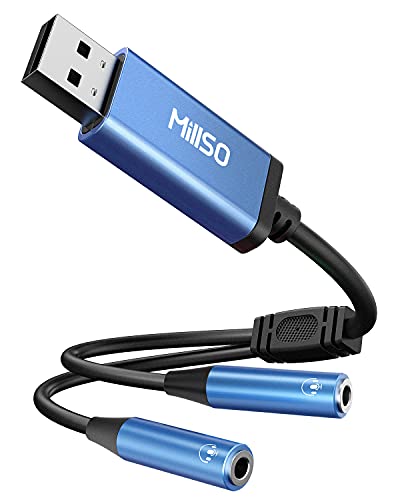
Best for sharing audio between two headsets or two speakers from one USB port. Useful for family viewing or collaborative listening.
Why this stands out: It provides two TRRS 3.5mm ports and a built-in DAC, enabling clearer stereo sound. Not compatible with non-TRRS microphones or non-headphone devices. If you need dual outputs, this is a strong pick; otherwise, a single-output adapter might suffice.
JSAUX USB to 3.5mm Jack Audio Adapter

Best for users seeking a reliable, pocketable USB-to-3.5mm solution with reliable plug-and-play recognition and HI-FI sound performance.
Key points: Outputs stereo sound and supports CTIA/OMTP standards. Note that microphone functionality of some Apple EarPods may not be supported depending on usage. Choose this if you want a compact, portable adapter with straightforward setup.
UGREEN USB Sound Card Adapter

Best for users who want a clean, high-fidelity USB sound card upgrade for laptops or desktops, with emphasis on high-resolution audio output and noise reduction.
Notes: It provides a USB DAC with the aim of improving overall sound quality. It is a straightforward, driver-free, plug-and-play option. If you are upgrading a computer’s audio path, this is a solid choice; verify compatibility with your device’s 3.5mm port and microphone needs.
Buying Guide: Key Considerations For Choosing
What should you evaluate when selecting a USB-to-3.5mm adapter?
- Output type: Do you need a single 3.5mm output or two outputs for sharing headphones or speakers?
- Microphone support: Do you require CTIA/OMTP compatibility or microphone input along with audio output?
- Driver requirements: Is plug-and-play enough, or do you need a device with a built-in DAC for higher fidelity?
- Power and portability: Is a bus-powered, compact adapter important for travel or office use?
- Device compatibility: Will the adapter work with Windows, macOS, Linux, Chrome OS, or specific consoles like PS4/PS5?
- Durability and cable quality: Do you need a braided cable and reinforced connectors for long-term use?
What situations favor USB-to-3.5mm adapters?
- Replacing a damaged laptop or desktop audio jack.
- Connecting a modern PC to legacy headphones or external speakers without a built-in DAC.
- Sharing audio in a family or classroom setting with dual-output adapters.
How to choose between DAC-based and simple output adapters?
- DAC-based adapters (with 24-bit/96kHz or similar specs) tend to deliver clearer, more detailed audio and better noise reduction.
- Simple output adapters are often sufficient for basic listening, conferencing, or quick retrofits where high fidelity is not critical.
Practical usage tips
- Ensure correct TRRS configuration when using dual-output devices; misalignment can prevent microphone or audio from functioning.
- If you plan to use a microphone, verify that the adapter supports microphone input on your chosen devices.
- Keep drivers updated where applicable, though many of these products are designed to be driver-free.
FAQ
- Can I use these adapters with a gaming console?
Yes, many adapters work with PS4/PS5 and similar platforms that support USB audio interfaces. Check compatibility notes for each model.
- Do any adapters require external power?
Most are USB bus-powered and do not require external power. Always confirm power requirements in the product features.
- Will these adapters improve built-in laptop sound quality?
Adapters with a built-in DAC can improve clarity and reduce noise, especially on budget laptops; simple adapters provide basic output.
- Is microphone support universal across all these adapters?
No, some adapters support microphone input via TRRS while others are output-only. Check the listed features for microphone compatibility.
- Are these compatible with iOS devices?
Some adapters are not compatible with iOS microphone functionality; they are typically output-only on iOS setups.