
Best Headphone Splitter for Audio Interfaces and Studio Setups
Direct answer: For audio interface use, choose a 1/4″ TRS splitter when you need to split a stereo signal cleanly, and a 3.5mm splitter for consumer devices like phones and laptops. The top five picks below balance durability, shielding, and compatibility to suit studio, DJ, and casual listening environments.
Buyer quick comparison
- HOSONGIN 1/4″ Splitter Cable — Best for studio or live sound with durable shielding.
- Syncwire 3.5mm Splitter — Best for everyday devices, compact and reliable.
- Poyiccot 1/4″ to 3.5mm Adapter — Best for versatile device pairing in compact setups.
- Quelong 3.5mm Headphone Splitter — Best for sharing audio with minimal signal loss.
- sovunis 3.5mm Splitter — Best for multi-output needs from a single 3.5mm source.
HOSONGIN 1/4″ Splitter Cable — 2x 1/4″ TRS Outputs

Best for: Studio engineers and live sound technicians who need to split a stereo signal without introducing crosstalk or significant signal loss. The dual 1/4″ TRS outputs support high-fidelity transfers in crowded environments where two performers or monitors require independent feeds.
Why selected: It uses gold-plated connectors and tinned copper wire to minimize distortion, with a fully molded, shielded design to resist EMI/RFI interference. Suitable for demanding studio or stage settings where stable audio is critical.
Limitations: This cable does not combine two outputs into one input, so use it strictly for splitting a single source.
Syncwire Nylon-Braided 3.5mm Splitter
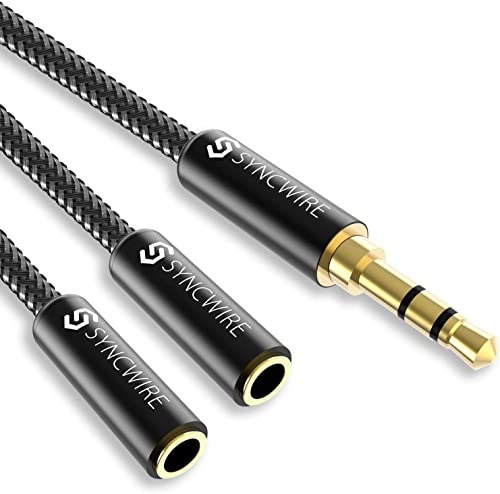
Best for: Consumers and travelers who need to share audio from a phone or tablet to two headphones or speakers on the go.
Why selected: It features 24K gold-plated connectors to reduce signal loss and noise, with double shielding for interference resistance. The nylon-braided construction offers durability for mobile use.
Limitations: It is a standard 3.5mm splitter without a mic passthrough, so it won’t support microphone sharing or inline control features on some devices.
Poyiccot 1/4″ To 3.5mm Adapter And Splitter Cable

Best for: Musicians and gear setups where you need to connect 1/4″ gear to consumer 3.5mm inputs or split a 1/4″ source into two 3.5mm stereo paths.
Why selected: This adapter provides a molded, shielded construction to prevent EMI/RFI interference and uses nickel-plated plugs for durable, stable connections.
Limitations: It operates as a 1/4″ to 3.5mm adapter/splitter, so ensure your signal path matches the intended input/output configuration before wiring multiple devices.
Quelong Headphone Splitter Nylon Braided

Best for: Shared listening on mobile devices, gaming consoles, and home entertainment setups where two listeners need to balance output from one source.
Why selected: It uses 24K double-shielded gold-plated connectors and oxygen-free copper cores to preserve sound quality, while a double-braided nylon shell adds durability and minimizes tangling.
Limitations: Microphones are not supported; only stereo audio sharing is provided.
sovunis 3.5mm 3-Way Splitter

Best for: Basic home audio setups where a single source needs to feed three outputs, such as multiple speakers or headphones from a 3.5mm port.
Why selected: It provides a compact 3-way distribution with a simple 3.5mm stereo plug and three female outputs. Shielding helps reduce interference on common consumer devices.
Limitations: It should not be used to feed three inputs into one device; only one input to multiple outputs is supported.
Buying Guide: How to Choose the Right Headphone Splitter For Your Audio Interface
- What signal path do I need? Choose 1/4″ TRS splitters for studio or monitor splits and 3.5mm splitters for consumer devices.
- Do I need shielding and low interference? Look for fully shielded cables and gold-plated connectors to minimize noise and EMI/RFI.
- What about durability? Nylon braiding and molded housings improve longevity in practice rooms, stages, and on the road.
- Will I use microphones or control features? Many splitters only support stereo audio; avoid those if you need mic passthrough or inline controls.
- How many outputs do I need? Choose a model with the appropriate number of outputs (two, three, etc.) to match the number of devices you’ll connect.
Practical tips for setup
- Label each output to prevent confusion during performances or recording sessions.
- Route high-impedance devices away from power cables to minimize hum and interference.
- Test one output at a time when integrating into a new interface to confirm clean, undistorted audio.
FAQ
- Can I use a headphone splitter to combine two outputs into one input?
No. Most splitters are designed to split a single signal into multiple outputs, not merge two signals into one input. - Are 1/4″ splitters compatible with audio interfaces?
Yes, many interfaces provide 1/4″ TRS jacks suitable for studio monitors or headphones, making these splitters ideal for studio use. - Is mic support available on standard headphone splitters?
Some models do not support microphones; check product features to confirm mic compatibility before purchase. - Will a gold-plated connector always improve audio quality?
Gold plating helps resist corrosion and can improve signal durability, but overall audio quality depends on the entire signal path and shielding. - Which splitter is best for travel?
A compact 3.5mm splitter with nylon braid and robust shielding is typically best for portable setups and casual listening on the go.
Summary table of recommended products
| Product | ||
|---|---|---|
| HOSONGIN 1/4″ Splitter Cable | 1/4″ TRS Splitter | Studio and live sound, two independent outputs |
| Syncwire Nylon-Braided 3.5mm Splitter | 3.5mm Stereo Splitter | Everyday devices, travel, two headphones |
| Poyiccot 1/4″ To 3.5mm Adapter | 1/4″ to 3.5mm Adapter/Splitter | Versatile device pairing, compact setups |
| Quelong Nylon Braided Headphone Splitter | 3.5mm Stereo Splitter | Sharing audio on mobile and home systems |
| sovunis 3-Way Splitter | 3.5mm 3-Way Splitter | Single source to three outputs |