
Best Headphone to Coaxial Cable Options for Clear Digital-to-Analog Audio
When choosing a headphone to coaxial cable adapter, the priority is reliable digital-to-analog conversion, clear sound, and compatibility with common home audio gear. This guide highlights five well-suited options for connecting coaxial digital outputs to 3.5mm headphone or AUX inputs. Best for desktop setups, home theater, gaming, and personal listening, these cables vary in length and direction to fit different arrangements and devices.
Summary of selected products:
| Product | Best For | Length | Key Benefit |
|---|---|---|---|
| MagiDeal Coaxial Audio Video Cable RCA to 3.5mm | Budget setups | 200 cm | Simple RCA to 3.5mm extension |
| Elecan DAC 192kHz Coaxial to 3.5mm AUX Female | Desktop listening with DAC | 0.61 m | Built-in DAC, PCM 192kHz |
| Veeloon DAC 192kHz Coaxial to 3.5mm AUX | Versatile connections | 0.61 m | USB powered, 24/192kHz support |
| Elecan DAC 192kHz Coaxial to 3.5mm AUX Male (10 ft) | Longer desktop setups | 10 ft | Long reach with DAC |
| Elecan DAC 192kHz Coaxial to 3.5mm AUX Male (4 ft) | Compact desks | 4 ft | Short, tidy cable with DAC |
MagiDeal Coaxial Audio Video Cable RCA to 3.5mm
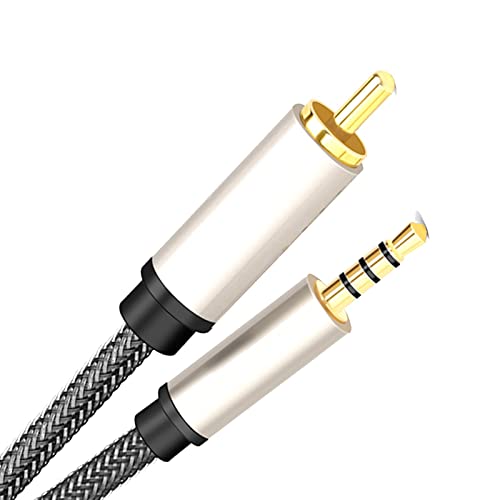
The MagiDeal option is an affordable 3.5mm digital coaxial cable designed to bridge SPDIF RCA outputs to a 3.5mm jack. It suits budget setups where simple conversion is the priority. Best for readers seeking a straightforward extension without built‑in DAC features. Caution: it does not include a DAC, so sound quality gains depend on the connected DAC/receiver.
Elecan DAC 192kHz Coaxial to 3.5mm AUX Female Converter

This Elecan model includes a built‑in DAC and amplification to convert SPDIF coaxial signals to analog 3.5mm output. It supports high-resolution formats up to 24-bit/192kHz and claims stable, low‑latency performance. Best for users who want a compact DAC-enabled adapter for TVs, Blu‑ray players, or gaming consoles. Limitation: one-way conversion (RCA to 3.5mm AUX) and USB power required.
Veeloon DAC 192kHz Coaxial to 3.5mm AUX Female Cable

The Veeloon option emphasizes 75Ω SPDIF transmission with a built‑in DAC, delivering high‑fidelity sound and compatibility with multiple 3.5mm devices. It is USB powered and designed for desktop setups, PS4/5, HDTVs, and Blu‑ray players. Choose this if you want reliable digital-to-analog conversion in a compact form. Caution: ensure PCM/LPCM output on source devices to avoid no-sound issues.
Elecan DAC 192kHz Coaxial to 3.5mm AUX Male (4 Ft)

Designed for short desktop connections, this Elecan model provides unidirectional SPDIF coaxial to 3.5mm AUX with a built‑in DAC. It supports up to 192kHz/24bit and uses a durable braided jacket for neat cable management. Best for compact workstations or entertainment centers where a shorter, tidy cable is preferred. Limitation: like other DAC adapters, it does not support reverse conversion from AUX to RCA.
Elecan DAC 192kHz Coaxial to 3.5mm AUX Male (10 Ft)
This longer Elecan cable extends flexibility for living rooms or media rooms with the same DAC-enabled conversion. It supports 24-bit/192kHz PCM/LPCM, ensuring detailed sound, and uses a robust outer jacket for better durability. Best for setups where the audio source sits farther from headphones or amplifiers. Caution: length may introduce slight signal loss if routing is not clean.
Buying Guide
What to consider when selecting a headphone to coaxial cable adapter
- Purpose and direction: Choose one-way SPDIF coaxial (RCA) to 3.5mm, unless you need bi‑directional capability, which these products typically do not offer.
- Built‑in DAC vs. passive: A DAC in the adapter adds explicit digital-to-analog conversion and can improve fidelity, especially on budget audio gear with limited DAC quality.
- Sampling rate support: Look for 24-bit/192kHz compatibility to ensure high-resolution audio is preserved when available from the source.
- Length and setup: Short cables keep clutter down; longer cables increase flexibility but may require careful routing to minimize interference.
- Connectors and compatibility: Gold-plated RCA and 3.5mm jacks reduce corrosion and ensure stable connections; verify your device’s PCM/LPCM output settings for best results.
- Powering: Some DAC adapters are USB powered; ensure there is a convenient power source if your device requires it, and note that power does not transmit audio in these designs.
Frequently Asked Questions
- Can I use these adapters to connect a headphone jack directly to a coaxial output?
– These adapters convert coaxial S/PDIF to a 3.5mm analog input; they are not designed to drive headphones directly without a separate amplifier or DAC stage. - Do these cables work with all TVs and Blu‑ray players?
– They work with devices that have a coaxial S/PDIF output and a 3.5mm analog input; some devices may require PCM/LPCM mode for audio to pass through. - Is the DAC inside the adapter necessary for good sound?
– A built‑in DAC can improve fidelity by providing a purpose-built conversion path; passive cables rely on the downstream DAC in the receiving device. - Will these work with gaming consoles like PS5 or Xbox?
– Yes, if the console outputs via coaxial S/PDIF and the receiving device accepts 3.5mm AUX input; ensure compatibility with your headset or amplifier. - Are there any setup steps I should follow?
– Set the source to PCM/LPCM if needed and connect the 3.5mm end to the amplifier or headphones; USB power may be required for DAC operation.