Best Headphones for Teams Calls: Clear Voice, Comfortable Wear, All-Day Use
If you need reliable audio for Microsoft Teams, Zoom, or other video meetings, these headphones and headsets are designed to improve speech clarity and reduce background noise. This guide highlights top options for different workstyles—from wired reliability to wireless convenience—so you can pick the best match for your teams calls. The top picks are suited for office workers, remote teammates, and students in hybrid setups. Below is a quick summary table of the five products that best meet common Teams call needs.
| Product | Best For | Connection Type | Key Benefit |
|---|---|---|---|
| Logitech H390 (Black) | Desk-based calls, quiet environments | Wired USB-A | Rotating mic, inline controls |
| Logitech H391 (Graphite) | Chromebook users, mixed device setups | Wired USB-C | Noise-canceling mic, inline controls |
| Logitech H390 (Rose) | Colorful, desk-based teams work | Wired USB-A | Rotating mic, inline controls |
| AOC USB Headset | Quiet clarity in busy offices | Wired USB-A | 270° rotatable mic, 40mm drivers |
| Lenovo Wireless VoIP Headset | Hybrid work with mobility | Bluetooth 5.3, USB-A | Teams certified, multi-device |
Logitech H390 Wired Headset for PC/Laptop

The Logitech H390 is a wired USB headset designed for clear call quality in busy environments. Its digital stereo sound and a rotating noise-canceling microphone help keep your voice sharp while minimizing background noise. Inline controls let you adjust volume or mute without disrupting your meeting flow.
Best for: Desk-based professionals who prioritize reliable wired connectivity and straightforward controls. The in-line mic mute and volume control are ideal for frequent meeting participation. A potential limitation is the fixed USB-A connection, which may require an adapter for newer devices.
Logitech H391 Wired Headset for PC/Laptop (Graphite)

This model adds USB-C compatibility while delivering similar noise-canceling mic performance and inline controls. The microphone’s rotatable arm provides flexible positioning and can be tucked away when not in use. Clear audio makes it suitable for extended Teams or Zoom meetings and calls.
Best for: Chromebook users and teams adopting USB-C devices seeking consistent mic performance. Limitation: USB-C compatibility may not cover older PCs without USB-C ports or adapters.
Logitech H390 Wired Headset (Rose)

The Rose variant provides the same core features as other H390 models: a digital stereo sound profile with a noise-canceling mic and handy inline controls. The rotating boom arm helps you adjust quick settings during calls, while the color option supports a non-distracting desk setup.
Best for: A color-conscious office desk where consistent wired reliability matters. Caution: Ensure your device supports USB-A or USB-C depending on the variant you choose, to avoid compatibility issues.
AOC USB Headset with Microphone
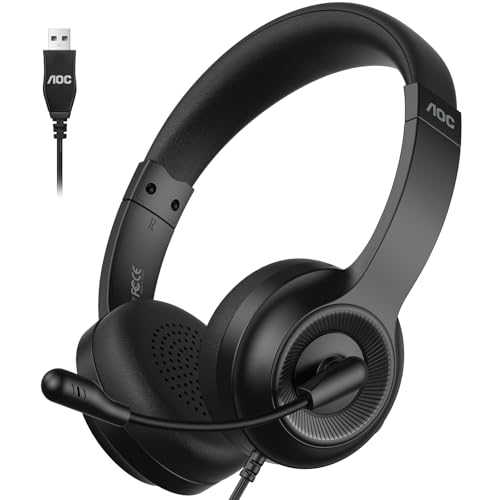
With a 270° rotatable noise-canceling mic and 40mm drivers, the AOC headset aims to deliver clear vocal pickup and balanced sound for calls and online meetings. It is designed for use with Zoom, Microsoft Teams, and other platforms, making it a solid choice for office-grade calls in noisy environments.
Best for: Users seeking a dependable wired option with robust mic control and universal meeting compatibility. Limitation: Some users may prefer lighter weight or softer ear cushions for all-day wear.
Lenovo Wireless VoIP Headset Teams Certified

This Lenovo model is Teams certified and UC optimized, combining a comfortable, lightweight over-ear design with Bluetooth 5.3 and a USB-A receiver. Three-mic noise suppression helps ensure your voice stands out in meetings, with multipoint connectivity allowing quick device switching.
Best for: Hybrid workers who need seamless device switching and a Teams-focused certification. Caution: Wireless performance can vary with distance or interference, so consider your workspace layout.
Lenovo USB-A Wired Stereo Headset Gen 2

Lenovo’s USB-A wired headset offers AI noise canceling refined by Lenovo software for clearer calls. It includes easy inline controls and a lightweight 140 g design with replaceable earcups for extended wear. The double-sided boom mic ensures consistent voice capture during meetings.
Best for: Office workers who want software-assisted noise suppression and long-wear comfort. Limitation: Requires Lenovo software integration for best results, which may be more relevant in Lenovo ecosystems.
Logitech Zone Vibe 100 Wireless Headphones

The Zone Vibe 100 is a wireless, over-ear option with active noise reduction and a microphone designed for meetings on popular platforms. It supports multipoint Bluetooth and is marketed as suitable for work and play, offering a contemporary look and comfortable fit for longer calls.
Best for: Remote workers or students who value mobility and a modern design. Caution: Wireless latency or battery management can affect long conference sessions; plan charging accordingly.
Waxop Wireless Headset with Mic
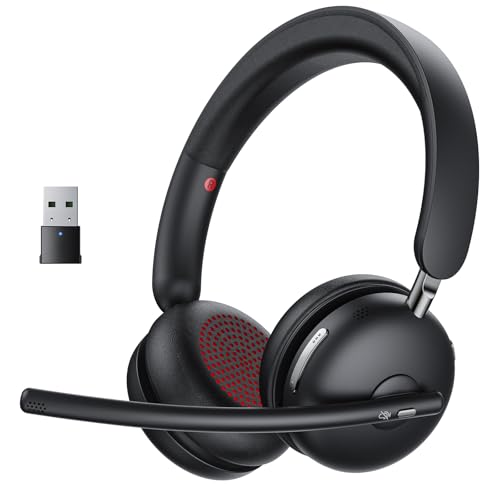
The Waxop headset emphasizes AI noise cancellation, a one-tap mute function, and Bluetooth 5.3 connectivity with a USB dongle option. It is designed to provide clear voice capture across devices and platforms, suitable for home offices and shared workspaces.
Best for: Teams that need dependable mute controls and broad device compatibility. Limitation: As a newer brand, long-term reliability and software updates may vary by region.
Buying Guide: Choosing the Right Headset For Teams Calls
What to consider when selecting a headset for Teams calls:
- Connection type: Wired headsets offer consistent audio with minimal latency, while wireless variants provide mobility but may experience interference or battery concerns.
- Microphone quality: Look for noise-canceling or multi-mic configurations to suppress ambient noise and improve speech clarity.
- Comfort and fit: For long calls, weight, ear cushion material, and headband design affect comfort and focus.
- Platform compatibility: If you use Teams extensively, confirm UC certification or Teams optimization to ensure seamless integration.
- Inline controls and mute: Quick access to mute and volume is valuable in fast-paced meetings to avoid interruptions.
- Durability and replaceability: Replaceable earcups or robust build helps extend life in daily use.
- Device compatibility: Consider USB-A vs USB-C or Bluetooth multipoint features for multi-device setups.
Frequently Asked Questions
- What is the difference between wired and wireless headsets for Teams calls? Wired headsets minimize latency and dropouts, while wireless headsets offer mobility but may require charging and can be affected by interference.
- Do I need a certification for Teams to work well with a headset? Not always, but Teams-certified or UC-optimized headsets generally provide smoother integration and better audio routing in Teams.
- Is a higher-end microphone necessary for call quality? For most meetings, a dedicated noise-canceling mic improves clarity, especially in noisy environments.
- Can I use these headsets with multiple devices? Many models support multipoint Bluetooth or have USB connections that allow easy switching between devices.
- Should I choose a lightweight headset for all-day wear? Yes, lighter models with soft ear cushions reduce fatigue during long sessions.
- Are replaceable earcups important for longevity? Replacing worn cushions can extend headset life and maintain comfort.