Best Hi8 Camcorder Tape Players and Digitization Solutions
For anyone preserving memories recorded on Hi8, 8mm, or Digital8 tapes, finding reliable hardware and services is essential. This guide highlights five practical options—from dedicated Hi8 camcorders and tape decks to capable digital converters and transfer services. Each picks up where others leave off, helping you view, capture, or convert your old footage with clarity and confidence. Use the sections below to compare features, compatibility, and transfer outcomes across a range of needs.
| Product | Brand | Format Support | Type | Link |
|---|---|---|---|---|
| Sony Camcorder for 8mm Digital8 Hi8 Tape Transfer to Computer USB and DVD | Sony | 8mm, Video8, Hi8, Digital8 | Camcorder + USB transfer | See product below |
| Hi8 8mm VCR Video Cassette Recorder | Tech Collector | Hi8, 8mm | VCR/Player | See product below |
| Sony Hi-8 HMPD 120 minute 2-Pack | Sony | Hi8 | Tapes | See product below |
| Sony Standard Grade 8mm Camcorder Videotape Cassette, 120 Minutes | Sony | 8mm | Tapes | See product below |
| Video Tape Transfer Service (VHS, Hi8, Video 8, 8mm, MiniDV) to Digital MP4 | Time To Remember | Hi8, Video8, 8mm, MiniDV | Transfer service | See product below |
Note: The following selections span hardware for playback and digitization, plus a professional transfer option. They are arranged to help you decide whether you want to view tapes directly, convert them at home, or rely on a service for final MP4 delivery.
Sony Camcorder for 8mm Hi8 Tape Transfer to Computer
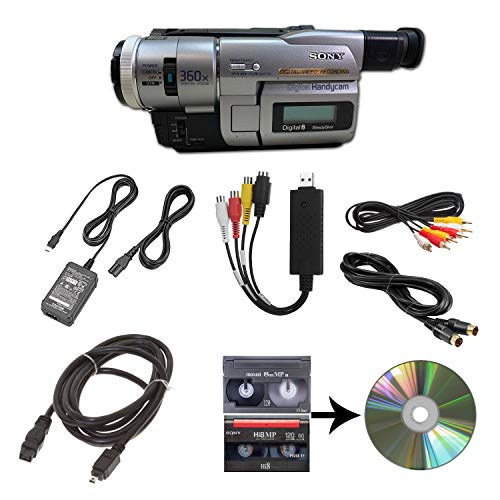
The Sony camcorder package supports playback of multiple legacy formats, including 8mm, Video8, Hi8, and Digital8 tapes. It includes a USB capture device to transfer footage to computer files or burn to DVD, plus power, AV, and S-Video cables for convenient transfer or TV viewing. This all-in-one approach simplifies the digitization workflow for collectors who want to preserve memories without purchasing separate capture gear.
Hi8 8mm VCR Video Cassette Recorder

This Hi8/8mm VCR combo offers a dedicated playback device for older tapes, enabling direct viewing and initial digitization. It includes a USB adapter to facilitate digitization with a PC, bridging the gap between legacy media and modern storage. If you have a shelf full of tapes but limited computer access, this unit streamlines the process to view or begin the digital transition.
Sony Hi-8 HMPD 120 Minute 2-Pack

These Sony Hi-8 tapes are designed to provide improved picture quality and reliable performance, featuring HMP digital compatibility and enhanced color for Hi8 recordings. For archival projects or regular playback, quality tapes help maintain your footage’s integrity across decades of use. The pair format is convenient for long-term storage and batch projects, ensuring you have ready media for future transfers.
Sony Standard Grade 8mm Camcorder Videotape Cassette, 120 Minutes

This standard-grade 8mm tape delivers reliable 120-minute recording capacity suitable for a range of Hi8 or 8mm camcorder sessions. The tapes are widely compatible with many older camcorders, and the 120-minute length strikes a balance between storage efficiency and long recording sessions. If you’re updating a library of older recordings, these tapes provide a dependable option to capture or re-record segments.
Video Tape Transfer Service (VHS, Hi8, Video 8, 8mm, VHS-C, MiniDV) to Digital MP4

For those seeking a hands-off digitization solution, this transfer service converts multiple tape formats—including Hi8 and 8mm—into MP4 files. Delivery is via Google Drive within about 10 business days after receipt of tapes, with a cloud-based transfer option and complimentary media recycling. It’s a practical choice when you lack the hardware or the time to perform DIY transfers, and you want a consistent, verifiable final product.
Buying Guide: Key Considerations For Hi8 Tape Digitization
- Format compatibility: If you have a mixed library (Hi8, 8mm, Digital8), a device or service that supports multiple formats reduces the need for adapters and multiple transfers.
- Playback vs. digitization: Some options are designed for live viewing, others for converting tapes to digital files. Decide whether you primarily want to watch footage or preserve it in digital form.
- In-device vs. PC-based transfer: USB capture devices can keep everything in-house, but dedicated transfer services may offer higher consistency and post-processing options.
- Quality and reliability: Tape quality degrades over time. Pair high-quality tapes with a dependable VCR or trusted transfer service to maximize retention of picture and audio fidelity.
- Longevity of formats: MP4 and other standard digital formats ensure broad compatibility with modern devices and platforms, simplifying long-term storage.
- Cost vs. convenience: Hardware purchases can incur recurring costs for media, while services come with per-tape pricing. Weigh long-term value against upfront investment and effort.
- Storage strategy: Plan for backup copies, ideally in multiple locations or cloud storage, to prevent data loss from hardware failure or environmental damage.
- Power and cabling: Ensure you have compatible cables (RCA, S-Video, USB) and compatible power supplies for your chosen devices to minimize setup friction.
When selecting a solution, align your choice with how many tapes you need to process, the desired final format, and your tolerance for DIY steps versus outsourcing. The products and services above provide a spectrum from direct playback to professional digitization, helping you preserve Hi8 and related tapes for future viewing and sharing.