Best Huddle Room Video Conferencing Systems for Small Meetings
Finding the right huddle room video conferencing system means balancing simple setup, strong audio, and clear video in compact spaces. This guide highlights five top options that fit small meeting rooms, desks, and collaboration corners. Each pick is explained for who benefits most, with practical pros, cons, and setup notes to help you compare quickly.
Quick reference: top picks for huddle rooms
| Product | Best For | Why It Stands Out | Limitations |
|---|---|---|---|
| Logitech MeetUp Video Conferencing System | Small teams needing all‑in‑one setup | Ultra HD sensor, wide FOV, beamforming mics | Expands with mic accessory for longer rooms |
| Logitech MeetUp and Expansion Mic | Rooms needing extended audio | 3 mics built in, wider pickup with expansion | Audio range depends on mic kit |
| COOLPO Camera 360 with AI Tracking | Flexible layouts and larger huddle spaces | 360° view, AI speaker tracking, plug‑and‑play | May rely on software for best tracking in some apps |
| Yealink A10 All‑in‑One Bar | Microsoft Teams or Zoom rooms | Integrated Android OS, touch panel, 4K camera | Depends on native app support |
| Jabra PanaCast 180° Camera | Teams or universal conferencing | 3‑lens 180° panoramic, real‑time stitching | Requires compatible USB setup |
Logitech MeetUp Video Conferencing System

Best for: small conference rooms or huddle spaces that require an all‑in‑one video and audio setup. This model integrates a camera, mic array, and speakers in a single unit for quick deployment and minimal cable clutter. Its Ultra HD 4K sensor, 120° field of view, and 5x HD zoom help capture everyone in a compact room, while beamforming mics pick up voices clearly within several meters.
What it offers: All‑in‑one form factor designed for quick setup in tight spaces. The 4K sensor provides sharp video, and the broad FOV reduces the need to move the camera. Beamforming microphones help maintain intelligibility in noisy environments.
Who should choose this: teams that want a straightforward, single‑device solution with strong video and reliable audio for short meetings. Better for rooms where minimal setup is a priority and participants sit around a table.
Caution: If your room is longer than typical huddle spaces, consider adding an expansion mic to extend audio pickup beyond the default range.
Logitech MeetUp and Expansion Mic HD System

Best for: huddle rooms that need stronger, broader audio coverage and a dedicated mic extension. This kit is designed to improve voice pickup across the room, making conversations clearer for remote participants.
Why it’s selected: Logitech’s premier ConferenceCam line emphasizes a super‑wide 120° field of view and audio tuned for small meeting rooms. The expansion mic option effectively boosts range from eight to fourteen feet, helping teams seated around larger tables or slightly irregular room layouts.
Who should choose this: teams that frequently experience edge seating or want more precise audio pickup for everyone in the room. Choose this if your room demands better coverage than a single unit can provide.
Caution: The audio improvement depends on using the expansion mic; without it, you may not realize the full pickup benefits in larger huddle spaces.
Logitech MeetUp HD (Renewed)

Best for: budget‑minded buyers who want a compact, easy‑to‑deploy system for small rooms. The renewed option may provide value while maintaining the core MeetUp benefits.
Why it’s selected: The all‑in‑one conference camera packs a wide 120° field of view and 4K video options with 5x HD zoom. It’s designed to cover the entire meeting table in tight spaces and supports motorized pan/tilt for flexible framing.
Who should choose this: teams seeking a cost‑effective, plug‑and‑play solution with reliable video for short, collaborative sessions. Avoid this if you require the latest model with the newest sensor in the market.
COOLPO 360° AI Huddle Pana

Best for: flexible seating and room layouts where a full 360° view helps include every participant. The AI speaker tracking supports natural conversation flow in midsize huddle spaces.
Why it’s selected: 360° coverage reduces blind spots, and eight built‑in microphones with noise cancellation promote clear audio across the room. The USB plug‑and‑play setup keeps installation simple for most meeting software.
Who should choose this: teams that want a panoramic view without multiple devices or cropping. Choose with caution if you rely heavily on a fixed framing approach in traditional software ecosystems.
Yealink A10 All‑In‑One Conference Bar

Best for: rooms that rely on seamless Microsoft Teams or Zoom Rooms experiences with a compact, integrated device. Combines camera, mics, and display control into one unit with a touch panel option.
Why it’s selected: An all‑in‑one video bar with 4K camera and eight MEMS microphones, plus a dedicated touch panel for confident meeting control. AI features include auto framing and speaker tracking for smart room management.
Who should choose this: teams that want native Teams and Zoom support in a single device with intuitive touch control. Avoid this if you prefer modular, highly customizable setups with separate components.
TONGVEO 4K Conference Room Camera System

Best for: rooms seeking advanced gesture control, AI auto‑tracking, and flexible mounting with PTZ capabilities. Suitable for mid‑sized conference spaces requiring dynamic framing.
What it offers: 4K AI PTZ camera, 350° horizontal and 180° vertical movement, 6 gesture controls, and 5x digital zoom. Includes a professional microphone array and long stand‑alone audio options. USB3.0 plug‑and‑play eases setup.
Who should choose this: teams wanting hands‑free tracking and precise pan/tilt/zoom via AI or gesture control. Caution: complex controls may require some initial setup to optimize tracking for your room.
Jabra PanaCast 180° Panoramic Camera
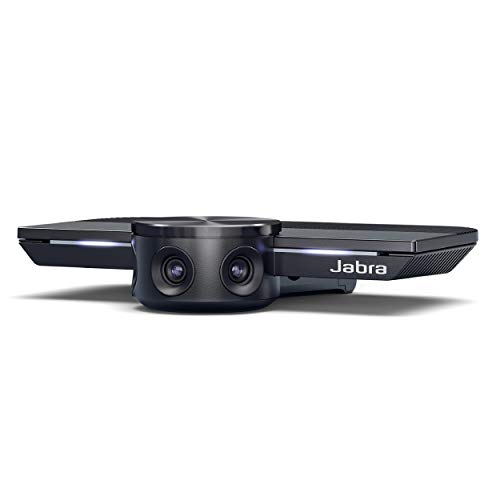
Best for: teams that require inclusive coverage and easy plug‑and‑play setup with 4K video. Its real‑time stitching presents a wide, unified view of all participants.
Why it’s selected: Intelligent video technology adapts to lighting, and automatic zoom ensures everyone is included as people move. Plug‑and‑play convenience supports quick starts in busy offices.
Who should choose this: teams that value wide room coverage and straightforward deployment. Avoid this if you need motorized PTZ control beyond stitching for complex room shapes.
Buying Guide: How to pick a huddle room system
- Room size and seating: For up to 6 people, a single‑unit solution with wide FOV is usually enough. For larger or irregular layouts, consider a system with an expansion mic or a separate speakerphone option.
- Camera features: If you need every participant in frame, look for 120°+ FOV, auto framing, or 360° coverage. For dynamic rooms, PTZ and AI tracking can help maintain focus on the active speaker.
- Audio quality: Small rooms benefit from beamforming mics and built‑in speakers tuned for voice. If noise is a concern, a system with noise reduction and echo cancellation is preferred.
- Platform compatibility: Ensure native support for your preferred apps (Microsoft Teams, Zoom, Google Meet) and check if a touch panel or remote control is included for ease of use.
- Setup and maintenance: Plug‑and‑play USB devices simplify deployment, while some systems offer asynchronous expansion options for future room changes.
- Future‑proofing: 4K video and multi‑microphone arrays help ensure the system remains capable as meeting software and collaboration standards evolve.
Frequently asked questions
- What defines a good huddle room video system? A good system delivers clear video with a wide field of view, reliable audio pickup, easy setup, and compatibility with common conferencing platforms.
- Should I prefer an all‑one device or a modular setup? All‑in‑one devices offer quick setup and cleaner cables, while modular systems can be tailored with separate cameras, mics, and speakers for larger or oddly shaped rooms.
- Can these systems work with Zoom and Teams? Yes, most listed options support major platforms, but check each model’s native app support for best performance.
- Is 4K essential for huddle rooms? 4K provides crisper video, especially on larger displays, but many huddle rooms perform well with 1080p depending on room lighting and bandwidth.
- What about audio expansion? If participants sit far from the camera or around long tables, expansion mics or a separate audio setup improves pickup and reduces dead zones.
- Are renewals or refurb items reliable? Renewed devices can be budget‑friendly but may carry different warranty terms; verify return policies and test functionality promptly.