Best Internal Blu-Ray Player Drives for PC and Tower Computers
Internal Blu-ray players and burners provide fast media reading, reliable disc writing, and seamless integration inside desktop towers and laptop-style bays. This guide highlights five top options, drawn from reliable brands and capable of handling BD-R/BD-RE, DVD, and CD media. Each product section includes a direct purchase link, an image, and key features to help you compare performance, compatibility, and drive longevity. Whether you’re building a media PC, upgrading a legacy rig, or replacing a failed optical drive, these picks cover both reading and writing capabilities across various form factors and interfaces.
Summary Of Chosen Products
| Product | Brand | Type |
|---|---|---|
| Digital LG HLDS Internal SATA 16X Blu-ray BDXL M-DISC | Vinpower Digital | Internal Blu-ray Burner |
| Tower Computer 4K Ultra HD Blu-ray Burner (Pioneer) | Maitlan | Internal Blu-ray/DVD Writer |
| 3D Blu-ray Burner UJ-272 9.5mm | Generic | Internal Blu-ray Writer |
| Internal Super Multi 12X BD-R BD-RE DL (Pioneer BDR-207DBK) | Valley Of The Sun | Internal Blu-ray Writer |
| LG WH14NS40 16X Blu-ray BDXL DVD CD Internal Burner | LG | Internal Blu-ray Burner |
Digital LG HLDS Internal SATA Blu-ray Burner (BDXL)
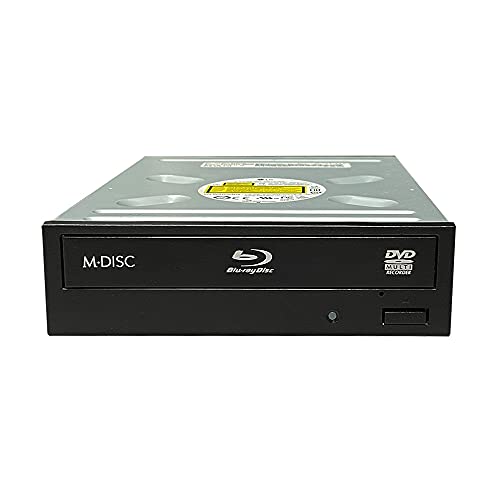
The Vinpower Digital offering combines an authentic LG HLDS drive with enhanced duplication-grade features designed for reliable burning and disc mastering. The drive emphasizes Enhanced Recording Preservation Control, which helps ensure stable burns and longer drive lifespan, a valuable trait for ongoing media creation workflows. Its strong read capability supports disc recovery from slightly scratched media, making it a robust choice for archiving and master disc preparation. Ideal for users who need dependable BD-R/BD-RE, DVD, and CD writing in a compact internal SATA form factor, this drive is suited for dedicated media creation systems and archival projects.
Maitlan 4K UHD Internal Blu-ray Burner (Pioneer BDR-211UBK)

This factory-refurbished internal 4K UHD Blu-ray writer, originally built by Pioneer, is designed for standard tower PCs with a SATA interface. It supports 16x BD-R write speeds, 4K Blu-ray playback, and DVD regional playback control. While not including software, manuals, or accessories, it offers plug-and-play operation with a tray-loading design. The model corresponds to the BDR-211EBK (Japanese edition) and is compatible with a wide range of tower configurations that house standard 5.25″ optical drives. It’s a practical option for users needing reliable BD-R writing and 4K-capable playback within a single internal drive.
3D Blu-ray Burner UJ-272 9.5mm Internal Drive

The UJ-272 is a 9.5mm high internal Blu-ray drive designed for laptop- or slim desktop-class installations, compatible with 9.5mm optical bays. It supports BD-R, BD-RE, BD-RE DL, DVD and CD formats, and can burn Blu-ray movies and data at speeds up to 6x. It doubles as a writer and reader, enabling both media playback and data archiving. The drive is tray-loading with SATA interface, emphasizing easy plug-and-play installation in compatible towers or slim desktops. Its support for a wide range of Windows, Linux, and Mac OS versions makes it a versatile option for mixed environments.
Valley Of The Sun Internal 12X BD-R BD-RE DL Drive

This Pioneer-based internal Blu-ray reader/writer is designed for tower desktops, with a SATA interface and tray-loading mechanism. It supports plug-and-play operation and is compatible with a broad spectrum of Windows, Linux, and Mac OS versions. The BDR-207DBK can burn up to 12x on BD-R and BD-R DL media, making it one of the fastest internal options for dual-layer BD media. It remains backward compatible with most DVD and CD formats, enabling an all-in-one optical solution for both reading and burning various disc types in a single drive bay. The unit is positioned as a practical upgrade for power users needing reliable Blu-ray write speeds inside a standard PC chassis.
LG WH14NS40 16X Blu-ray Burner Bundle

The LG WH14NS40 bundle adds value with Verbatim 50GB M-Disc BD-R DL media, a SATA cable, and mounting screws. The drive offers a robust internal Blu-ray burning capability with M-DISC longevity advantages, making it ideal for long-term archiving. The bundle’s M-Disc media is engineered for resistance to light, temperature, and humidity, with a projected lifespan measured in hundreds of years. The WH14NS40 supports a wide range of BD-R/BD-RE formats, along with standard DVD and CD media, and uses a vertical or horizontal mounting approach compatible with many desktop builds. This makes it a solid option for users prioritizing durability and high-capacity backup options inside an existing PC case.
Buying Guide: Key Purchase Considerations And Comparisons
When choosing an internal Blu-ray drive, consider the following factors to align with your needs:
- Purpose: Determine whether you need primarily Blu-ray reading, burning, or both. Some drives excel at fast BD-R writing, while others emphasize reliable media reading with robust disc handling.
- Write speeds and BD formats: Look for BD-R, BD-RE, and BD-R DL support, plus BD-R XL if you need larger disc capacities. 6x–16x write speeds are common for consumer drives; higher speeds save time for large backups.
- Interface and form factor: SATA is standard for internal drives. Height compatibility (9.5mm vs 12.7mm) matters for slim desktops or certain bays. Tray-loading mechanisms are common, but some units support slimline configurations.
- Media longevity: Features like Enhanced Recording Preservation Control and M-Disc compatibility enhance archival reliability. If long-term storage is a goal, factor in media quality and durability.
- Bundle and accessories: Bundled media, cables, or mounting screws add value. Ensure you have the appropriate SATA power and data cables in your build.
- OS and software compatibility: Verify driver and software support for your operating system (Windows, Linux, macOS). Some drives are plug-and-play without extra software, while others benefit from bundled utilities.
- Warranty and refurbished status: Factory-refurbished units can be cost-effective but may have shorter warranties. Consider warranty terms and vendor support when comparing options.
- Future-proofing: If you plan to store large media libraries or back up important data, a drive supporting BD-R XL and reliable disc reading becomes beneficial over time.
In comparing these five options, you’ll notice a balance between brand reliability, read/write versatility, and cost. For readers focused on archival durability, models featuring M-Disc media bundles and enhanced preservation controls stand out. For PC builders prioritizing maximum write speeds and 4K Blu-ray capabilities, higher-speed, larger-name drives from Pioneer and LG offer strong performance. Finally, consider the physical fit for your chassis and whether you need a slim 9.5mm drive for laptops or small form-factor builds versus a standard 5.25″ bay in a full-size tower.