
Best Karaoke System With Recording: Top Picks for Real-World Fun
If you need a karaoke system that can record performances or feed audio into recording software, these five models stand out for built-in audio interfaces, USB-C recording options, or easy integration with mic and mixer setups. This guide is ideal for home entertainers, content creators, and small event hosts who want to capture their sessions. Each pick explains who it is best for, plus practical limitations to consider before buying.
| Product | Best For | Why It Stands Out |
|---|---|---|
| Ikarao Smart Karaoke Machine for Adults | Family homes, casual parties | All-in-one unit with a 10.1″ screen, two wireless mics, and built-in YouTube/Karaoke apps for unlimited songs. |
| GEYGUY GTSK10-1 Karaoke Machine with USB-C Interface | Live streaming and recording enthusiasts | USB-C audio interface supports clean recordings, with built-in DSP effects. |
| Pyle Portable Bluetooth PA System | Outdoor events, portable recording | 600W system with Bluetooth, mic input, and basic recording capability via external devices. |
| Sound Town SWM16-MAX Wireless Karaoke Mixer | Home theater setups and multi-source mixing | Multiple inputs/outputs (HDMI, Optical, AUX) for flexible audio routing, good for capturing mixed audio. |
| CYY Karaoke Machine (4 Mic Version) | Group sing-alongs with extra mics | Four wireless mics and robust speakers; suitable for capturing multiple voices when connected to a recording device. |
Note: Availability and exact features may vary by model and region. If recording is your primary goal, prioritize models with USB-C or USB audio interfaces, line-level outputs, and clear mic preamps.
Ikarao Smart Karaoke Machine for Adults

Features include a self-contained 10.1″ HD karaoke tablet, two self-charging wireless microphones, and a 300W peak speaker for party-grade sound. It links to built-in YouTube and Kraraoke apps for access to millions of songs in multiple languages. The 180-degree-rotating tablet keeps lyrics visible from various viewing angles. This model is best for buyers who want a ready-to-use, plug-and-play party system without extra devices. Caution: It does not specify a dedicated USB audio interface for high-quality direct recording, so external recording solutions may be necessary for studio-grade work.
Ikarao Karaoke Machine for Adults (10.1″ Screen, KaraFun Prime)

Best for households seeking a built-in lyrics screen and streaming-enabled song library, with two wireless mics and a 280W stereo setup. It includes KaraFun Prime for extensive song access and a user-friendly interface. The built-in screen simplifies lyric visibility for group singing and reduces the need for external tablets. Caution: While it offers robust playback, direct USB-C or USB audio recording is not highlighted, so plan to record through an external interface if you need studio-quality captures.
GTSK10-1 Karaoke Machine for Adults with USB-C Audio Interface

Best for creators who want clean digital audio paths and live-stream-ready sound. The USB-C audio interface supports recording with lower noise and latency, and the built-in DSP effects offer vocal tailoring. The 10″ woofer and dual tweeters provide strong room-filling sound, suitable for indoor gatherings and small performances. Caution: This model might require external recording software or hardware to capture multi-channel performances beyond basic USB audio.
Pyle Portable Bluetooth PA System

Best for events where portability and simple recording workflows matter. This 600W system includes a built-in Bluetooth connection, mic input, and basic recording capability via external devices. It’s a solid choice for outdoor gatherings or casual home parties that require quick setup and easy microphone integration. Caution: It lacks a dedicated USB audio interface; for higher-quality recordings, use an external audio interface or mixer.
Sound Town SWM16-MAX Wireless Karaoke Mixer System
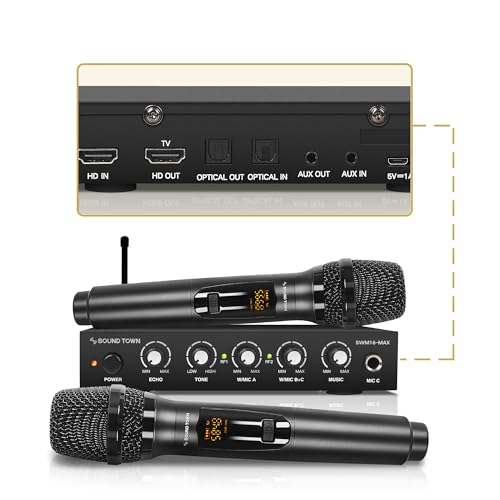
Best for home theater setups and flexible routing. This mixer system provides HDMI In/Out, Optical in/out, and AUX, enabling clean integration with TVs, soundbars, and recording devices. It uses preset mic modes and UHF wireless mics to minimize interference, and the device can blend music and vocals for a polished capture. Caution: It requires compatible recording hardware to capture a mixed signal at a high quality, and setup may be more complex than single-unit solutions.
Buying Guide: Key Considerations For Karaoke With Recording
- Recording path: Look for USB-C or USB audio interfaces, line outputs, and dedicated mic preamps to ensure clean recordings. If a model lacks these, plan to use an external audio interface or mixer.
- Microphone setup: Consider the number of included wireless mics and their battery life. More mics help with group performances but may complicate syncing in recordings.
- Song library access: Built-in apps and streaming options expand song choices without extra devices. Verify available services and regional restrictions.
- Latency and ease of use: USB-C interfaces offer lower latency for real-time recording. A straightforward setup helps non-technical users capture performances quickly.
- Sound quality vs. portability: High-widelity speakers improve capture quality but may increase size and weight. Balance portability with recording needs for home use versus events.
- Output options: HDMI, Optical, and AUX support is useful to route audio to TVs, soundbars, or external recorders. Choose a system that aligns with your preferred recording chain.
Frequently Asked Questions
- Can I record karaoke directly from these systems?
Answer: Some models offer USB-C audio interfaces or line outputs for direct recording. Others may require an external interface or mixer to capture high-quality audio. - Which model is best for streaming while singing?
Answer: Models with USB-C audio interfaces and built-in DSP effects are ideal for streaming and live performance capture. - Do these units require extra devices for recording?
Answer: Depending on the model, you may need an external USB audio interface, mixer, or computer to record in higher fidelity. - Is a built-in lyrics display helpful for recording?
Answer: A large lyrics display helps performers stay in sync, which can indirectly improve recording timing and performance accuracy. - Can I use Bluetooth to record?
Answer: Bluetooth is convenient for playback but typically not ideal for direct high-quality recording due to potential latency and compression. - What should I consider for outdoor karaoke recording?
Answer: Ensure the system has adequate power options, robust wireless mics, and proper weather protection if used outside.