Best Low Latency Gaming Earbuds for Fast, Fluid Play
Answering the need for ultra-fast audio in gaming, these low latency earbuds are designed for competitive play, VR use, and seamless cross‑device gaming. Each top pick targets a different buyer profile, from PC and PS5 fans to mobile gamers and VR enthusiasts. Below you’ll find five options chosen for their real-world latency specs, cross‑platform compatibility, and practical usability.
Summary table of chosen products
| Product | Best For | Latency | Platform Support |
|---|---|---|---|
| AOC ACT3512 | PC/PS5 and Switch gamers seeking dual mode | 20 ms (2.4 GHz mode) | 2.4 GHz dongle, Bluetooth 5.3 |
| ASUS ROG Cetra | Mobile and PC players who want ANC and long battery | Low latency mode with gaming focus | Bluetooth, native PC/console support via devices |
| ONIKUMA T27 (New Version) | Multiplatform gamers who want dual mode | 20 ms (2.4 GHz + Bluetooth 5.3) | 2.4 GHz dongle, Bluetooth 5.3 |
| Razer Hammerhead V3 X | Cross‑platform gamers needing best battery life | 2.4 GHz HyperSpeed and Bluetooth 5.3 | Multi‑platform with HyperSpeed wireless |
| RYR Neo100 | VR and multi‑platform users on a budget | Under 20 ms via 2.4G dongle | 2.4G dongle + Bluetooth |
AOC ACT3512 Wireless Gaming Earbuds

Best for gamers who want a dual‑mode setup with plug‑and‑play compatibility. The ACT3512 includes a 2.4 GHz dongle and a USB‑C to USB‑A adapter for broad PC, PS5, Switch, VR, and Bluetooth device use. It delivers 20 ms ultra‑low latency when using the 2.4 GHz connection, helping with precise in‑game timing. A built‑in amplifier and large‑diaphragm drivers aim to balance clear highs with punchy bass for both gaming soundtracks and music.
Who it’s best for: Players who need seamless cross‑device gaming without sacrificing audio quality. Ideal for PC/PS5 users who want a straightforward upgrade over standard Bluetooth gaming headphones.
Limitation: Does not support Xbox Series consoles, so Xbox players may want a different option.
ASUS ROG Cetra True Wireless Gaming Earbuds
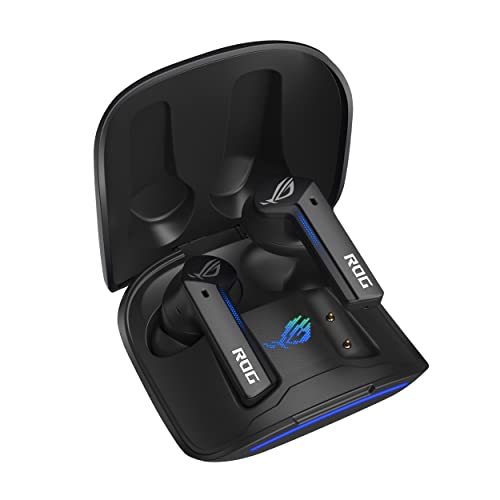
Best for gamers who want a balance of low latency, hybrid ANC, and strong battery life. The Cetra includes Gaming Mode to reduce audio delay, and Hybrid ANC to minimize external noise. It supports substantial total playtime, with wireless charging and a quick‑charge option that adds usable time quickly. This option is particularly appealing to mobile and desktop gamers who value a compact form and robust features in one package.
Who it’s best for: Players who value noise suppression and long sessions on the go, with a need for reliable Bluetooth performance at home or on commutes.
Limitation: Battery life varies with ANC on; consider use cases where ANC is off for maximum longevity.
ONIKUMA T27 New Version Wireless Earbuds

Best for players seeking a practical dual‑mode option with a clear emphasis on synchronized audio. The T27 uses 2.4 GHz dongle plus Bluetooth 5.3 to offer near‑zero latency for PS5, PS4, Switch, and PC. It supports dual‑device switching, letting you answer calls without leaving the game. A dedicated game and music mode helps tailor sound for footstep cues or music enjoyment.
Who it’s best for: Gamers who switch between console and mobile gaming and want quick device switching without audio lag.
Limitation: Some users may notice that certain devices require manual pairing steps; ensure compatibility with your primary devices before buying.
Razer Hammerhead V3 X HyperSpeed
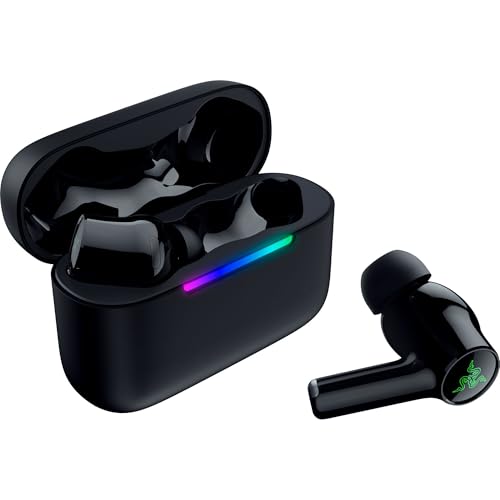
Best for enthusiasts who want a long battery life and robust cross‑platform performance. The Hammerhead V3 X offers multi‑platform wireless freedom with 2.4 GHz HyperSpeed Wireless and Bluetooth 5.3. It provides extended battery life through its large capacity case and supports a THX spatial audio experience on compatible devices, making it a strong choice for immersed gaming and general use.
Who it’s best for: Players who value a strong, consistent wireless connection and extended playtime across devices, including mobile, PC, and consoles.
Limitation: THX Spatial Audio may require compatible software or hardware to realize its full benefit; verify your setup first.
RYR Neo100 Wireless Gaming Earbuds
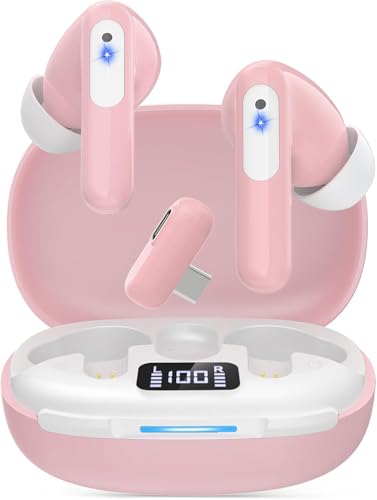
Best for VR and multi‑platform use on a budget. The RYR Neo100 delivers sub‑20 ms latency via its 2.4G dongle and supports Bluetooth connectivity for secondary devices. It combines a balanced driver setup to deliver clear mids with strong bass, and its dual‑device capability helps gamers stay in action while handling calls.
Who it’s best for: VR players and multi‑platform gamers seeking a cost‑effective option with solid latency performance.
Limitation: Note that some mixed setups may experience occasional pairing delays; plan for a quick switch test when first pairing.
Buying Guide: How To Choose Low Latency Gaming Earbuds
What latency level is truly needed?
Latency under 25 ms is generally ideal for fast‑paced games. Look for claims of 20 ms in 2.4 GHz mode or dual‑mode setups that guarantee ultra‑low latency when gaming. Latency varies by device and platform, so verify the specific mode you’ll use most often.
What platforms and connections matter?
Choose earbuds that support both 2.4 GHz dongles and Bluetooth if you game across PC, console, and mobile. Hybrid options simplify switching between devices without lag. Ensure the dongle is compatible with your primary devices (PC, PS5, Switch, VR headsets, etc.).
How important is battery life and charging?
Consider total playtime with and without ANC or gaming modes enabled. Look for devices with substantial earbud and case battery life, and quick‑charge options if you play long sessions.
What about noise reduction and mic quality?
Hybrid or active noise cancellation can help in noisy environments, while a clear mic minimizes in‑game voice issues. If mic quality is essential, read about how microphones perform in different modes and noise conditions.
What should I avoid or verify first?
Avoid models that overpromise on latency without clearly defining the mode used. Verify compatibility with your primary devices and confirm whether certain features (like Xbox support or specific software requirements) apply to your setup.
FAQ
- What is considered ultra‑low latency for gaming earbuds? Ultra‑low latency typically means 20 ms or better in 2.4 GHz gaming mode.
- Do I need a dongle for low latency? Many 2.4 GHz‑based earbuds require a dongle for the lowest latency on PCs and consoles, while Bluetooth alone is slower.
- Can I use gaming earbuds for VR? Yes, if they support low latency 2.4 GHz connections compatible with VR headsets.
- Is ANC important in earbuds for gaming? ANC helps reduce ambient noise, but it can add a small latency or drain battery; use it if you game in noisy spaces and the device supports it well.
- Are these earbuds suitable for cross‑platform gaming? Yes, models with dual‑mode connections are designed for PC, PS5, Switch, mobile, and VR use.
- Do these earbuds support Xbox? Some models do not; verify Xbox compatibility if that is a priority.