
Best Microphone and Headphone Combiner for PC and Console Gaming
Finding the right microphone and headphone combiner can simplify your setup by letting a single 3.5mm jack handle both audio output and mic input. This guide highlights five top USB-free splitters and adapters suited for gamers, students, and remote workers. Each pick caters to different device ecosystems, so you’ll know which is best for PC, PlayStation, Xbox, or mobile use.
Summary of selected products (quick reference):
- KINGTOP 3.5mm Headphone Mic Splitter Adapter — Best overall for universal compatibility and dual-plug headsets
- StarTech.com Headset Adapter — Best for travel and legacy equipment, not a true splitter
- DUKABEL Headset Splitter — Best for wide compatibility and robust build
- ENVEL Headset Splitter Cable — Best value with sturdy braided cable
- AAOTOKK 2-Pack 4-Pole Splitter — Best for multi-pack needs and versatility
KINGTOP 3.5mm Headphone Mic Splitter

The KINGTOP splitter uses one male to two female connectors, enabling a single CTIA combo port to drive a headset’s audio and microphone separately. It features 24K gold-plated contacts for a stable connection and compatibility with PS4, PS5, Xbox One, Switch controllers, laptops, and Android devices. Best for: gamers who own dual-plug headsets from common brands and need a compact, portable adapter. Limitation: Not designed for 2 headphones on a single CTIA port; it’s a mic-and-audio splitter rather than a true two-headphone output accessory.
StarTech.com Headset Adapter, Microphone and Headphone Splitter

StarTech’s MUYHSMFF model converts a 3.5mm TRRS port into separate mic and headphone jacks. It’s compact for travel and suits users who want to reuse older gear with newer laptops or ultrabooks. Best for: travelers or students who carry a lightweight kit and want a reliable, non-bulk adapter. Caution: It’s not a true two-headphone splitter; it’s a mic-and-headphone combo adapter, so using two headphones simultaneously isn’t advised.
DUKABEL Headphone Mic Splitter, 3.5mm TRRS to Dual
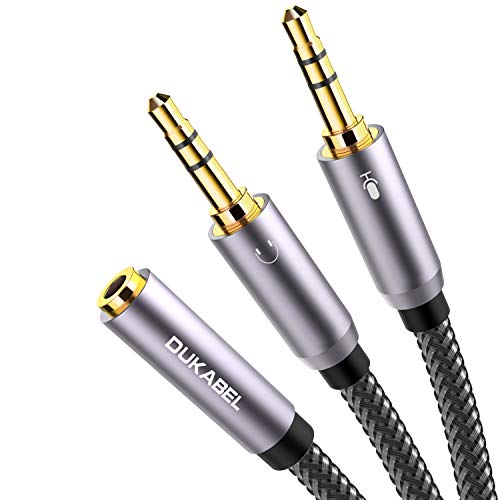
DUKABEL’s splitter uses a single TRRS mic+audio input with dual TRS outputs, designed to connect a headset to a PC or laptop. It emphasizes 24K gold-plated contacts, a rugged metal housing, and a nylon-braided cord. Best for: users needing a robust, long-lasting solution for online gaming or VOIP apps such as Skype. Caution: Not compatible with iOS earphones or Beats headsets that rely on different wiring.
ENVEL Headset Splitter Cable for PC

ENVEL’s splitter provides a simple, durable bridge between a stereo headset and PC ports. It carries a green audio line and pink microphone line, using oxygen-free copper to minimize signal loss. Best for: users seeking an easy, affordable way to pair a standard headset with PCs or laptops. Caution: It does not advertise compatibility with all gaming headsets; compatibility can vary with certain condenser mics or 4-pole configurations.
AAOTOKK 2-Pack 3.5mm Headphone+Mic Splitter

This 2-pack includes 4-pole to dual 3-pole adapters, combining a TRRS male with two TRS females for microphone and headphone outputs. Best for: households or labs needing multiple adapters for different systems or friends using shared equipment. Caution: The 4-pole TRRS to dual TRS setup can misbehave with some devices that require special wiring; verify device compatibility before buying a bundled pack.
Buying Guide: Key Considerations For Choosing A Microphone And Headphone Combiner
- Device compatibility: Check whether your devices use CTIA or OMTP wiring and whether the adapter handles mic and audio separately or as a combined output. Choose a model that matches your console, PC, or mobile device.
- Connector configuration: If you have a headset with separate mic and headphone plugs, ensure the adapter provides one mic port and one headphone port. If you only have a single 3.5mm combo jack, pick a true splitter that splits audio and mic correctly.
- Durability and build: Look for metal housings, braided cables, and gold-plated contacts for long-lasting performance, especially if you travel or use gear daily.
- Length and portability: Short cables benefit on-desk setups; longer cables help with couch gaming or mobile use. Consider whether a 30 cm to 2 m range better fits your space.
- Multi-pack vs. single: If you own multiple devices or plan to share gear, a multi-pack provides flexibility but confirm whether all adapters meet your primary devices’ wiring needs.
- Limitations to watch for: Some adapters are designed as mic-and-headphone combos, not two independent headphone outputs. Some devices or headsets may require specific wiring not supported by all adapters.
Frequently Asked Questions
- What is a mic and headphone splitter best used for?
It enables a single headset to connect to devices that separate audio and microphone lines, such as PCs or gaming consoles with dual ports.
- Will this work with all gaming headsets?
Most dual-plug headsets are compatible, but compatibility varies by model and device wiring. Check the adapter’s supported port types (TRRS vs. TRS) before purchasing.
- Should I buy a 2-pack or a single adapter?
A 2-pack is useful for households or teams needing multiple adapters, but confirm each adapter’s wiring matches your devices.
- Is a travel-friendly option available?
Yes. Compact StarTech-style adapters are designed for portability, keeping cables light and easy to carry.
- Are there any performance drawbacks?
Quality and wiring affect audio clarity and mic reliability. Look for gold-plated contacts and robust shielding to minimize noise.