
Best Microphone Speaker for Computer: Clear Voice for Meetings
Looking for a reliable microphone speaker for computer use? This guide highlights five top USB and Bluetooth options that deliver clear voice pickup, easy setup, and practical features for office calls, remote learning, and gaming. Each product is evaluated for who it’s best for, plus a straightforward pros/cons rationale to help you compare quickly. The top picks cover compact desk setups, clip-on monitor designs, and expandable conference solutions for larger meetings.
Buyer’s quick glance: the following table summarizes key traits of the selected models to help you compare at a glance.
| Product | Best For | Key Benefit |
|---|---|---|
| EMEET M0 Plus Conference Speaker and Microphone | Small to mid-sized meetings | 360° pickup with 4 mics, Daisy Chain expansion |
| Anker PowerConf S330 USB Speakerphone | Home office, remote teams | Smart Voice Enhancement, 360° coverage |
| PLYEE Computer Speakers With Detachable Mic | Clutter-free desks, single-monitor setups | Detachable mic, clip-on design, immersive sound |
| INGA Computer Speakers With Detachable Mic | Versatile desktops, plug-and-play users | AEC mic, USB-C/USB-A compatibility |
| ROFALL USB Computer Speakers | Budget-friendly, broad compatibility | Two sound modes, built-in mic, easy controls |
EMEET M0 Plus Conference Speaker and Microphone

The EMEET M0 Plus is a compact Bluetooth speakerphone designed for small to medium meeting rooms. It features a four-microphone array with 360° voice pickup and EMEET’s VoiceIA algorithm to reduce background noise and echo. The device delivers crystal-clear audio with full duplex support, ensuring natural, in-person-like conversations. It supports daisy-chaining to extend conferencing space up to 16 attendees, making it suitable for expandable meetings. Best for: small teams that want reliable, plug-and-play conferencing on a budget. Caution: setup involves pairing and, for larger rooms, adding more units may be necessary for optimal coverage.
Cyber Acoustics CA-2890BT USB and Bluetooth Speaker Bar

This compact speaker bar combines USB and Bluetooth connectivity for desktop and laptop use. It is simple to attach under a monitor, saving desk space, with easy-to-use controls for switching between USB and Bluetooth, volume, play/pause, and mic mute. Best for: users who want a space-saving, straightforward speakerphone with basic meeting features. Limitation: performance depends on proximity to the computer and Bluetooth stability in busy wireless environments.
Anker PowerConf S330 USB Speakerphone

The Anker PowerConf S330 is a plug-and-play USB speakerphone designed for home offices and remote teams. It emphasizes smart voice enhancement to reduce background noise while enhancing voices, and it provides 360° coverage with four microphones for room-wide pickup. Best for: users who prioritize reliable USB connectivity and clear voice in various environments. Caution: wired connection is recommended for stability, but wireless options exist via USB dependency.
PLYEE Computer Speakers With Detachable Microphone
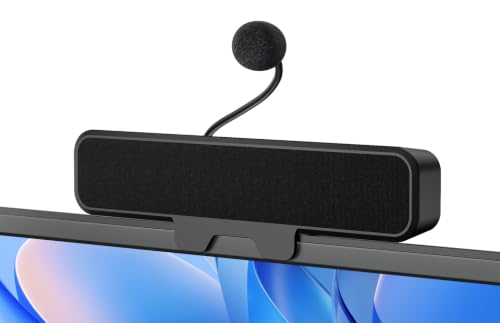
The Plyee setup combines clip-on monitor mounting with a detachable cardioid microphone and Enhanced Echo Cancellation. It offers a flexible desk arrangement, strong voice pickup, and a wider soundstage from dual drivers and a bass radiator. Best for: users who want a space-saving, clip-on mic solution with strong vocal clarity. Caution: monitor clip compatibility may vary with monitor thickness; check the max thickness before purchasing.
INGA Computer Speakers With Detachable Mic
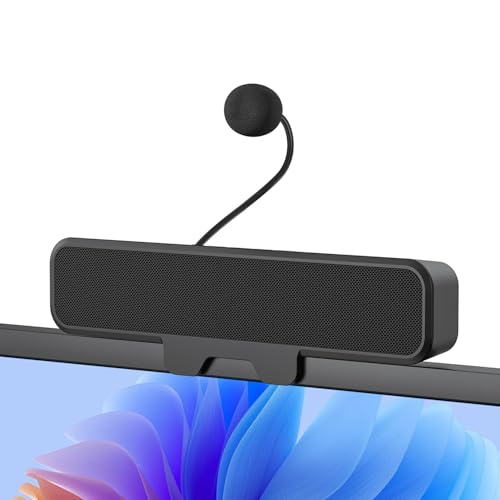
INGA’s system uses a detachable mic with Advanced Echo Cancellation to suppress background noise, producing crisp voice with immersive stereo sound from dual drivers and a passive bass radiator. It includes USB-C and USB-A adapters for broad compatibility. Best for: users who need flexible connection options and enhanced call clarity. Caution: not all curved-back monitors are compatible with the clip design—verify your monitor shape before mounting.
ROFALL USB Computer Speakers with Microphone

ROFALL offers universal compatibility with Windows, macOS, Linux, and Chrome OS, featuring two sound modes (Music and Move) and a built-in microphone with noise reduction. It’s a practical pick for versatile setups and online meetings. Best for: budget-conscious buyers needing flexible audio for calls and multimedia. Caution: the two-mode switch may require experimentation to find the best balance for your use-case.
Buying Guide
What should you look for when buying a microphone speaker for a computer?
- Connectivity: Do you prefer USB, USB-C, Bluetooth, or a combination? USB options tend to be plug-and-play with wide compatibility.
- Microphone array: More mics can improve pickup in larger rooms or busy environments; consider whether you need 360° coverage or targeted pick-up.
- Echo and noise suppression: Look for AI or advanced echo cancellation for clearer calls, especially in rooms with hard surfaces.
- Form factor: Clip-on monitor mounts save desk space; compact bars fit under most monitors; consider whether expansion (Daisy Chain) is needed for larger conferences.
- Audio quality: Stereo or single speaker design matters for music vs. voice; bass response can influence overall perceived clarity.
- Compatibility and ease of use: One-touch mute, LED indicators, and simple controls help maintain productive flow in meetings.
- Scalability: If you expect growth, choose models that support daisy-chaining or can be paired with additional units for larger rooms.
FAQ
- What is the best microphone speaker for small teams?
– A model with 360° voice pickup and noise suppression, like the EMEET M0 Plus or Anker PowerConf S330, works well for small teams. - Do I need a detachable microphone?
– Detachable mics offer flexible setups and can be helpful in shared spaces or monitor-clipped configurations, as with Plyee or INGA. - Is USB-C better than USB-A for these devices?
– USB-C can offer a newer interface and power delivery in modern computers, but USB-A is still widely compatible; choose based on your devices. - Can these devices be used for gaming and streaming?
– Yes, many provide clear vocal pickup and solid stereo output, but check mic sensitivity and echo cancellation for dynamic gaming sounds. - Will these work with both Windows and Mac?
– Most listed models support Windows, macOS, and other OSes via USB or Bluetooth; confirm specific compatibility if you have a non-standard setup. - Do I need multiple units for a larger conference room?
– For larger rooms, consider models with Daisy Chain support or pair multiple units to extend coverage, as offered by some EMEET products.