
Best Microphones for Meeting Rooms: Clear Sound for Small to Medium Teams
Answering the common need for crisp, reliable audio in meeting spaces, these microphones are best for small to medium conference rooms, online classes, and remote collaboration. They’re ideal for teams that require clear voice pickup from multiple speakers without shouting. The top picks below emphasize omnidirectional pickup, plug‑and‑play setup, and built‑in noise reduction. The buyer profiles range from remote teams needing simple USB mics to conference setups requiring room-wide coverage. See the quick table for a snapshot of selected options.
| Product | Best For | Pickup Range | Notes |
|---|---|---|---|
| Up to 11.5 ft | |||
| Up to 16.4 ft | |||
| Up to 13 ft | |||
| 3–5 m (9.8–16.4 ft) depending on chain | |||
| Up to 10 ft |
TONOR Conference USB Microphone, Omnidirectional Condenser PC Mic G11

Best for small to mid-sized meeting rooms where clear 360° pickup is essential. The G11 uses an omnidirectional condenser design with an 11.5 ft pickup distance to capture voices from all directions. It is plug-and-play on Windows and macOS, with no driver installation required. This makes it a solid choice for teams needing quick setup and reliable VOIP performance in Skype, Zoom, WebEx, and similar platforms.
Who it’s best for: individuals or small teams seeking a straightforward USB microphone without a built-in speaker. Why selected: strong omnidirectional pickup and broad compatibility, ideal for informal conference calls. Caution: while adequate for most rooms, very large spaces may benefit from a longer-range or additional mic array.
TONOR USB Conference Microphone TM20

Best for meetings and teaching sessions that require consistent timbre across a room. TM20 uses a 360° omnidirectional pickup pattern with a wide range, capturing voices from all speakers with minimal distance bias. It includes noise reduction technology to reduce ambient sound and echo, producing clearer calls.
Who it’s best for: classrooms and collaborative meetings where multiple participants speak from various locations. Why selected: balanced 360° pickup and reliable performance across a typical classroom or small office. Caution: described as “not a speaker,” so use with separate room speakers if playback is needed.
Yealink Sp92 Conference Speaker and Microphone

Best for small-to-medium conference rooms that need AI-driven noise suppression and full-duplex audio. The SP92 combines a 50 mm speaker with an omnidirectional mic for 360° pickup within about 13 feet. Real-time AI noise cancellation helps filter keyboard noise, fans, and other interference, improving clarity for all participants.
Who it’s best for: teams using Teams or Zoom in well‑sized small rooms. Why selected: strong noise cancellation and seamless integration with popular conferencing platforms. Caution: may be overkill for very small rooms where a single USB mic suffices.
RayBit Conference Speaker and Microphone

Best for flexible room layouts and scalable setups. RayBit features AI noise cancellation, voice enhancement, and a 360° pickup with a 3–5 m radius through a daisy-chain option. It supports wireless dongle connectivity and USB, enabling multiple microphone arrangements for larger rooms.
Who it’s best for: teams that plan to expand audio coverage with additional units. Why selected: modular design and strong background noise handling. Caution: the measurement range can vary with room acoustics and daisy-chain configuration.
CMTECK Conference USB Microphone
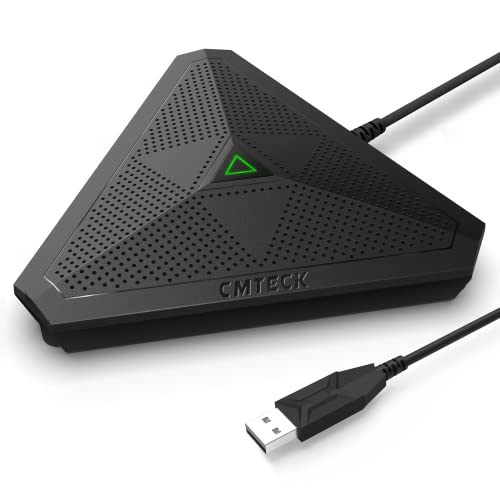
Best for portable, plug‑and‑play use in impromptu meetings and travel-friendly setups. CMTECK emphasizes 360° pickup within 3–10 ft and easy USB connection with no driver installation. It is suitable for Windows and macOS environments and fits well in quick-huddle spaces or home offices used for meetings.
Who it’s best for: travelers or small teams needing a compact, reliable mic. Why selected: portability and simplicity. Caution: not a substitute for larger room mics in bigger conference spaces.
Buying Guide: Key Considerations For Meeting Room Mitches
- Pickup pattern and range: Omnidirectional mics capture voices from all directions, which suits collaborative spaces. If your room is large, consider multiple mics or a system designed for longer reach.
- Ease of use: Plug-and-play USB mics minimize setup time and reduce IT support needs. Look for mics with built‑in mute controls if quick meeting control matters.
- Noise suppression: Built-in DSP and echo cancellation help maintain clarity, especially in rooms with HVAC or fans. AI-based noise reduction is a plus for busy offices.
- Compatibility: Ensure compatibility with common conferencing software (Zoom, Teams, WebEx) and operating systems (Windows, macOS).
- Room layout: For fixed conference tables, a single long-range mic might suffice. For flexible spaces, modular solutions with daisy chains or multiple units can adapt to different configurations.
- Portability vs. permanence: Portable USB mics are suitable for huddle spaces and travel; fixed desktop mics are better for dedicated rooms with predictable layouts.
Frequently Asked Questions
- What mic should I choose for a small meeting room with one or two speakers?
A compact omnidirectional USB microphone like the TONOR G11 or CMTECK can provide clear pickup without complex setup. - Do I need a separate speaker when using a microphone for conferencing?
If the room lacks a built-in speaker, pair a mic with a dedicated speaker or sound system. Some devices combine speaker and mic in one unit, like Yealink SP92, which includes a speaker. - Is AI noise cancellation worth it for a typical office?
Yes, AI noise cancellation helps filter keyboard clicks, HVAC noise, and ambient hum, improving intelligibility in shared spaces. - Can I expand microphone coverage in a large room?
Yes, consider modular setups or daisy-chain capable devices like RayBit to extend coverage and maintain consistent audio quality. - Do these mics work with Chromebooks or Android systems?
Most listed mics are plug-and-play on Windows and macOS. Compatibility with Chrome OS or Android may require checking specific driver support or USB class compatibility. - What is the best pickup range for a typical boardroom?
For rooms with 4–8 participants, a range of 3–13 feet is often sufficient, but room acoustics will influence performance.