
Best Mixer With DAW Control for Hybrid Studio Setups
Yes—these mixers with DAW control simplify music production by mapping hardware controls to your software. This guide highlights five top options, ideal for different creators: the Novation Launch Control XL 3 for deep DAW integration, the Korg nanoKONTROL2 for compact setups, the Akai MIDImix for portable mixing, the Solid State Logic UF1 for advanced metering, and the Teenage Engineering EP–136 K.O.–SIDEKICK as a standalone/studio companion. The table below helps compare core strengths at a glance.
| Product | Best For | |
|---|---|---|
| Novation Launch Control XL 3 | Hybrid setups needing deep DAW integration | Extensive DAW compatibility and custom mode |
| Korg nanoKONTROL2 | Ultra-compact control surface | Low-profile, multi-function controls |
| Akai MIDImix | Portable, all-in-one DAW control | 8 faders + 24 knobs, complete mix mapping |
| Solid State Logic UF1 | Professional metering and DAW control | High-resolution displays and SSL Meter integration |
| Teenage Engineering EP–136 K.O.–SIDEKICK | Standalone or lightweight studio companion | Two-channel mixer with built-in effects |
Novation Launch Control XL 3 USB MIDI Control Surface

The Launch Control XL 3 offers deep integration with major DAWs, including Ableton Live, Logic Pro, FL Studio, and Cubase. It supports MIDI In, Out, and Out2/Thru for external hardware, enabling fully mapped control without a computer when needed. This makes it ideal for hybrid setups that blend hardware synths, effects, and plugin parameters. Best for producers who want comprehensive DAW control in a compact, keyboard-free surface. A caution: setup may vary by DAW, requiring initial configuration to maximize Custom Mode.
Korg nanoKONTROL2 Slim-Line USB Control Surface

The nanoKONTROL2 is exceptionally compact and low-profile, making it a fit for small studios or travel rigs. It supports track selection and marker advancement and works with numerous software titles, including major DAWs. Choose this if you need a tiny footprint with essential controls and straightforward mapping. Limitation: fewer faders than larger controllers means less hands-on control for complex sessions.
Akai Professional MIDImix USB MIDI Mixer Controller

The MIDImix combines a compact mixer with straightforward DAW mapping. It features 8 line faders and 1 master fader for track and plugin control, plus 24 assignable knobs. This makes it well-suited for on-the-go producers who need a complete, portable mix-control solution. Best for performers and creators who value a single-device workflow. Caution: the device focuses on control rather than high-end mastering features.
Solid State Logic UF1 Advanced DAW Controller

The UF1 stands out with two high-resolution displays, including a large 4.3” TFT LCD for visual feedback on DAW track names, parameters, and meters. It integrates with the SSL Meter plug-in and the SSL 360° Plug-in Mixer for comprehensive metering and control. Best for users who need precise visual feedback and professional metering. Limitation: more complex to set up compared to entry-level controllers, requiring familiarity with SSL ecosystem.
Teenage Engineering EP–136 K.O.–SIDEKICK
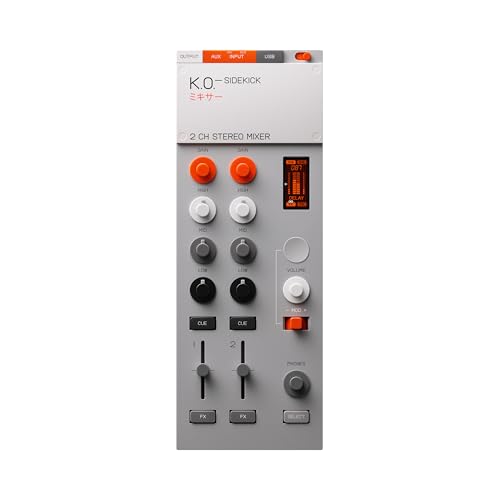
The K.O.–SIDEKICK is a versatile two-channel standalone mixer with built-in effects. It can serve as a standalone DJ-style mixer or as an audio interface connected to a computer or phone. It also acts as a compact studio companion for quick captures into a DAW. Best for mobile producers needing standalone operation. Caution: two-channel limit may be restrictive for larger projects.
Buying Guide: Key Considerations For DAW-Control Mixers
- Workflow fit: Do you need full DAW mapping, or lightweight transport controls?
- Portability: Is a compact unit essential for travel or small spaces?
- Visual feedback: Are high-resolution meters and displays important?
- DAW compatibility: Does the controller support your primary DAW with deep integration?
- Expansion options: Do you need MIDI I/O or external hardware compatibility?
- Power and connectivity: USB power vs. external power, and latency considerations.
Frequently Asked Questions
- What is a DAW-control mixer best used for?
It maps mixer controls to your DAW, enabling hands-on editing of volume, pan, effects, and plugins for faster workflow.
- Are standalone options useful alongside DAW control?
Yes; standalone units can operate without a computer and still provide critical mixing or interface functions.
- Do all models support USB MIDI class-compliant operation?
Most do, but check each model’s documentation for compatibility with your computer and DAW.
- What should I consider when choosing between many faders and knobs?
More faders help with larger projects; knobs enable precise control of EQ and effects.
- Is high-end metering necessary for home studios?
Not always, but professional metering helps with accurate level management and mastering preparation.
- Can I mix hardware synths with software in these controllers?
Yes; many controllers provide MIDI I/O and mapping modes to control external gear and plugins.