
Best Mixers With Optical Output for Home Theaters and Karaoke
The best mixers with optical output provide clean digital audio paths from your TV, soundbar, or receiver to a mixer or keyboard for enhanced karaoke, broadcasting, or home entertainment. This guide highlights five strong options, explains who they’re best for, and shows how to pick the right model for your setup. Ideal buyers include home theater lovers seeking easy integration with Toslink, karaoke enthusiasts needing reliable wireless mics, and small venues needing versatile input/output options.
Overview of selected products:
| Product | Key Feature | Best For | Notes |
|---|---|---|---|
| Sound Town SWM16-PRO | Optical (Toslink) input/output; 16 channels; 2 handheld mics; UHF wireless | Home theaters and smart TVs needing reliable wireless mics | Great flexibility with TV connections |
| Sound Town SWM15-MAX | HD ARC; Optical; Bluetooth; 1/4″ mics; effects | Smart TVs, media boxes, and Bluetooth-enabled rooms | HD Audio Return Channel support requires setup |
| Rockville RPA60BT V2 | Rack-mountable digital hybrid amp/mixer with optical input | Organized setups needing robust power and routing | Requires powered speakers or amplifier |
| blafili B3 | LDAC & aptX HD Bluetooth receiver; DAC-focused | Wireless playback to mixers or speakers | Not a transmitter; Bluetooth-only receiver |
| Rockville RKI60 | Dual UHF wireless mics; multiple inputs including optical | Karaoke/DJ parties and multi-source sessions | Designed for use with powered speakers or amps |
Sound Town SWM16-PRO: 16-Channel Wireless Karaoke Mixer System
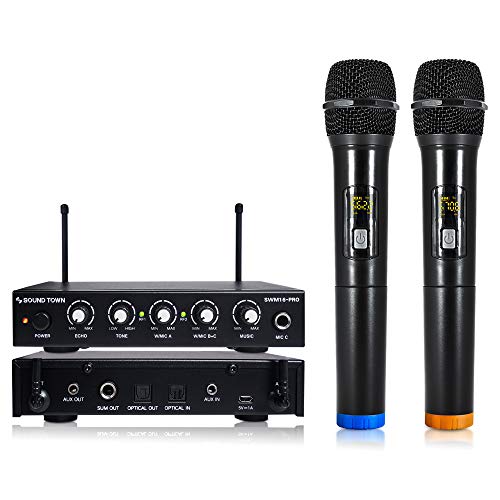
The SWM16-PRO uses optical input and output to connect to smart TVs, soundbars, and home receivers, with a robust 16-channel wireless microphone system. It includes two handheld mics and supports easy pairing with Toslink-equipped devices. Best for home theaters and karaoke setups where clean digital audio is a priority and interference from other devices is a concern thanks to its UHF 550-590 MHz band.
Who it’s best for: buyers wanting a ready-to-use, optical-friendly karaoke mixer that pairs with TVs or sound systems without analog signal loss. Why selected: strong optical connectivity and a practical multi-mic wireless setup. Caution: ensure your TV or receiver supports Toslink input and that your external devices’ volumes are balanced for optimal mic levels.
Sound Town SWM15-MAX: Multi-Input Karaoke Mixer with HD ARC

SWM15-MAX integrates HD Audio Return Channel, Optical, and 3.5mm inputs, enabling flexible connections to smart TVs, media boxes, and soundbars. It supports dynamic mics and instruments via 1/4″ jacks, with vocal effects and a dedicated vocal-cut mode for karaoke. Best for: rooms where HD ARC usage and Bluetooth pairing extend flexibility. Why chosen: offers ARC-based audio path plus convenient effects controls for voice enhancement. Caution: HDMI/ARC setups require the TV’s CEC and PCM configuration to behave as expected, and some users may need to adjust external device volumes for balance.
Rockville RPA60BT V2: Bluetooth Karaoke Amp/Mixer

The RPA60BT V2 combines a 125W x 2 RMS amplifier with a mixer that handles multiple inputs, including optical, RCA, and aux connections. It’s rack-mountable and designed for venue-style or home setups requiring reliable power and multiple source routing. Best for: users who need a compact, rack-ready solution with built-in amplification. Why chosen: solid power handling and versatile input options. Caution: this model requires powered speakers or an external amplifier; it is not suitable for passive speaker configurations alone.
blafili B3: Bluetooth 5.1 Receiver with LDAC & AptX HD

The blafili B3 functions as a Bluetooth receiver designed to stream high-quality audio from phones, tablets, or computers to an existing mixer or amplifier. It supports LDAC and aptX HD for better wireless audio depth and clarity. Best for: those who want wireless streaming to a fixed mixer setup without Bluetooth transmission to headphones. Why chosen: excellent codec support and customizable Bluetooth name for multi-unit spaces. Caution: it’s a receiver, not a transmitter; it cannot stream audio from a TV to Bluetooth headphones.
Rockville RKI60: Dual UHF Wireless Mic Karaoke Interface

The RKI60 offers dual UHF wireless mics with eight selectable frequencies, plus multiple input options (optical, coaxial, RCA, 3.5mm). It’s designed to be used with powered speakers or an amplifier and supports a range of sources for karaoke and small events. Best for: multi-person karaoke and events where wireless mic stability is key. Why chosen: strong wireless performance and flexible input matrix. Caution: requires external powered speakers or amplifier; not a standalone mixer.
Buying Guide: Key Considerations When Choosing an Optical-Output Mixer
- Optical connectivity compatibility: Verify Toslink input/output availability on your TV, soundbar, or receiver before purchasing. Optical connections provide a digital path that can reduce noise and improve clarity.
- Input and output options: Consider how many mics, instruments, or media players you need to connect. Look for a model with HDMI ARC or HD ARC if you plan to route TV audio through the mixer.
- Wireless microphone performance: If you need wireless mics, check the frequency range (UHF vs VHF), the number of selectable frequencies, and claimed interference resistance.
- Amplification needs: Some units include built-in amplification; others require powered speakers or an external amp. Ensure your speakers’ impedance (ohms) matches the amp’s output.
- Ease of setup: Favor models with straightforward TV and speaker integration, clear control layouts, and helpful guidance for balancing mic and music levels.
Frequently Asked Questions
- What is Toslink and why is it important for a mixer?
Toslink is a digital optical audio connection that can reduce noise and preserve sound quality when routing audio between devices like TVs, soundbars, and mixers.
- Do I need a powered speaker with optical-output mixers?
Yes, if the mixer does not include built-in amplification, you must pair it with powered speakers or a separate amplifier to hear sound.
- Can I use a Bluetooth receiver as the main audio input for a mixer?
Yes, using a Bluetooth receiver like the blafili B3 can add wireless streaming to an otherwise wired setup, but note it is a receiver, not a transmitter.
- Is HD ARC required to use optical with some TVs?
HD ARC can simplify audio return between a TV and a connected device, but some configurations require manual PCM settings to work correctly.
- What should I consider when choosing between 2 vs. 16 channels?
More channels offer flexibility for multiple mics or instruments; however, consider whether you have enough inputs and available outputs to utilize all channels.
- Can optical outputs be used with all soundbars?
Many modern soundbars include Toslink inputs, but it’s best to verify that your specific model supports optical input for direct digital audio.